
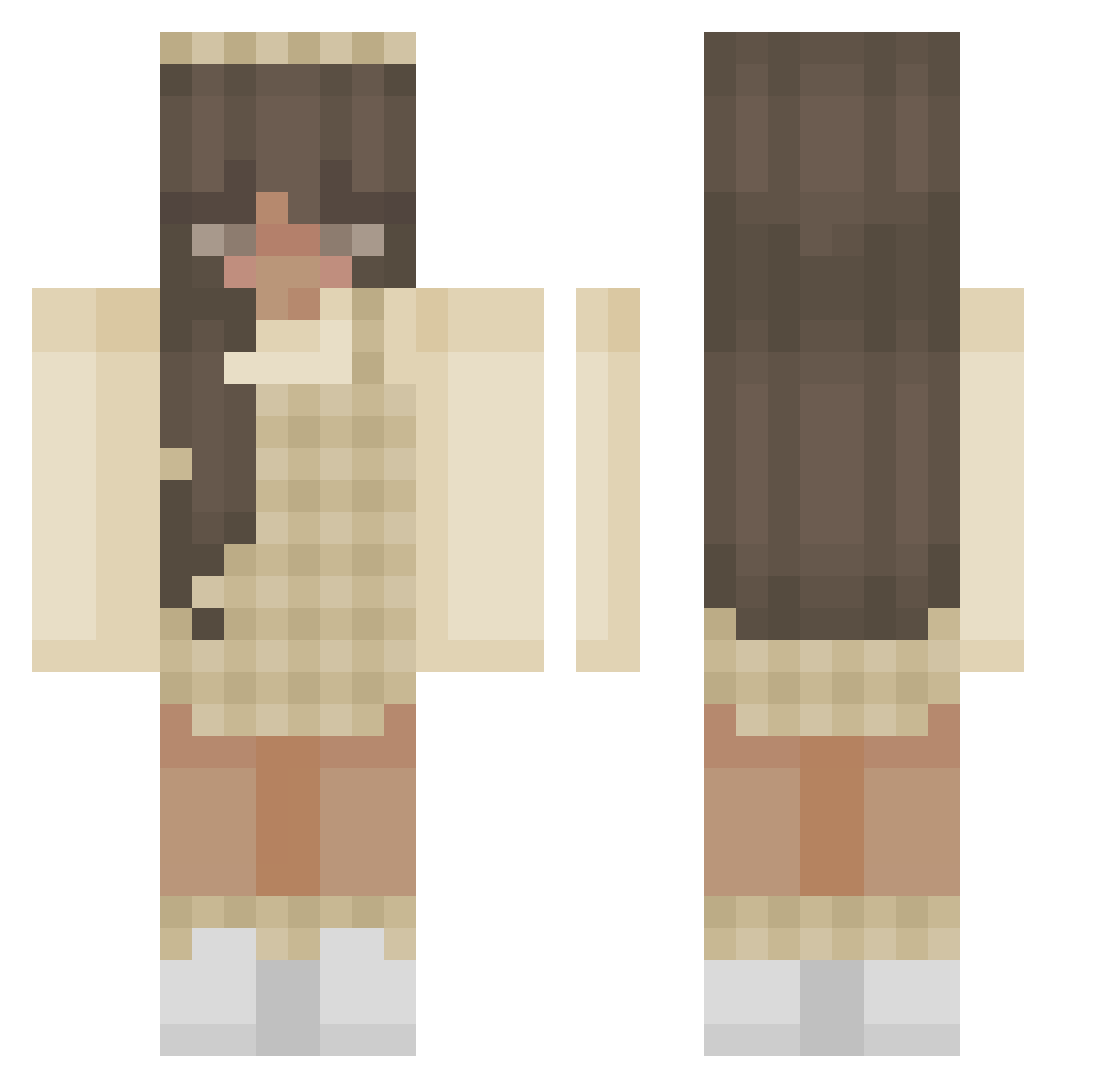
Current Minecraft skin of the player Sleepycat3256, loaded from the official Mojang API. Rotate the 3D model with your mouse or finger, then download the skin as a PNG file and use it in Minecraft: Bedrock Edition or Java Edition for free. When Sleepycat3256 changes their skin, this page updates automatically and the old skin stays in the history below.
Other players with this skin (316)
Sleepycat3256 was the 207th player we have seen with this skin, first spotted on 22.09.2026. The same skin was seen on these players. Open a nickname to see their current skin and skin history.
 SarahCloudXx eimboden mackoroni_ Aleunia cookiecrumb78 MaggieB_ rawria Torir2k axirose_ SkylaPaula __Vicky__ happyllama909 Zahararara_BBBBB zuziaczek_ jada_gamez Llunaaa anoxuu Fuzzyflower24 eslynne Amaliebredvig Ulaliaa simullator BlazingBlitz07 NitramD59 Samanthaskyy b3n1O YandereSeChan luv4ranboo ebsin4k Diamondwolf2kk SaraLundstrom naattsukiii Puffadore IsyMyGirl sessi07 Mayumishare Bi_biane gableroof __NANCY__ Sage_Blossom vividite futerk00 Shrekisdad123 lululol4 propl_ Tadpole_Ems libbyrose16 iinterstella Kambenova Sabi9903 SASHA3333 nxuzym _Kais3rka Llaalsk InnocentCow453 livrose_ amcber DaniqueNL _hermine 3em7
More Aesthetic Minecraft skins
How to install the Sleepycat3256 skin
- Press the Download button above to save the skin as a PNG file.
- Minecraft: Bedrock Edition (PE): open the Dressing Room from the main menu (or tap your character → Edit Character), go to Classic Skins → Owned, press the + (new skin) button, choose the downloaded PNG and pick the Classic (Steve) model. Works on PC and mobile; consoles cannot import custom skins.
- Minecraft: Java Edition: open the Minecraft Launcher, go to the Skins tab, click New Skin, load the PNG, pick the Classic (Steve) model and press Save & Use. You can also upload it at minecraft.net → Profile → Change Skin.
The skin does not show up after import - what should I do?
Restart Minecraft and open the Dressing Room again - imported skins sometimes appear only after a restart. Also make sure you selected the imported skin and picked the Classic (Steve) model.
Which model should I choose, Classic or Slim?
This skin is designed for the Classic (Steve) model. If you pick the wrong model, the arms of the skin will look stretched or squeezed.
Is the skin of Sleepycat3256 free to download?
Yes. Press Download, save the PNG file and use it in Minecraft: Bedrock Edition or Java Edition - no payment or registration needed. The skin also works on multiplayer servers and Realms.
More skins
Looking for more? Go back to all Minecraft skins and check the top skins of the week, month and all time, or find any player's skin by nickname.