
Semjaap - Minecraft Skins & Skin History
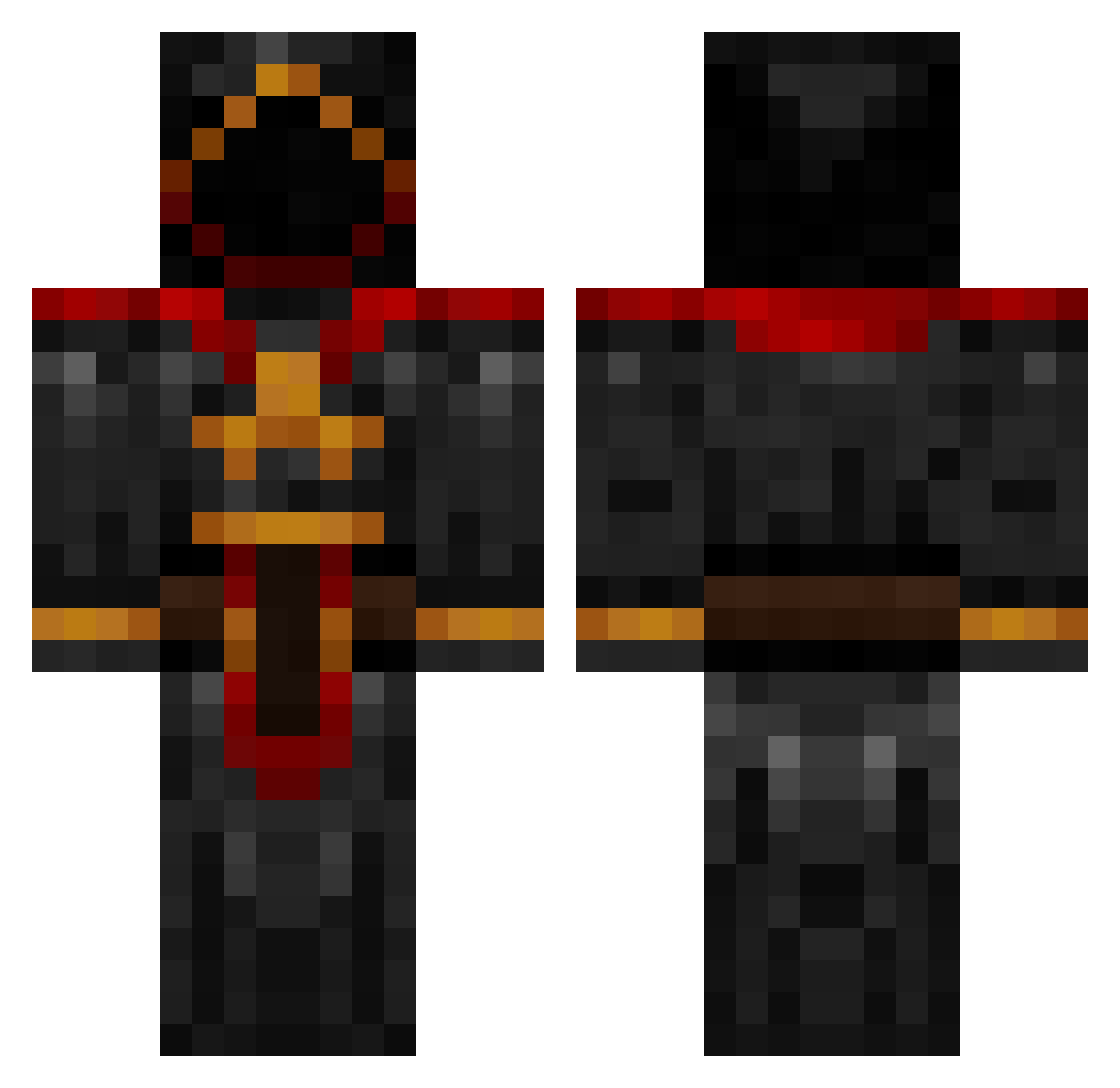
Current Minecraft skin of the player Semjaap, loaded from the official Mojang API. Rotate the 3D model with your mouse or finger, then download the skin as a PNG file and use it in Minecraft: Bedrock Edition or Java Edition for free. When Semjaap changes their skin, this page updates automatically and the old skin stays in the history below.
Other players with this skin (984)
Semjaap was the 946th player we have seen with this skin, first spotted on 06.11.2026. The same skin was seen on these players. Open a nickname to see their current skin and skin history.
 hawkmoon2690 Bigtanker20 drummerdude007 IMACTUALLY13 m4rduk Igotthebubbles PolarBear4270 AwakenMe majus0002 WaNaBee15 Zuzuvela Syccyl TeaMan KlyeBlackadder aidsfree Dovahkiin72 Vain_Glory obosho Wutangs Daloose minehecker Zer0Tolerance Eqixa nbyang ChuckRhoades AztecTom nutball1999 WolverineSlayer Alpha246 Keydra ApostleO GODF LM5HParadox DarrenMang anjo900 RagnarokWins Rapunzel17 Johnsen1 JONAHXM ShadiestGamer Alan_Mareck Rezo650 Creep456 echo2315 ninja95511 Augnelli Vidster Bie9 Minalzargul FatUglyN1GG3RZ CuriosityIsMe killkid443 Effigie13 triforceofthegod CosmicElder youtubeisa CL2002 Bluer mphebus Mindsoup
More Cultist Minecraft skins
How to install the Semjaap skin
- Press the Download button above to save the skin as a PNG file.
- Minecraft: Bedrock Edition (PE): open the Dressing Room from the main menu (or tap your character → Edit Character), go to Classic Skins → Owned, press the + (new skin) button, choose the downloaded PNG and pick the Classic (Steve) model. Works on PC and mobile; consoles cannot import custom skins.
- Minecraft: Java Edition: open the Minecraft Launcher, go to the Skins tab, click New Skin, load the PNG, pick the Classic (Steve) model and press Save & Use. You can also upload it at minecraft.net → Profile → Change Skin.
The skin does not show up after import - what should I do?
Restart Minecraft and open the Dressing Room again - imported skins sometimes appear only after a restart. Also make sure you selected the imported skin and picked the Classic (Steve) model.
Which model should I choose, Classic or Slim?
This skin is designed for the Classic (Steve) model. If you pick the wrong model, the arms of the skin will look stretched or squeezed.
Is the skin of Semjaap free to download?
Yes. Press Download, save the PNG file and use it in Minecraft: Bedrock Edition or Java Edition - no payment or registration needed. The skin also works on multiplayer servers and Realms.
More skins
Looking for more? Go back to all Minecraft skins and check the top skins of the week, month and all time, or find any player's skin by nickname.