
Selmetre - Minecraft Skins & Skin History
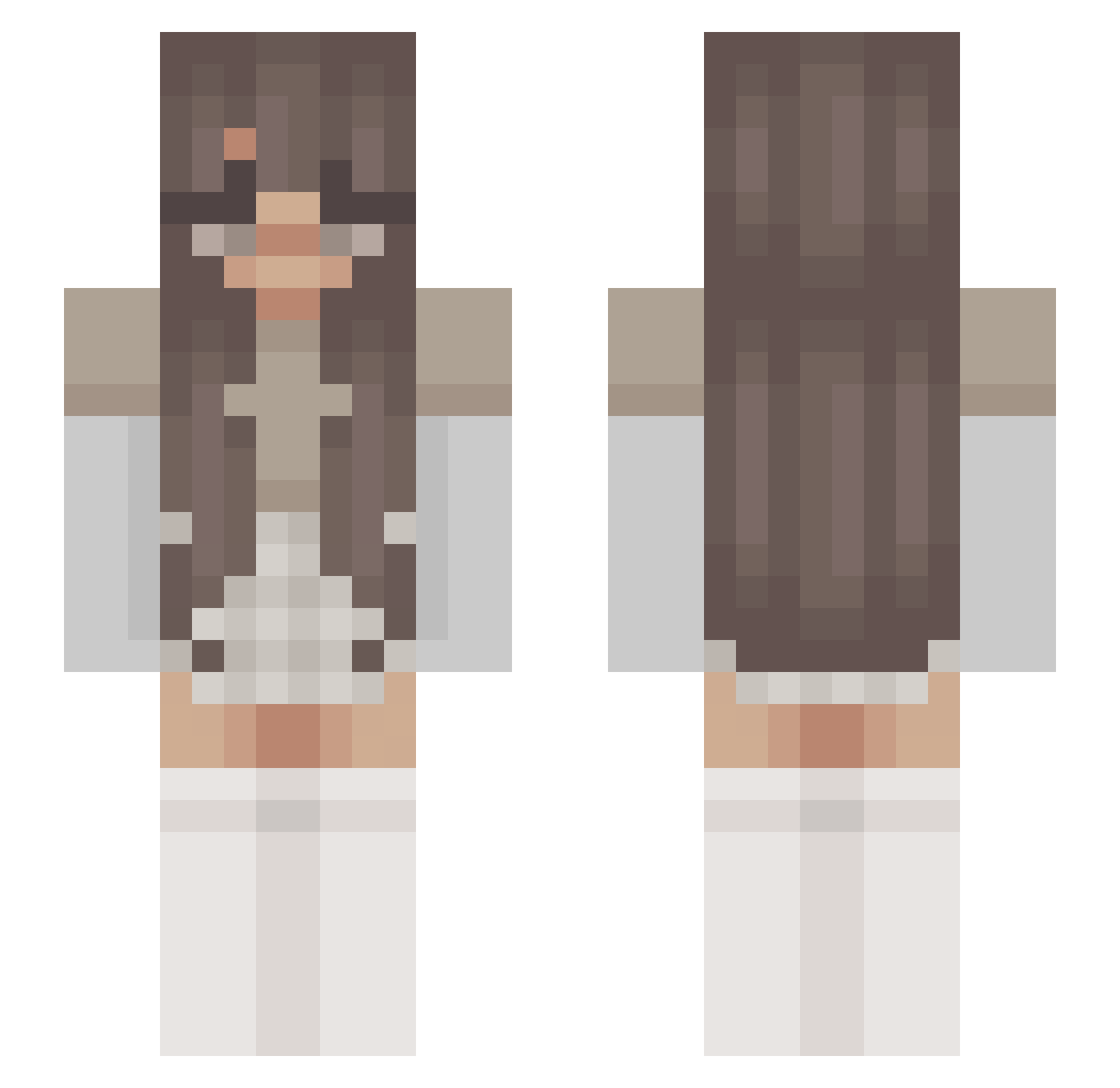
Current Minecraft skin of the player Selmetre, loaded from the official Mojang API. Rotate the 3D model with your mouse or finger, then download the skin as a PNG file and use it in Minecraft: Bedrock Edition or Java Edition for free. When Selmetre changes their skin, this page updates automatically and the old skin stays in the history below.
Other players with this skin (250)
Selmetre was the 212th player we have seen with this skin, first spotted on 02.11.2026. The same skin was seen on these players. Open a nickname to see their current skin and skin history.
 mayaapapayaa7 Zofie Hbruiners Boragirl _lovelyy_ sydmoong chezmalfoy legoon r4tlanta Amorie soccer_boy100 smellabellaa daddy_ana bxrna Vlogged LumberGirl Soachfleisch nopenotparihs MartitX AREUM_5 purz_ Demon_child_666 TalZk kcyaa brawlyfleurs lcowli tashinaa not_evaa KiraKri Hol_Hols CINNABOON ItzMaddyHere Clax_x WikaIstCool BayleeDyke Sunshinerddf2qa dialpile parihss Mater_Welon Was_not Eumeldie1 cinnamynn astriival Eldern ConradoMoreno MegLee23 tylertyrant SavyyLeigh whateverlikewhat saiphlynx ElinRaud JustShirah notparihs moohdia polari_ Sabrina9114 lilyszewo Ohjeez ichheissekay Kira_a_a
More Aesthetic Minecraft skins
How to install the Selmetre skin
- Press the Download button above to save the skin as a PNG file.
- Minecraft: Bedrock Edition (PE): open the Dressing Room from the main menu (or tap your character → Edit Character), go to Classic Skins → Owned, press the + (new skin) button, choose the downloaded PNG and pick the Slim (Alex) model. Works on PC and mobile; consoles cannot import custom skins.
- Minecraft: Java Edition: open the Minecraft Launcher, go to the Skins tab, click New Skin, load the PNG, pick the Slim (Alex) model and press Save & Use. You can also upload it at minecraft.net → Profile → Change Skin.
The skin does not show up after import - what should I do?
Restart Minecraft and open the Dressing Room again - imported skins sometimes appear only after a restart. Also make sure you selected the imported skin and picked the Slim (Alex) model.
Which model should I choose, Classic or Slim?
This skin is designed for the Slim (Alex) model. If you pick the wrong model, the arms of the skin will look stretched or squeezed.
Is the skin of Selmetre free to download?
Yes. Press Download, save the PNG file and use it in Minecraft: Bedrock Edition or Java Edition - no payment or registration needed. The skin also works on multiplayer servers and Realms.
More skins
Looking for more? Go back to all Minecraft skins and check the top skins of the week, month and all time, or find any player's skin by nickname.