
SamL1ght - Minecraft Skins & Skin History
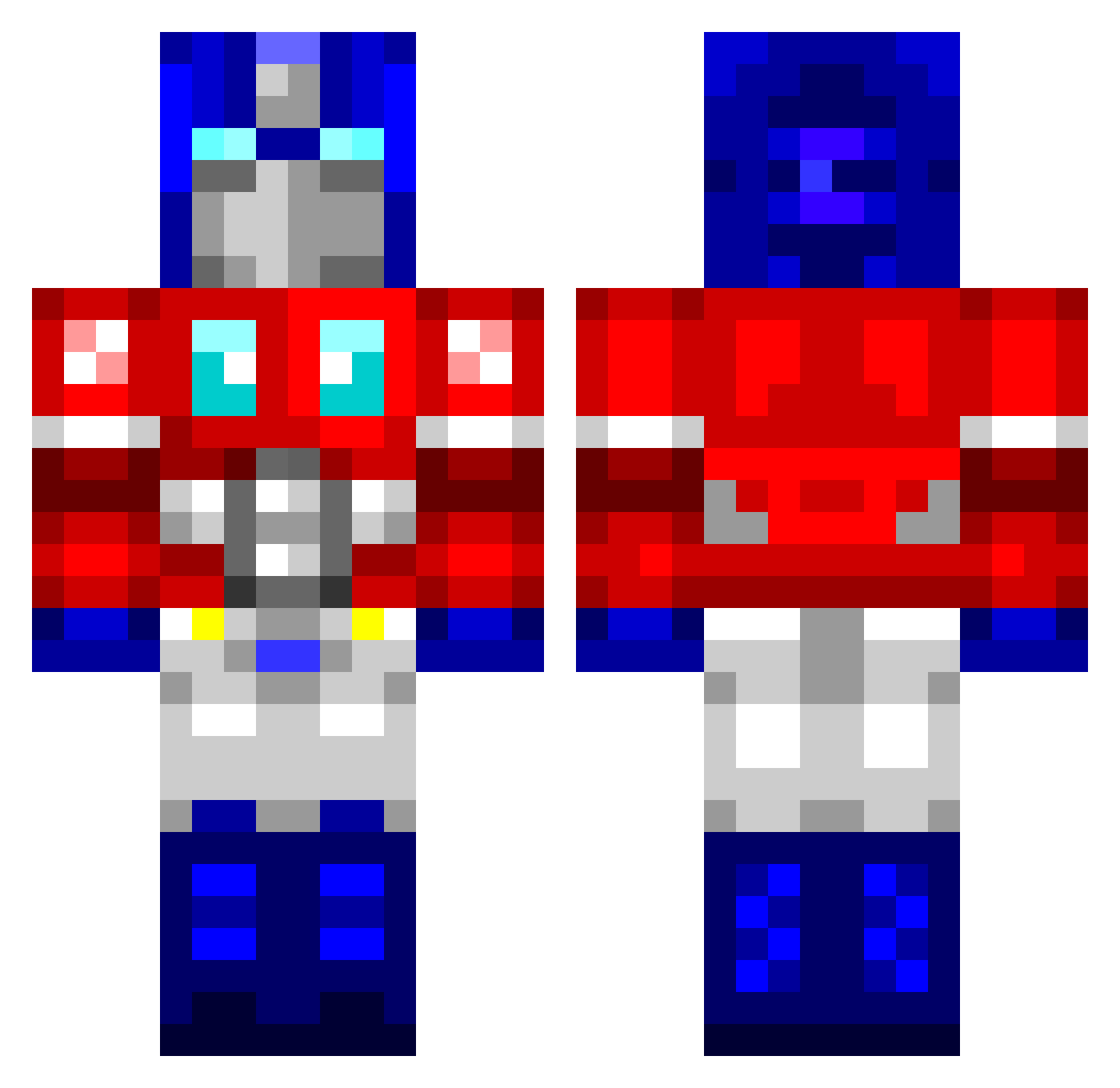
Current Minecraft skin of the player SamL1ght, loaded from the official Mojang API. Rotate the 3D model with your mouse or finger, then download the skin as a PNG file and use it in Minecraft: Bedrock Edition or Java Edition for free. When SamL1ght changes their skin, this page updates automatically and the old skin stays in the history below.
Other players with this skin (73)
SamL1ght was the 15th player we have seen with this skin, first spotted on 28.08.2026. The same skin was seen on these players. Open a nickname to see their current skin and skin history.
 healupnub VaigEe ChaBoiBrick TheHenzo nael997 FrankinGameplay SadeceKaan90 Phecda_f Dwizzight Boonjoomoon Starwalker1203 CHUSC0 Valkeyreion Toerktumlare MAGNUSRISING JuDoX11 Pipex703 Belea200 YTEvolve RoxSaint Nxsu OptimusPL02 RiskHype ificouldf OptimusPrimeBoss Vaurrtex Squizie_ FrozenHayl DodgimusPrime Belgianboxer larstheimpalor Gasbal09 Darrin OptimusPr3m MY_METALMONSTER hekt012 TexasPancakes mattist_au Zorachinas Joel_Is_Baws striker1992 Dougdich SpacelordPJs zmjjjh Hossenfepher Kowalski002 n8crawl3r deathring2000 Kadu025 digouter PrimeZeroX2 KnightUSA45 lol266 Turtleneck_Ed Efrying RockSnake56 2013unv Strzelec47 ethan_rossie WORTEX23
More Optimus Prime Minecraft skins
See all 92 Optimus Prime skins
How to install the SamL1ght skin
- Press the Download button above to save the skin as a PNG file.
- Minecraft: Bedrock Edition (PE): open the Dressing Room from the main menu (or tap your character → Edit Character), go to Classic Skins → Owned, press the + (new skin) button, choose the downloaded PNG and pick the Classic (Steve) model. Works on PC and mobile; consoles cannot import custom skins.
- Minecraft: Java Edition: open the Minecraft Launcher, go to the Skins tab, click New Skin, load the PNG, pick the Classic (Steve) model and press Save & Use. You can also upload it at minecraft.net → Profile → Change Skin.
The skin does not show up after import - what should I do?
Restart Minecraft and open the Dressing Room again - imported skins sometimes appear only after a restart. Also make sure you selected the imported skin and picked the Classic (Steve) model.
Which model should I choose, Classic or Slim?
This skin is designed for the Classic (Steve) model. If you pick the wrong model, the arms of the skin will look stretched or squeezed.
Is the skin of SamL1ght free to download?
Yes. Press Download, save the PNG file and use it in Minecraft: Bedrock Edition or Java Edition - no payment or registration needed. The skin also works on multiplayer servers and Realms.
More skins
Looking for more? Go back to all Minecraft skins and check the top skins of the week, month and all time, or find any player's skin by nickname.