
Rulas47 - Minecraft Skins & Skin History
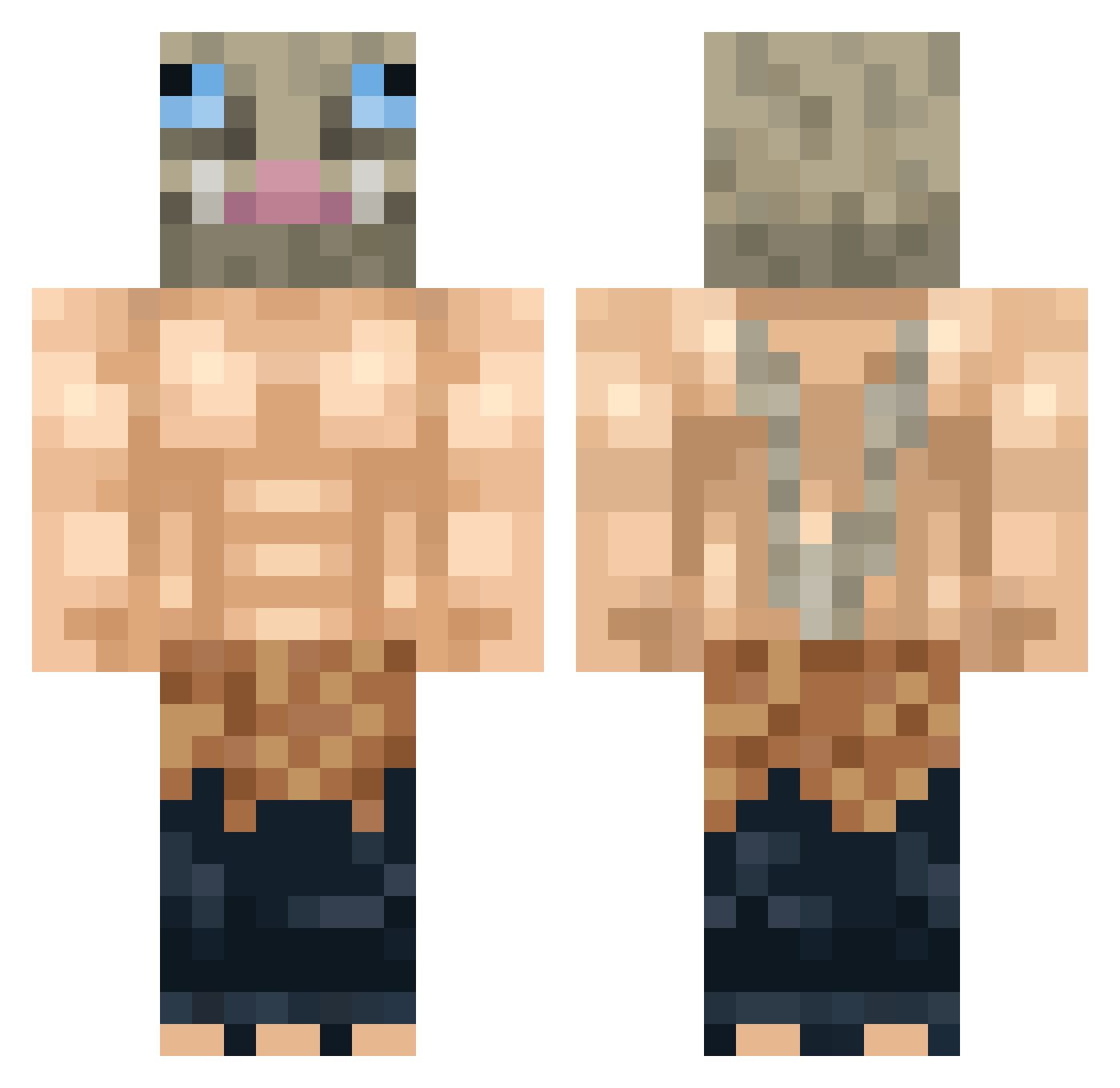
Current Minecraft skin of the player Rulas47, loaded from the official Mojang API. Rotate the 3D model with your mouse or finger, then download the skin as a PNG file and use it in Minecraft: Bedrock Edition or Java Edition for free. When Rulas47 changes their skin, this page updates automatically and the old skin stays in the history below.
Other players with this skin (300)
Rulas47 was the 157th player we have seen with this skin, first spotted on 16.09.2026. The same skin was seen on these players. Open a nickname to see their current skin and skin history.
 Kutut Puplip nitrojin HoriHimi kjirstin Dofhy FanaticalOwl Torennn Hirumageek Hyper675 Joking_Jordan sub_2_a_rat alex155151 Lucario1239 K3c1m0T Ace_Knight9 Weston0417 yoav2345 BlackDominus ZeFFeline Duboskee Godzilla3254 Carnitas27 CleverCat1760 ali3n3ga _D4rKz_ T0EcE hirococo RunawayCreeperX DikalS YOROTOTO ElmoBrabo Vierzou Abundant_Peaches ThunderFire01 thekevinramirez mtxl021 Crabocalypse Mattceol alora11 angelot45 Jitkoi Kilokiller DzikKacper Billo1308 Oneline_21 SynkroKPR avulcro fatshark2319 groskkboud1_ Joekalex05 Enjimon CosmicalLotus TheMercurial Sancher_Frost Joaberto _Miilka FamousLigre Pedror03 Pizzaboxcat
More Boar Mask Minecraft skins
How to install the Rulas47 skin
- Press the Download button above to save the skin as a PNG file.
- Minecraft: Bedrock Edition (PE): open the Dressing Room from the main menu (or tap your character → Edit Character), go to Classic Skins → Owned, press the + (new skin) button, choose the downloaded PNG and pick the Classic (Steve) model. Works on PC and mobile; consoles cannot import custom skins.
- Minecraft: Java Edition: open the Minecraft Launcher, go to the Skins tab, click New Skin, load the PNG, pick the Classic (Steve) model and press Save & Use. You can also upload it at minecraft.net → Profile → Change Skin.
The skin does not show up after import - what should I do?
Restart Minecraft and open the Dressing Room again - imported skins sometimes appear only after a restart. Also make sure you selected the imported skin and picked the Classic (Steve) model.
Which model should I choose, Classic or Slim?
This skin is designed for the Classic (Steve) model. If you pick the wrong model, the arms of the skin will look stretched or squeezed.
Is the skin of Rulas47 free to download?
Yes. Press Download, save the PNG file and use it in Minecraft: Bedrock Edition or Java Edition - no payment or registration needed. The skin also works on multiplayer servers and Realms.
More skins
Looking for more? Go back to all Minecraft skins and check the top skins of the week, month and all time, or find any player's skin by nickname.