
Roxtleo - Minecraft Skins & Skin History
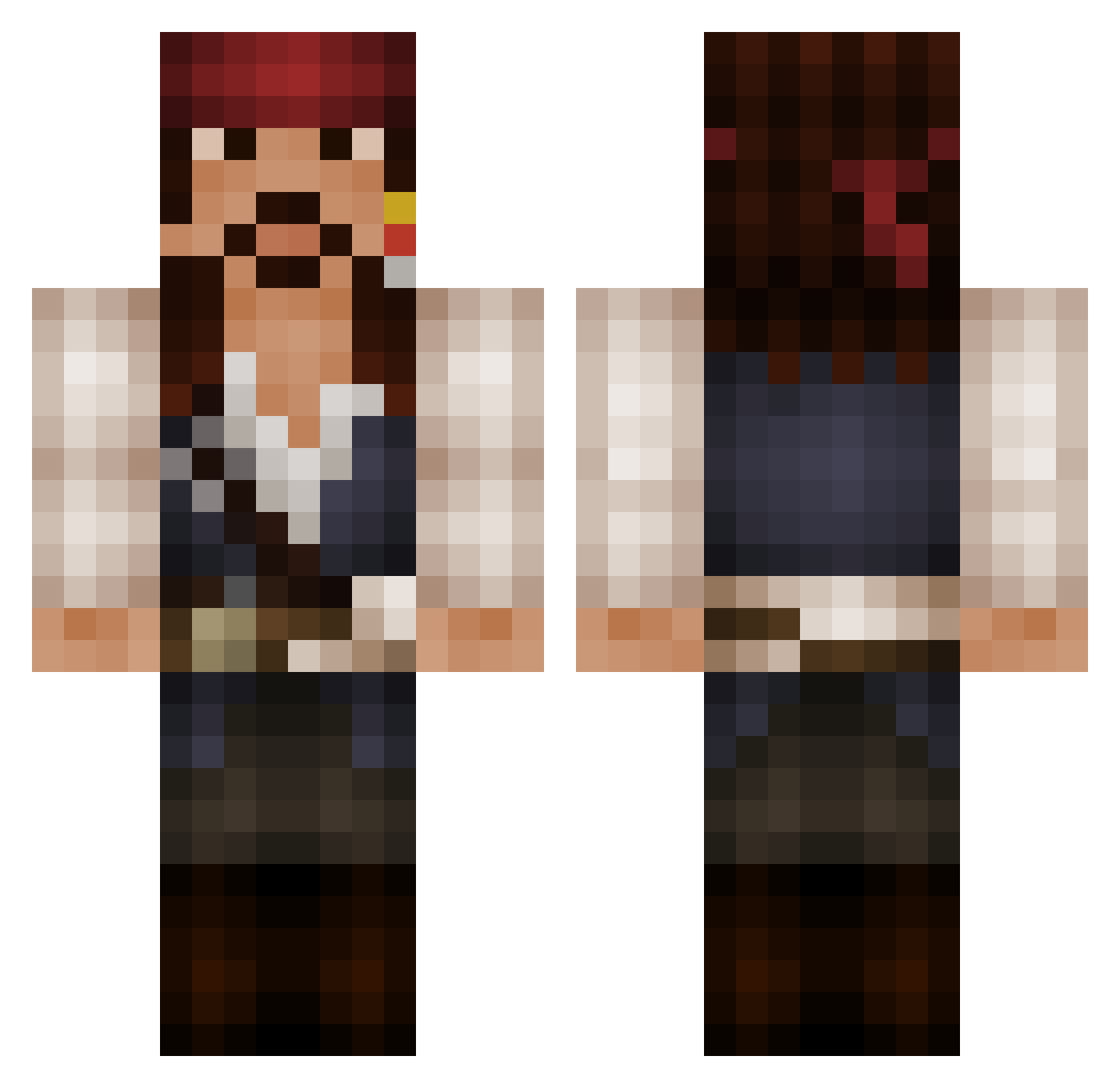
Current Minecraft skin of the player Roxtleo, loaded from the official Mojang API. Rotate the 3D model with your mouse or finger, then download the skin as a PNG file and use it in Minecraft: Bedrock Edition or Java Edition for free. When Roxtleo changes their skin, this page updates automatically and the old skin stays in the history below.
Other players with this skin (652)
Roxtleo was the 620th player we have seen with this skin, first spotted on 15.11.2026. The same skin was seen on these players. Open a nickname to see their current skin and skin history.
 YouMoh NichoLord muttley687 iMev Bryankoeff SgtYanz Valerysx _OzarkCowboy_ Amoridion Bradette19 juanmiojitos CallMeBo Corndog765 LookingForOwls XiaoYaoTan bararack alexrebmann Amandius DietFail MrHenrik Bjornstaag DuangCarmen zackydack Molemouse321 Quatsch21 Gurgelfluff Gelter Platero94 bahamuut84 TyzuhR SDean22 napofranco amacf CaptJacSparo Erodrelin Wilhelm2451 d_ray21 captainm0rgan adamepic Lunakok BakerDog boristruyens Wyatt_SBG OBenned Mariohbeas Frzanny Eray072 Flaming_Moomba iAMH3CK Domostep Kvazars Wodkavampir Watermain Schizonoise NeedsMorePie Cowboylil ADBGamer1999 Spykematt donjoey spin_me
More Jack Sparrow Minecraft skins
See all 128 Jack Sparrow skins
How to install the Roxtleo skin
- Press the Download button above to save the skin as a PNG file.
- Minecraft: Bedrock Edition (PE): open the Dressing Room from the main menu (or tap your character → Edit Character), go to Classic Skins → Owned, press the + (new skin) button, choose the downloaded PNG and pick the Classic (Steve) model. Works on PC and mobile; consoles cannot import custom skins.
- Minecraft: Java Edition: open the Minecraft Launcher, go to the Skins tab, click New Skin, load the PNG, pick the Classic (Steve) model and press Save & Use. You can also upload it at minecraft.net → Profile → Change Skin.
The skin does not show up after import - what should I do?
Restart Minecraft and open the Dressing Room again - imported skins sometimes appear only after a restart. Also make sure you selected the imported skin and picked the Classic (Steve) model.
Which model should I choose, Classic or Slim?
This skin is designed for the Classic (Steve) model. If you pick the wrong model, the arms of the skin will look stretched or squeezed.
Is the skin of Roxtleo free to download?
Yes. Press Download, save the PNG file and use it in Minecraft: Bedrock Edition or Java Edition - no payment or registration needed. The skin also works on multiplayer servers and Realms.
More skins
Looking for more? Go back to all Minecraft skins and check the top skins of the week, month and all time, or find any player's skin by nickname.