
Rolator26 - Minecraft Skins & Skin History
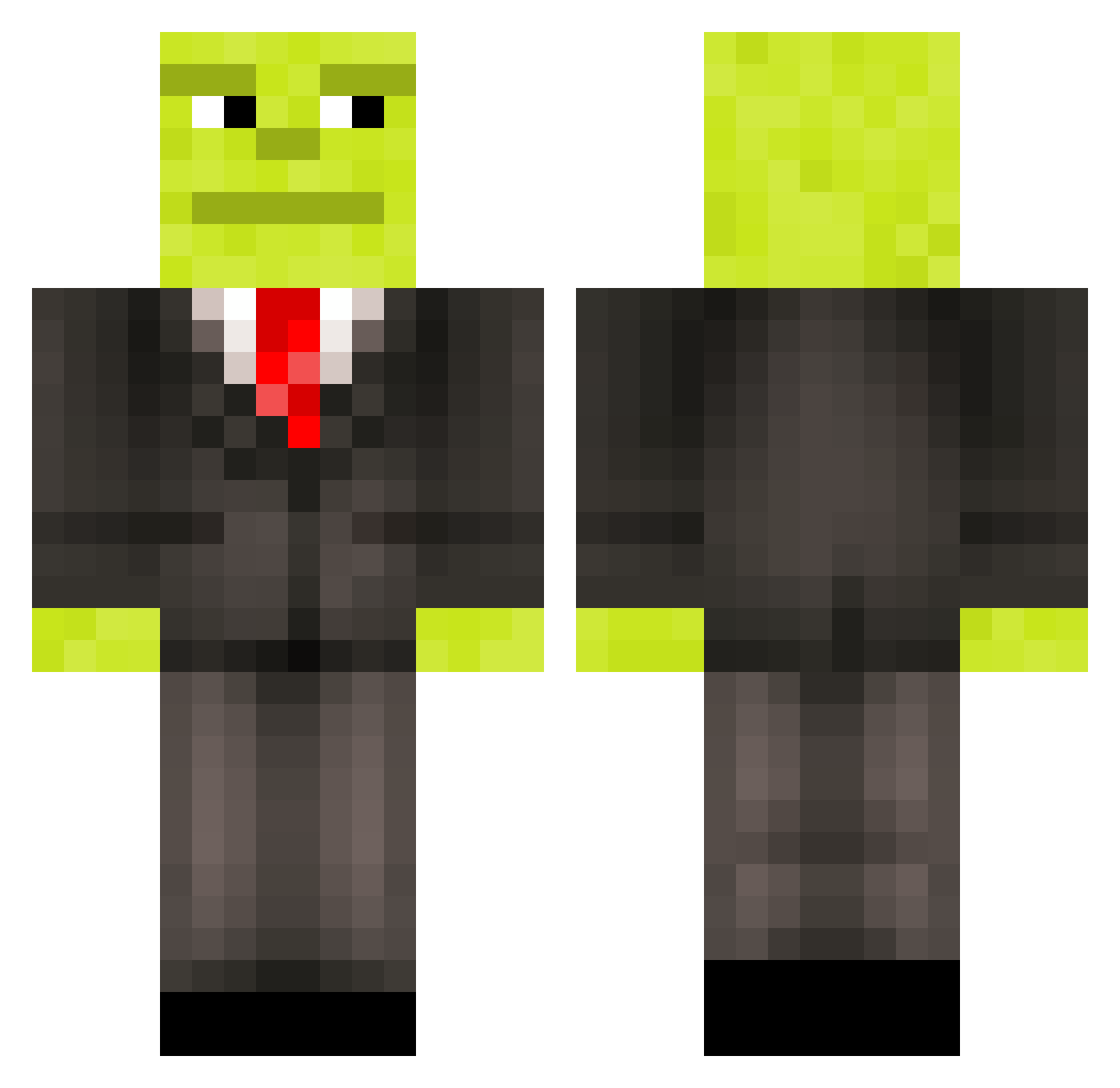
Current Minecraft skin of the player Rolator26, loaded from the official Mojang API. Rotate the 3D model with your mouse or finger, then download the skin as a PNG file and use it in Minecraft: Bedrock Edition or Java Edition for free. When Rolator26 changes their skin, this page updates automatically and the old skin stays in the history below.
Other players with this skin (105)
Rolator26 was the 29th player we have seen with this skin, first spotted on 02.09.2026. The same skin was seen on these players. Open a nickname to see their current skin and skin history.
 atomameise24 Pauettt xTomaas16 subwaysamich69 skor2a KFA1199 Wielka_kluska Lasse2012 M0nst3r_x1t T3tinh4 _V_0_I_D_
 Vetinh Karlsson08 Daniel_banana555 Limitless864 mnz05 thepro336 Ebble222 Thorasta ThS2__ Drive128GB soccerdragon20 celer_y thintable9119 Lama_Agent BigGuz69 Calo23 lars_ans igolass___ Drocker54 Franeksal jewelvsz aartan1 _RCDMARCELO_ robbyjj luznyy ErMonto12 Itz_Nlzz Loili_Sofia17 lihongyang666 Papelito12 BigYahuTheBeast ForestFox13 DeZaLeY JulesDM popegrigorii RichyIsHere tulip_xx richfurball9958 CZ_jiho LautaroMartino28 Pomchpomch Loan18
 DasTatWeh anusisthebest QU3_3MP4L0
 Nikosthebest2013 The_Big_Kirkie marioboss72 UviuHaltMeinSip
More Shrek Minecraft skins
How to install the Rolator26 skin
- Press the Download button above to save the skin as a PNG file.
- Minecraft: Bedrock Edition (PE): open the Dressing Room from the main menu (or tap your character → Edit Character), go to Classic Skins → Owned, press the + (new skin) button, choose the downloaded PNG and pick the Classic (Steve) model. Works on PC and mobile; consoles cannot import custom skins.
- Minecraft: Java Edition: open the Minecraft Launcher, go to the Skins tab, click New Skin, load the PNG, pick the Classic (Steve) model and press Save & Use. You can also upload it at minecraft.net → Profile → Change Skin.
The skin does not show up after import - what should I do?
Restart Minecraft and open the Dressing Room again - imported skins sometimes appear only after a restart. Also make sure you selected the imported skin and picked the Classic (Steve) model.
Which model should I choose, Classic or Slim?
This skin is designed for the Classic (Steve) model. If you pick the wrong model, the arms of the skin will look stretched or squeezed.
Is the skin of Rolator26 free to download?
Yes. Press Download, save the PNG file and use it in Minecraft: Bedrock Edition or Java Edition - no payment or registration needed. The skin also works on multiplayer servers and Realms.
More skins
Looking for more? Go back to all Minecraft skins and check the top skins of the week, month and all time, or find any player's skin by nickname.