
PlodPais - Minecraft Skins & Skin History
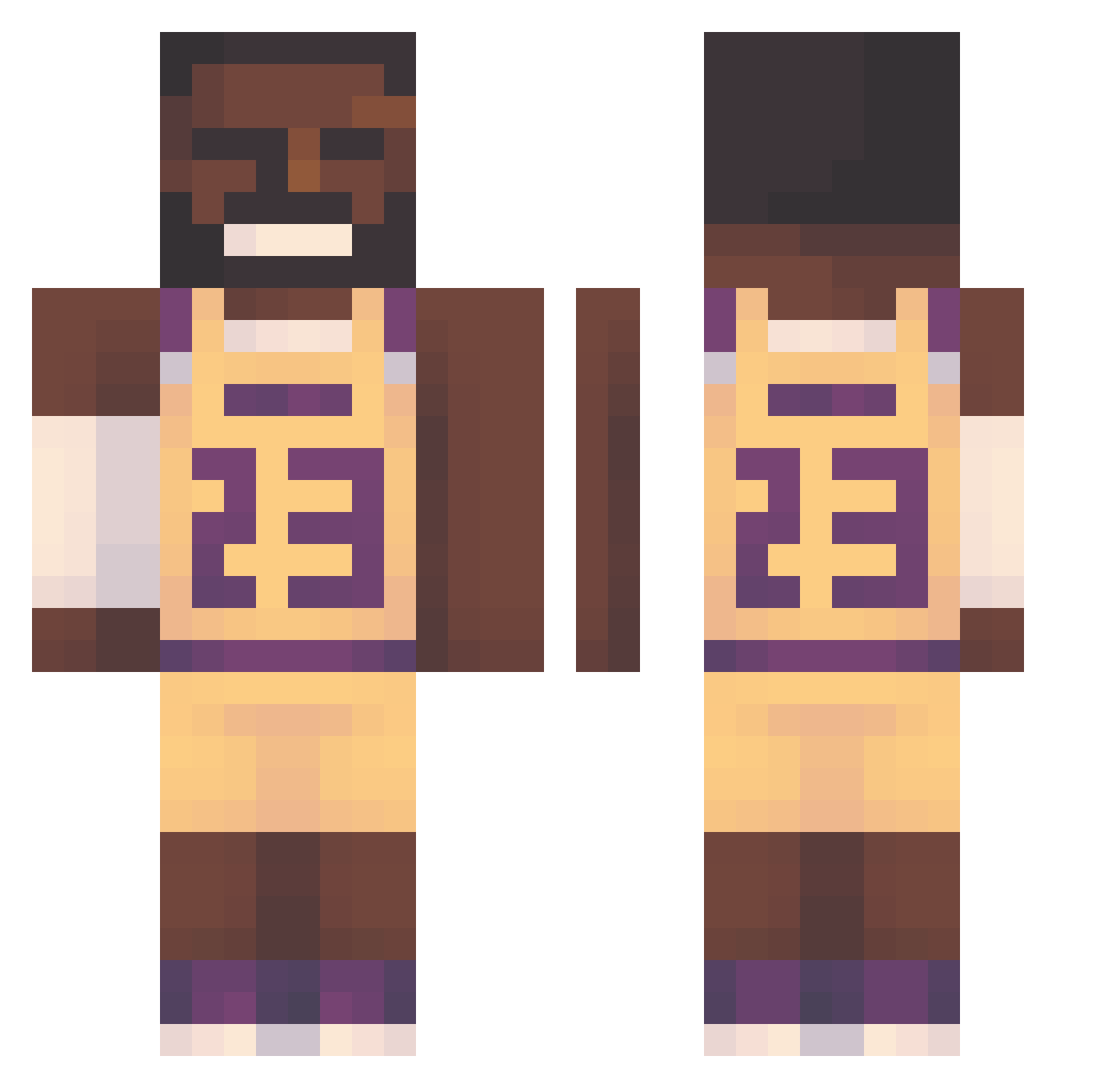
Current Minecraft skin of the player PlodPais, loaded from the official Mojang API. Rotate the 3D model with your mouse or finger, then download the skin as a PNG file and use it in Minecraft: Bedrock Edition or Java Edition for free. When PlodPais changes their skin, this page updates automatically and the old skin stays in the history below.
Other players with this skin (155)
PlodPais was the 130th player we have seen with this skin, first spotted on 01.11.2026. The same skin was seen on these players. Open a nickname to see their current skin and skin history.
 nerfdiamondboy RyanSanderson DihBuh69 dobiliuks SLIMEBALL1519 Stickman_III Ric_Hac _kimchi_king DamonSalvatore59 HeniekkTenFejm KingHam14 flaxmas elmorenacio oIcebear Venomicity Janekkebab12 eye___sac Cheeseduder lucas266 Gokce8328 _RiceEater AlamBree MaximonReign gr0be nyd_noskil Theapero78 donica_0808 Nola00187 saggynuthair4532 meram01 xxxSHIXXX Kixcrz woafang bobman15984x gvaq_ JayUpNxT DevSingh_ ruben6104 RataBerto99 KianLuca kkfcjde CvS_Nick Sloppyjoe1862 XRubikusX HDSavage Jaciku kordek6ES T_man_punch RyanButtlord0 W1se_Guy366 UB4Y Doncena8 AetemoAlt squirtchel twelveandtwo xRydaa misagamer12 Zurrixz okizachy fabiancitoo
More Lakers Minecraft skins
How to install the PlodPais skin
- Press the Download button above to save the skin as a PNG file.
- Minecraft: Bedrock Edition (PE): open the Dressing Room from the main menu (or tap your character → Edit Character), go to Classic Skins → Owned, press the + (new skin) button, choose the downloaded PNG and pick the Classic (Steve) model. Works on PC and mobile; consoles cannot import custom skins.
- Minecraft: Java Edition: open the Minecraft Launcher, go to the Skins tab, click New Skin, load the PNG, pick the Classic (Steve) model and press Save & Use. You can also upload it at minecraft.net → Profile → Change Skin.
The skin does not show up after import - what should I do?
Restart Minecraft and open the Dressing Room again - imported skins sometimes appear only after a restart. Also make sure you selected the imported skin and picked the Classic (Steve) model.
Which model should I choose, Classic or Slim?
This skin is designed for the Classic (Steve) model. If you pick the wrong model, the arms of the skin will look stretched or squeezed.
Is the skin of PlodPais free to download?
Yes. Press Download, save the PNG file and use it in Minecraft: Bedrock Edition or Java Edition - no payment or registration needed. The skin also works on multiplayer servers and Realms.
More skins
Looking for more? Go back to all Minecraft skins and check the top skins of the week, month and all time, or find any player's skin by nickname.