
PixelPunch10 - Minecraft Skins & Skin History
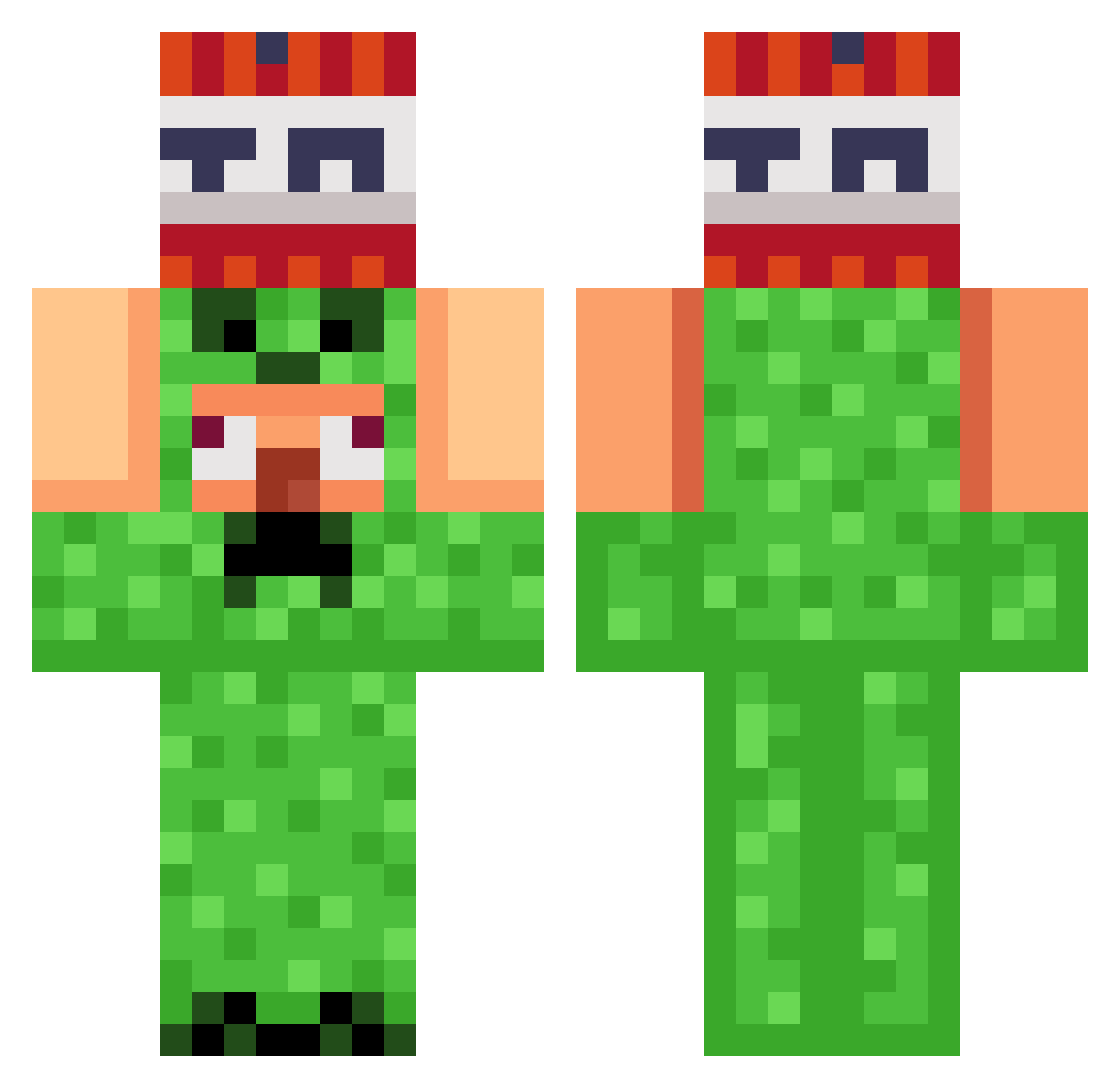
Current Minecraft skin of the player PixelPunch10, loaded from the official Mojang API. Rotate the 3D model with your mouse or finger, then download the skin as a PNG file and use it in Minecraft: Bedrock Edition or Java Edition for free. When PixelPunch10 changes their skin, this page updates automatically and the old skin stays in the history below.
Other players with this skin (821)
PixelPunch10 was the 151st player we have seen with this skin, first spotted on 08.08.2026. The same skin was seen on these players. Open a nickname to see their current skin and skin history.
 Nono4463
 WoolyThrone Pepino50 EmilGamerpro Itzhenley Nightraven6666 Fabienne08
 edududes 5sinn LippeX23 Mal_0077 Aaly4h _333_333 elpaatron Zecarias2 velocity558 Bonesy2
 Zam31 godcs godgimchi1 UPI7 CJHulkSmash52 federicos2312 THE_Dream_BLADE maxchen1109 BaseFinder3000
 TurboPetter ghork_BAKO WAGNERtr Wastl29 Niklas201 Neton93 AllemagneEn1945 acpcat Birdsis danien Sompong168 EL_LOKO_ fluffy5102 thinhkoo
 lordigerlord SchwarzeMaenner kdzinn Riceboii4939 Danik2018 Paninihead23
 dakusb PrOGaMeR_a111 BING_CHILING_123 Alkali64 overguys
 IILLISION Xxrzx007 klimcha Ernestosaurus Oriiginal1 iFoTi Mr_Momcake
 gerrox__YT Slapdash0906
More TNT Minecraft skins
How to install the PixelPunch10 skin
- Press the Download button above to save the skin as a PNG file.
- Minecraft: Bedrock Edition (PE): open the Dressing Room from the main menu (or tap your character → Edit Character), go to Classic Skins → Owned, press the + (new skin) button, choose the downloaded PNG and pick the Classic (Steve) model. Works on PC and mobile; consoles cannot import custom skins.
- Minecraft: Java Edition: open the Minecraft Launcher, go to the Skins tab, click New Skin, load the PNG, pick the Classic (Steve) model and press Save & Use. You can also upload it at minecraft.net → Profile → Change Skin.
The skin does not show up after import - what should I do?
Restart Minecraft and open the Dressing Room again - imported skins sometimes appear only after a restart. Also make sure you selected the imported skin and picked the Classic (Steve) model.
Which model should I choose, Classic or Slim?
This skin is designed for the Classic (Steve) model. If you pick the wrong model, the arms of the skin will look stretched or squeezed.
Is the skin of PixelPunch10 free to download?
Yes. Press Download, save the PNG file and use it in Minecraft: Bedrock Edition or Java Edition - no payment or registration needed. The skin also works on multiplayer servers and Realms.
More skins
Looking for more? Go back to all Minecraft skins and check the top skins of the week, month and all time, or find any player's skin by nickname.