
Pickelback - Minecraft Skins & Skin History
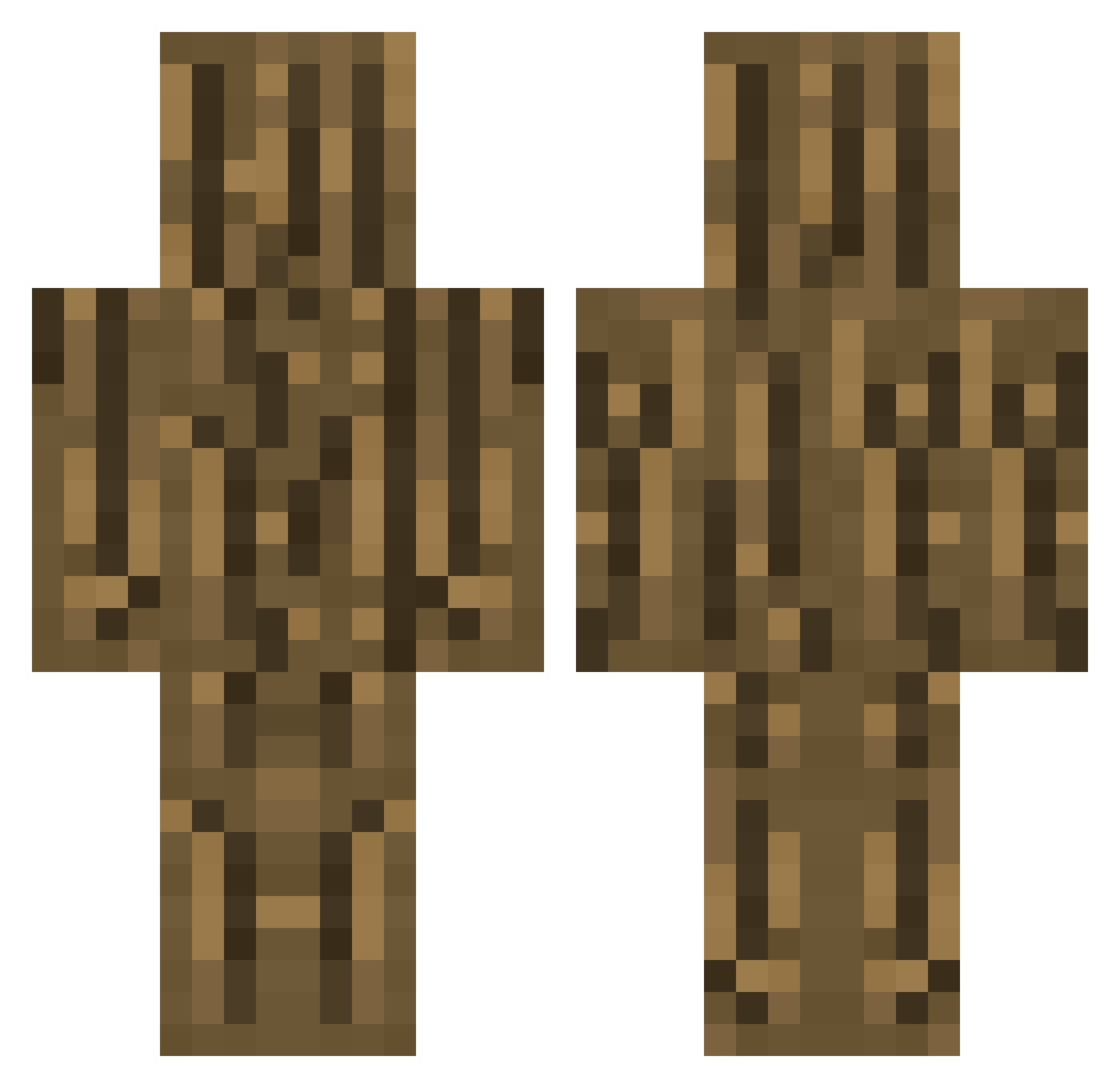
Current Minecraft skin of the player Pickelback, loaded from the official Mojang API. Rotate the 3D model with your mouse or finger, then download the skin as a PNG file and use it in Minecraft: Bedrock Edition or Java Edition for free. When Pickelback changes their skin, this page updates automatically and the old skin stays in the history below.
Other players with this skin (274)
Pickelback was the 192nd player we have seen with this skin, first spotted on 02.10.2026. The same skin was seen on these players. Open a nickname to see their current skin and skin history.
 Nightstalker001 Doberman870 TucoPlayer etttttt12 Eraxela Hazelfejs zzume inaya56 M3333 Valhalla8010 HelloSeYoun JDB6805YT NNKO1217 Drenon Akifuzn Killerpingin 1tox4 ThiefSeeker fawoodland Hasumon LivGoNi xSweSoupHD_MC ImBurningMan ItouLion Doooooms tutinokko58 uyyy67 YoungerSam Hans2323 Pavonzz MonkayNono Thesouille Magnesis_ BOKI114 TapWOOD69 Joshikiwa Woodman0103 Andrewdb231 nerfdude420 LukeCorgi12 dongmakri PearlHarborPart2 Ixter jhord4n radisssh0701 Corner33 hachimitu iam_degenerate lulubad58 RobotDogFuneral ryu_muffin timebir Noah_BYCM AlanoCapo debitz Darkness_Eoppl LOUIJI31 harrada256 Randy0511_TW Fefe_2005
More Oak Log Minecraft skins
How to install the Pickelback skin
- Press the Download button above to save the skin as a PNG file.
- Minecraft: Bedrock Edition (PE): open the Dressing Room from the main menu (or tap your character → Edit Character), go to Classic Skins → Owned, press the + (new skin) button, choose the downloaded PNG and pick the Classic (Steve) model. Works on PC and mobile; consoles cannot import custom skins.
- Minecraft: Java Edition: open the Minecraft Launcher, go to the Skins tab, click New Skin, load the PNG, pick the Classic (Steve) model and press Save & Use. You can also upload it at minecraft.net → Profile → Change Skin.
The skin does not show up after import - what should I do?
Restart Minecraft and open the Dressing Room again - imported skins sometimes appear only after a restart. Also make sure you selected the imported skin and picked the Classic (Steve) model.
Which model should I choose, Classic or Slim?
This skin is designed for the Classic (Steve) model. If you pick the wrong model, the arms of the skin will look stretched or squeezed.
Is the skin of Pickelback free to download?
Yes. Press Download, save the PNG file and use it in Minecraft: Bedrock Edition or Java Edition - no payment or registration needed. The skin also works on multiplayer servers and Realms.
More skins
Looking for more? Go back to all Minecraft skins and check the top skins of the week, month and all time, or find any player's skin by nickname.