
Peniscreeper37 - Minecraft Skins & Skin History
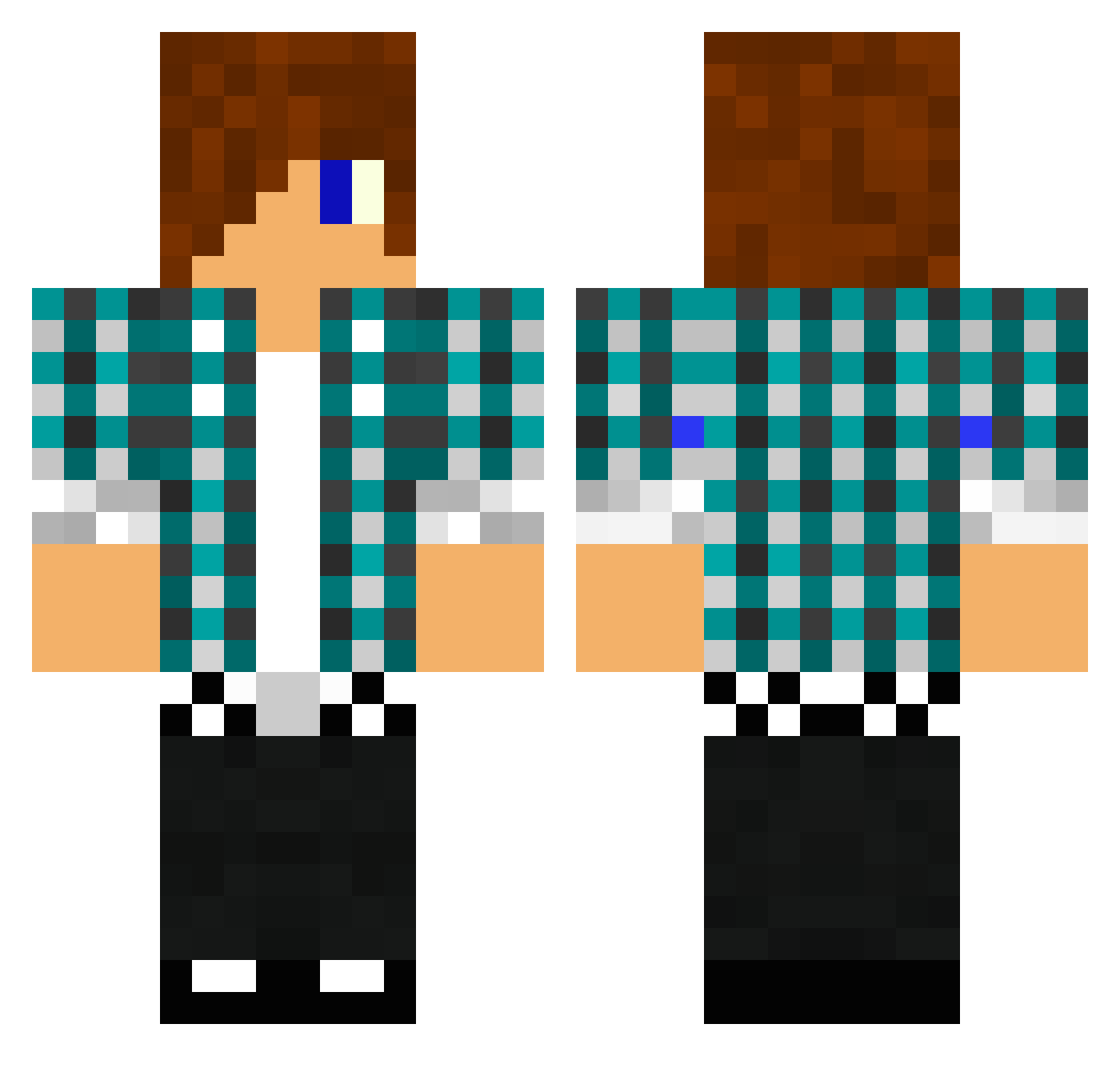
Current Minecraft skin of the player Peniscreeper37, loaded from the official Mojang API. Rotate the 3D model with your mouse or finger, then download the skin as a PNG file and use it in Minecraft: Bedrock Edition or Java Edition for free. When Peniscreeper37 changes their skin, this page updates automatically and the old skin stays in the history below.
Other players with this skin (1475)
Peniscreeper37 was the 755th player we have seen with this skin, first spotted on 25.09.2026. The same skin was seen on these players. Open a nickname to see their current skin and skin history.
 darthmad2 jetpackboy16 Symple25 hacker123dos RyderTheKiller 77national ichhaltso_ JonnyEllis jrsebesta hbomb47 schaeffer2 timmi1998 jesp602a linuxcraft arbin1999 Large__Chungus ninjaaman jaba1997 rasmus29 David_Heinrichs __August__ roffe12345 vanushik Exadon Robert5648 G4LANX Frank_iz 30582 MonsterSofa honry1 nat990 iyasser07 dave5151515 slayer2404 ssc_27k Theolito_Caramba BalkMatt367 SweetMonkeyMan OpTic_ReTro zPredPvPz Greycloak42 ferjuan1 mineyiannis Shadow_Knight_1_ ATR9000 Zacob Begnild xFlip09x lulu1715 Enderdragen860 kubaboss2012 jmhettinga jonnymckenna999 korvare DanielArnold8 Boogyman_dev MadMike266 DragonNards Micha156 redarmy_123
More Emo Minecraft skins
How to install the Peniscreeper37 skin
- Press the Download button above to save the skin as a PNG file.
- Minecraft: Bedrock Edition (PE): open the Dressing Room from the main menu (or tap your character → Edit Character), go to Classic Skins → Owned, press the + (new skin) button, choose the downloaded PNG and pick the Classic (Steve) model. Works on PC and mobile; consoles cannot import custom skins.
- Minecraft: Java Edition: open the Minecraft Launcher, go to the Skins tab, click New Skin, load the PNG, pick the Classic (Steve) model and press Save & Use. You can also upload it at minecraft.net → Profile → Change Skin.
The skin does not show up after import - what should I do?
Restart Minecraft and open the Dressing Room again - imported skins sometimes appear only after a restart. Also make sure you selected the imported skin and picked the Classic (Steve) model.
Which model should I choose, Classic or Slim?
This skin is designed for the Classic (Steve) model. If you pick the wrong model, the arms of the skin will look stretched or squeezed.
Is the skin of Peniscreeper37 free to download?
Yes. Press Download, save the PNG file and use it in Minecraft: Bedrock Edition or Java Edition - no payment or registration needed. The skin also works on multiplayer servers and Realms.
More skins
Looking for more? Go back to all Minecraft skins and check the top skins of the week, month and all time, or find any player's skin by nickname.