
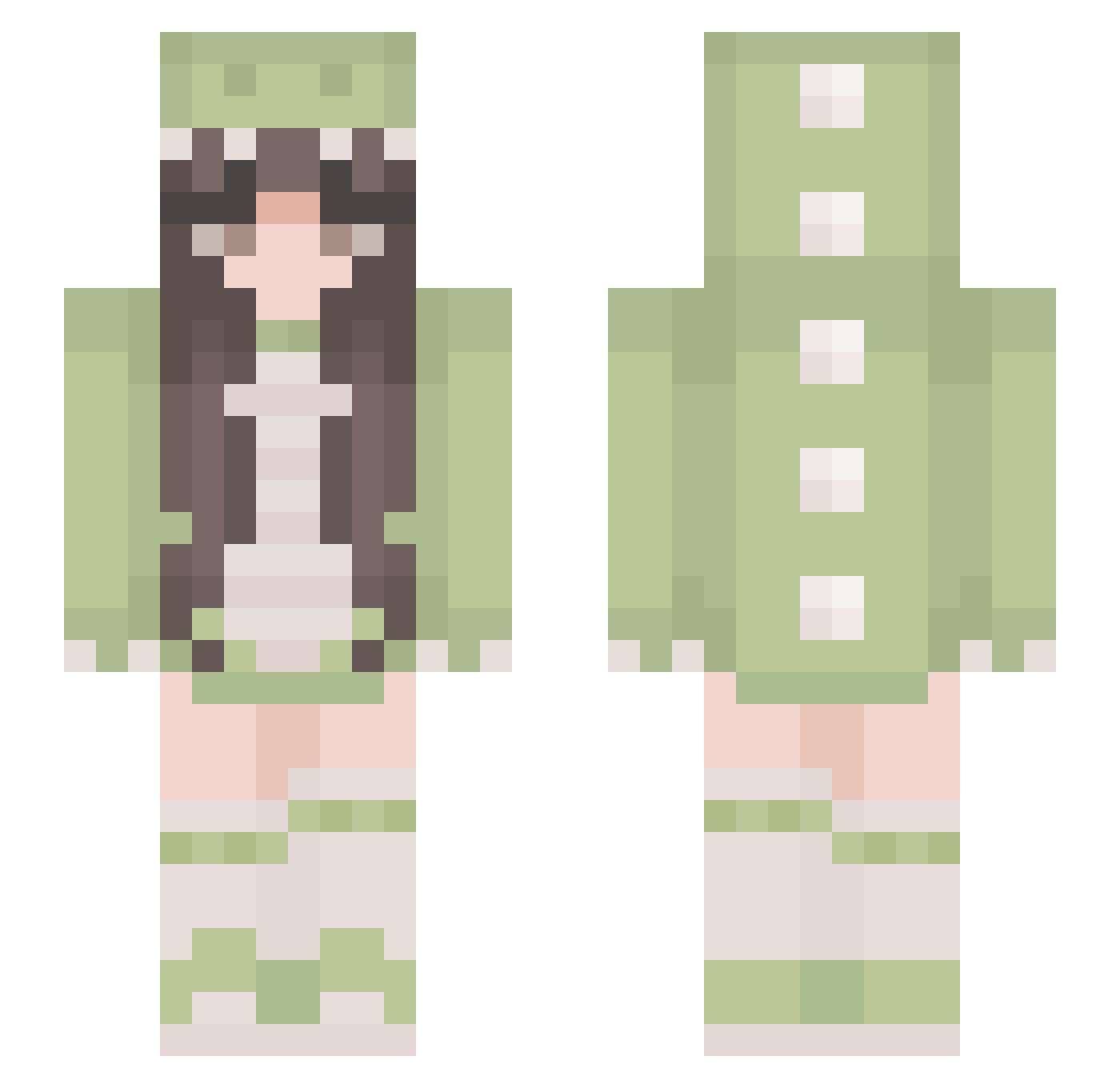
Current Minecraft skin of the player PeachXp_, loaded from the official Mojang API. Rotate the 3D model with your mouse or finger, then download the skin as a PNG file and use it in Minecraft: Bedrock Edition or Java Edition for free. When PeachXp_ changes their skin, this page updates automatically and the old skin stays in the history below.
Other players with this skin (320)
PeachXp_ was the 83rd player we have seen with this skin, first spotted on 16.08.2026. The same skin was seen on these players. Open a nickname to see their current skin and skin history.
 Yukk529 wikusia062 jenissimo Katicawa MrsKyoko RRIINN_ miaroosevrlt Eternalsflame EmSauce11 Alive_121 VanilleFuchs Insomniac98 Mya_Moo savannahstick69 bonnie_fish Laora_ sabennisa Vitto987654321
 yuji_434 Pastel206 Audiqwq aozora1224 jujumaru_machhan jungle_witch Codiusss Cxtxlina mbscizi Pushka127 Alquo1 me_is_karena CalmDucky64 guanxi02 xXninja9Xx_911 samxv12 Kehru WangRui12
 Canislu Lycoornie StardustMiner26 xLittleShaanx Lesadinha THElara4 TaroSky Chloerules123
 sssfyy LargeKiwi BlueFyr333 holaaa00 Rossetta09 linyll sanoll Lorentzs valeean denisse9512 SkyPaper Estrellaot JustLei anhao0319 piripiripyong pumpkincutie
More Pastel Minecraft skins
How to install the PeachXp_ skin
- Press the Download button above to save the skin as a PNG file.
- Minecraft: Bedrock Edition (PE): open the Dressing Room from the main menu (or tap your character → Edit Character), go to Classic Skins → Owned, press the + (new skin) button, choose the downloaded PNG and pick the Slim (Alex) model. Works on PC and mobile; consoles cannot import custom skins.
- Minecraft: Java Edition: open the Minecraft Launcher, go to the Skins tab, click New Skin, load the PNG, pick the Slim (Alex) model and press Save & Use. You can also upload it at minecraft.net → Profile → Change Skin.
The skin does not show up after import - what should I do?
Restart Minecraft and open the Dressing Room again - imported skins sometimes appear only after a restart. Also make sure you selected the imported skin and picked the Slim (Alex) model.
Which model should I choose, Classic or Slim?
This skin is designed for the Slim (Alex) model. If you pick the wrong model, the arms of the skin will look stretched or squeezed.
Is the skin of PeachXp_ free to download?
Yes. Press Download, save the PNG file and use it in Minecraft: Bedrock Edition or Java Edition - no payment or registration needed. The skin also works on multiplayer servers and Realms.
More skins
Looking for more? Go back to all Minecraft skins and check the top skins of the week, month and all time, or find any player's skin by nickname.