
PMinAZ - Minecraft Skins & Skin History
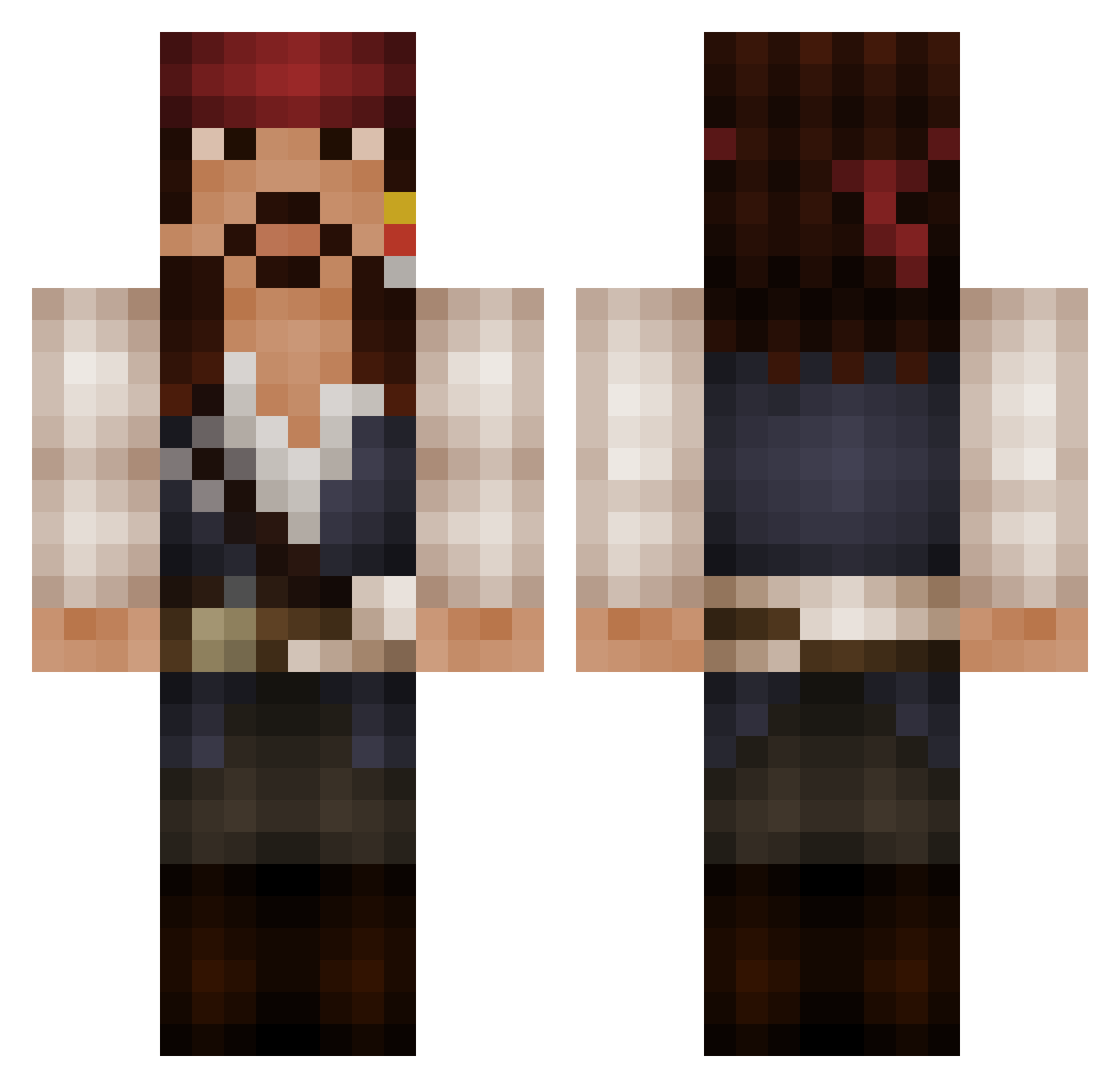
Current Minecraft skin of the player PMinAZ, loaded from the official Mojang API. Rotate the 3D model with your mouse or finger, then download the skin as a PNG file and use it in Minecraft: Bedrock Edition or Java Edition for free. When PMinAZ changes their skin, this page updates automatically and the old skin stays in the history below.
Other players with this skin (525)
PMinAZ was the 364th player we have seen with this skin, first spotted on 04.10.2026. The same skin was seen on these players. Open a nickname to see their current skin and skin history.
 Sevemble Johnny82 shadowblaze10 TheGrey10 Bockeye corrad13 Hagbardceline32 IllegalSnow hyper_girl johny_massacre JackSpaarrow DeltaForce49 Pipenio Zach_Sparrow_ Jevander xTeckk FlukyLuky77 Bankiwa_YT ricoalluws cordell098 swayper muse1999 xTwentiiThree Baronen83 KadedaSpade Bainz9 greef777 stafford8 Chvpters Handya SparrowGurl PringlesVerdi DangerJr19 blindaggro SAUBER77 alexosbu adminthung389 TARDIS_Crafter Ratjarz Gidown danilefecan 121Astro Whispering_Soul CaptainEdward1 MikaloAngelo Bob_Burrows NesquickPT Snerti Unabola dead_meadow Dark4Sly Treesavery Denethork SKRAGGLE Hazmatical PrivateerGaming KeunG_SS Caffreyj mhelmik tilenbox
More Jack Sparrow Minecraft skins
See all 108 Jack Sparrow skins
How to install the PMinAZ skin
- Press the Download button above to save the skin as a PNG file.
- Minecraft: Bedrock Edition (PE): open the Dressing Room from the main menu (or tap your character → Edit Character), go to Classic Skins → Owned, press the + (new skin) button, choose the downloaded PNG and pick the Classic (Steve) model. Works on PC and mobile; consoles cannot import custom skins.
- Minecraft: Java Edition: open the Minecraft Launcher, go to the Skins tab, click New Skin, load the PNG, pick the Classic (Steve) model and press Save & Use. You can also upload it at minecraft.net → Profile → Change Skin.
The skin does not show up after import - what should I do?
Restart Minecraft and open the Dressing Room again - imported skins sometimes appear only after a restart. Also make sure you selected the imported skin and picked the Classic (Steve) model.
Which model should I choose, Classic or Slim?
This skin is designed for the Classic (Steve) model. If you pick the wrong model, the arms of the skin will look stretched or squeezed.
Is the skin of PMinAZ free to download?
Yes. Press Download, save the PNG file and use it in Minecraft: Bedrock Edition or Java Edition - no payment or registration needed. The skin also works on multiplayer servers and Realms.
More skins
Looking for more? Go back to all Minecraft skins and check the top skins of the week, month and all time, or find any player's skin by nickname.