
Orogosaki - Minecraft Skins & Skin History
Current Minecraft skin of the player Orogosaki, loaded from the official Mojang API. Rotate the 3D model with your mouse or finger, then download the skin as a PNG file and use it in Minecraft: Bedrock Edition or Java Edition for free. When Orogosaki changes their skin, this page updates automatically and the old skin stays in the history below.
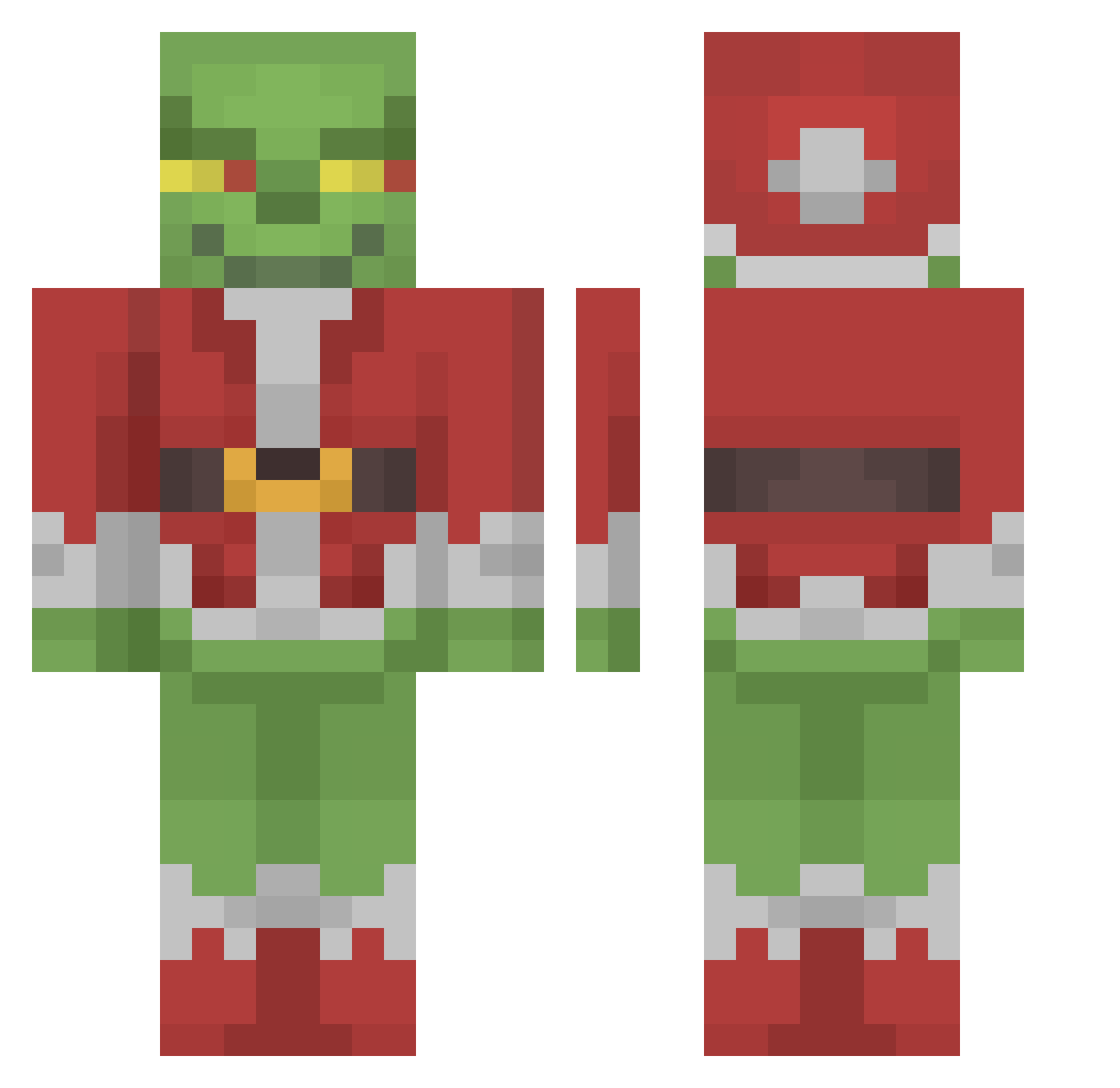
Other players with this skin (190)
Orogosaki was the 138th player we have seen with this skin, first spotted on 25.10.2026. The same skin was seen on these players. Open a nickname to see their current skin and skin history.
 KiNgDiRtY20 Atgaca EricXd Zidgy toast_fred V_kT0r22119 TheUltraGronckle kirstynkoala UAEFOX12 rachawill SergeantPoossy K1NG_Julien_ talltejas Hexogone SpongeRobert CristianWYE Hasikoko Rraw darraghc333 vigaviggo YBKEEF slag110 Jordan_Air2012 muffpunch pizzatriplebacon jaidahamilton ScoobyDoobyDoge TheAzkhar eGirlHayleyy Monster22Killer BlushingAngel NoBueno1 xAnKo_X AxSt13 iCIV2 Herro14 DJArmany MattyG456 piterox_pvv MarioSace03 IH8ELIJAH viperSLATTT ItsRaiim Gr1nchas Nasaleki SaraProGamer CoffeeSpilled HxcksEnabled TheDarkDungeoner FatCatZaddy rwena40 TH_Division GooBooSwag _0K__ RolphySlime Eyrox101 yelrebmikjl Water_Botel Nakarnum Andaere
More The Grinch Minecraft skins
How to install the Orogosaki skin
- Press the Download button above to save the skin as a PNG file.
- Minecraft: Bedrock Edition (PE): open the Dressing Room from the main menu (or tap your character → Edit Character), go to Classic Skins → Owned, press the + (new skin) button, choose the downloaded PNG and pick the Classic (Steve) model. Works on PC and mobile; consoles cannot import custom skins.
- Minecraft: Java Edition: open the Minecraft Launcher, go to the Skins tab, click New Skin, load the PNG, pick the Classic (Steve) model and press Save & Use. You can also upload it at minecraft.net → Profile → Change Skin.
The skin does not show up after import - what should I do?
Restart Minecraft and open the Dressing Room again - imported skins sometimes appear only after a restart. Also make sure you selected the imported skin and picked the Classic (Steve) model.
Which model should I choose, Classic or Slim?
This skin is designed for the Classic (Steve) model. If you pick the wrong model, the arms of the skin will look stretched or squeezed.
Is the skin of Orogosaki free to download?
Yes. Press Download, save the PNG file and use it in Minecraft: Bedrock Edition or Java Edition - no payment or registration needed. The skin also works on multiplayer servers and Realms.
More skins
Looking for more? Go back to all Minecraft skins and check the top skins of the week, month and all time, or find any player's skin by nickname.