
OliverTtttt - Minecraft Skins & Skin History
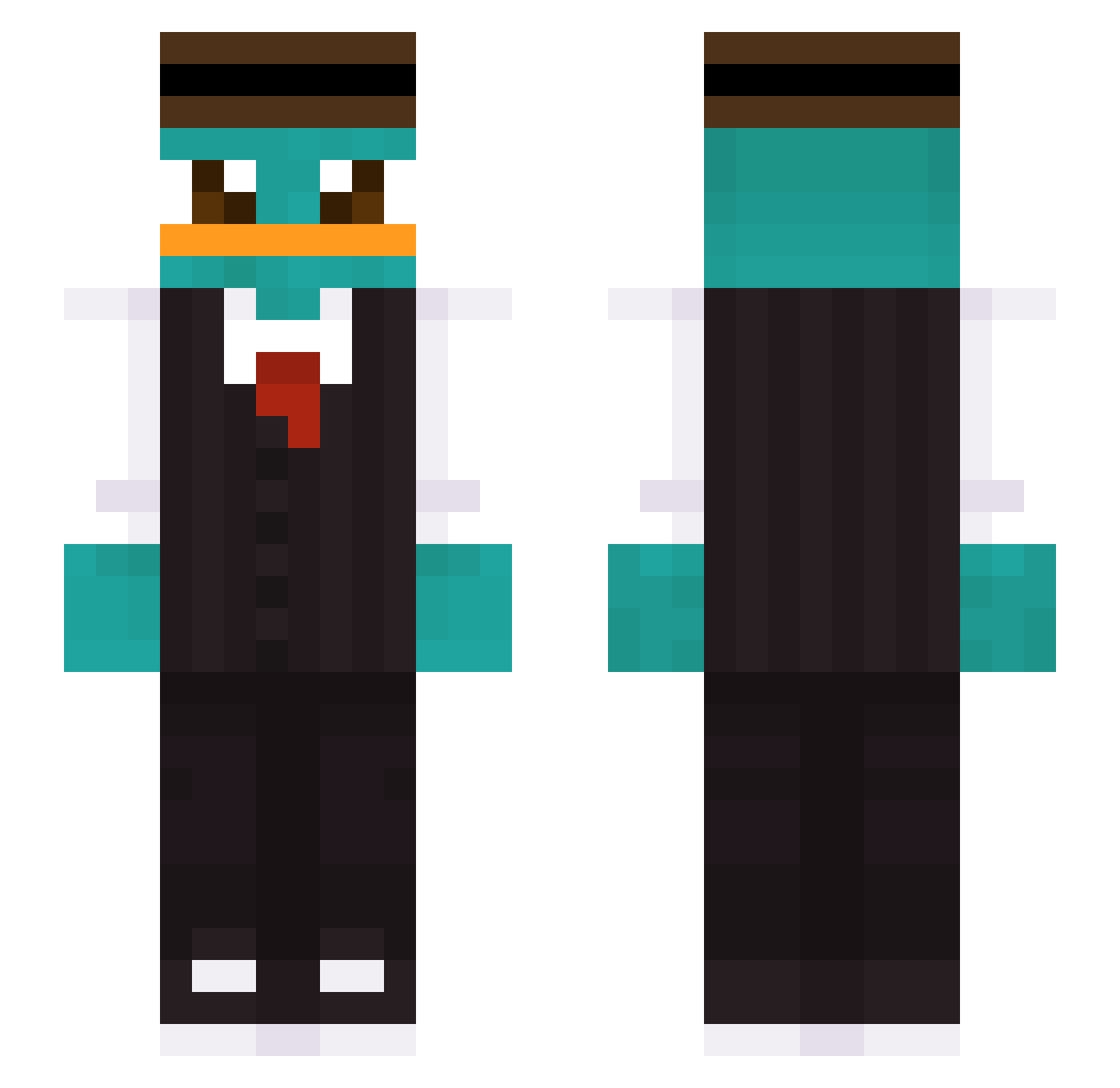
Current Minecraft skin of the player OliverTtttt, loaded from the official Mojang API. Rotate the 3D model with your mouse or finger, then download the skin as a PNG file and use it in Minecraft: Bedrock Edition or Java Edition for free. When OliverTtttt changes their skin, this page updates automatically and the old skin stays in the history below.
Other players with this skin (361)
OliverTtttt was the 20th player we have seen with this skin, first spotted on 29.07.2026. The same skin was seen on these players. Open a nickname to see their current skin and skin history.
 rxxxse IsaacNotToxic MangoMen007 Desolate0306 JasiowyJas lj_bruh Llyze _Pozzi Flow2323 Fil6000 EJ181 HanzB1782 Loohg
 Big_Goldo CORSAIR__ Qugenn TheRealAnanke MrMonkey69420 JoshHasBigWood MarchiOreo cotti890 Huskygawted
 AnFeR_SiTo Fenris3912
 jongleeseob Stinki0 Orbital_Duck HelloKK _rodrev Squalos_ Jakob_5_7 Bren0TR IamCZOne EyalHavarvar Antonnovic sopsip El_Kompostero_ Jason0827 Tabela0 SunnySeamus Bumpkin132 MrSiin89 Ashton3146 Danitz09 CurusBahleda Zoink3 fishtacos808 Takota91 TheKid48 FrozenTF latte037
 RyannGamerr Morphengine1337 lemona614 SketchyBach2 gavo341 BOT_TR4KO leier01 sofarsogood2022 Jubjub737
More Platypus Minecraft skins
How to install the OliverTtttt skin
- Press the Download button above to save the skin as a PNG file.
- Minecraft: Bedrock Edition (PE): open the Dressing Room from the main menu (or tap your character → Edit Character), go to Classic Skins → Owned, press the + (new skin) button, choose the downloaded PNG and pick the Slim (Alex) model. Works on PC and mobile; consoles cannot import custom skins.
- Minecraft: Java Edition: open the Minecraft Launcher, go to the Skins tab, click New Skin, load the PNG, pick the Slim (Alex) model and press Save & Use. You can also upload it at minecraft.net → Profile → Change Skin.
The skin does not show up after import - what should I do?
Restart Minecraft and open the Dressing Room again - imported skins sometimes appear only after a restart. Also make sure you selected the imported skin and picked the Slim (Alex) model.
Which model should I choose, Classic or Slim?
This skin is designed for the Slim (Alex) model. If you pick the wrong model, the arms of the skin will look stretched or squeezed.
Is the skin of OliverTtttt free to download?
Yes. Press Download, save the PNG file and use it in Minecraft: Bedrock Edition or Java Edition - no payment or registration needed. The skin also works on multiplayer servers and Realms.
More skins
Looking for more? Go back to all Minecraft skins and check the top skins of the week, month and all time, or find any player's skin by nickname.