
NotDeadTrainBG - Minecraft Skins & Skin History
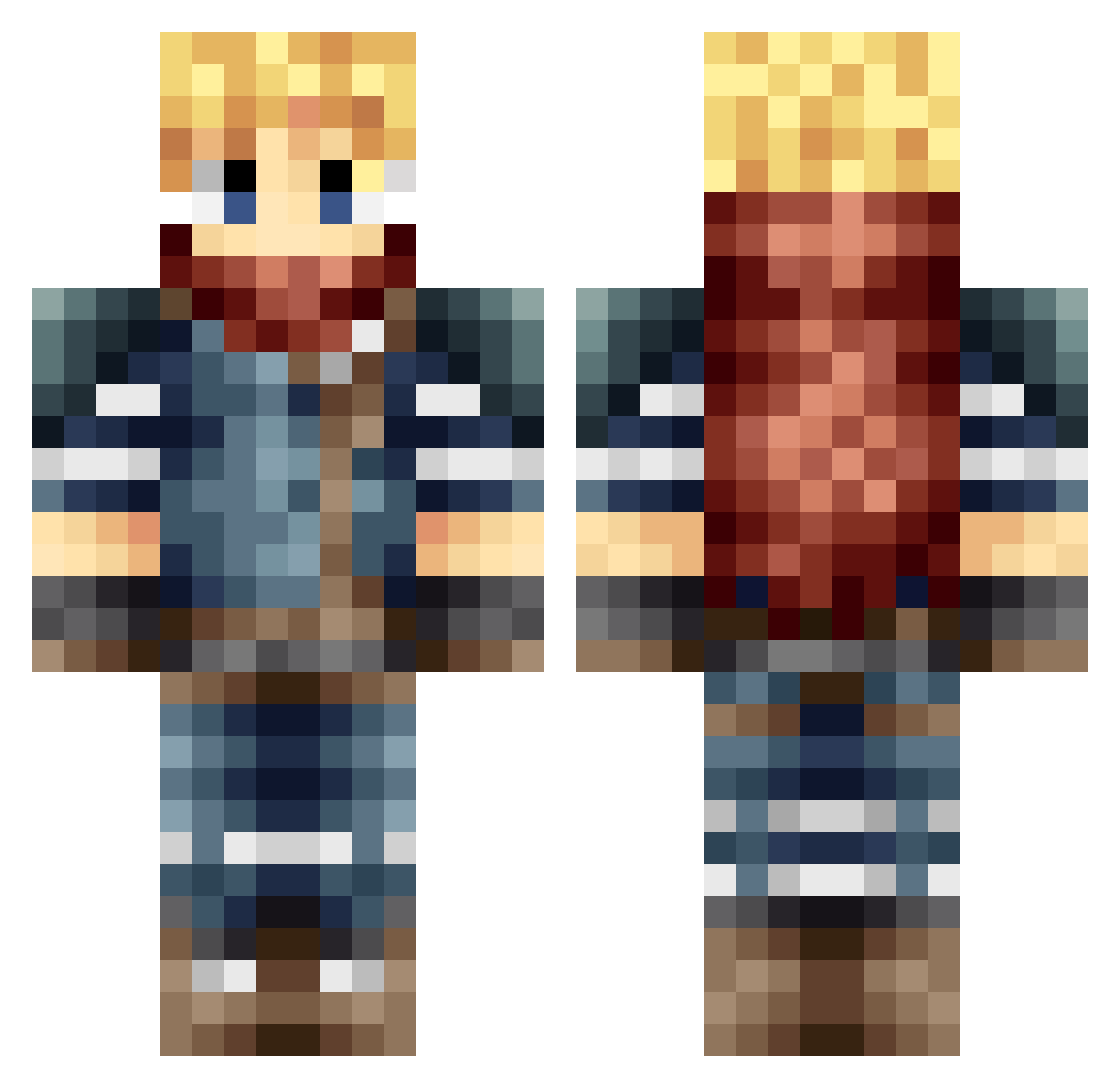
Current Minecraft skin of the player NotDeadTrainBG, loaded from the official Mojang API. Rotate the 3D model with your mouse or finger, then download the skin as a PNG file and use it in Minecraft: Bedrock Edition or Java Edition for free. When NotDeadTrainBG changes their skin, this page updates automatically and the old skin stays in the history below.
Other players with this skin (100)
NotDeadTrainBG was the 30th player we have seen with this skin, first spotted on 01.09.2026. The same skin was seen on these players. Open a nickname to see their current skin and skin history.
 NoOneTheNinja Aubinns Pakkitoo rainz0 AwesomeAJ43 AD0Gbeast Bitlord76 fargonofrivia Forild Virtuel0101BE exodia275 Fynov GenericBrick urupeac CalebRP Agbaman kas7_9
 Iconolatry_ nkkgod M1llEd Hvick655 Soccky wretsker Tyraelimon ExtremeProGaming MaxPlayingMc Aloysius01 Chronoxed K_B_M ouranosK8 Patorikku7 fcq53 G4NDOLPHIN Wackersblut krawczyyk Rimmar fuhuang09 Jossal34 NatNus sidwishes89 Speakser Ryzkee Forian_ RaijuDrake DANIBL17 yuyumi111 SamuraiDetective Aardvark4312 kipitril JoncraftLP Markeddwolf slaygoob ZappeCS madts7 joshoowa Corny_0 chrom3e Tadaszi KatzNoss Noa15_
More Adventurer Minecraft skins
How to install the NotDeadTrainBG skin
- Press the Download button above to save the skin as a PNG file.
- Minecraft: Bedrock Edition (PE): open the Dressing Room from the main menu (or tap your character → Edit Character), go to Classic Skins → Owned, press the + (new skin) button, choose the downloaded PNG and pick the Classic (Steve) model. Works on PC and mobile; consoles cannot import custom skins.
- Minecraft: Java Edition: open the Minecraft Launcher, go to the Skins tab, click New Skin, load the PNG, pick the Classic (Steve) model and press Save & Use. You can also upload it at minecraft.net → Profile → Change Skin.
The skin does not show up after import - what should I do?
Restart Minecraft and open the Dressing Room again - imported skins sometimes appear only after a restart. Also make sure you selected the imported skin and picked the Classic (Steve) model.
Which model should I choose, Classic or Slim?
This skin is designed for the Classic (Steve) model. If you pick the wrong model, the arms of the skin will look stretched or squeezed.
Is the skin of NotDeadTrainBG free to download?
Yes. Press Download, save the PNG file and use it in Minecraft: Bedrock Edition or Java Edition - no payment or registration needed. The skin also works on multiplayer servers and Realms.
More skins
Looking for more? Go back to all Minecraft skins and check the top skins of the week, month and all time, or find any player's skin by nickname.