
Noostos - Minecraft Skins & Skin History
Current Minecraft skin of the player Noostos, loaded from the official Mojang API. Rotate the 3D model with your mouse or finger, then download the skin as a PNG file and use it in Minecraft: Bedrock Edition or Java Edition for free. When Noostos changes their skin, this page updates automatically and the old skin stays in the history below.
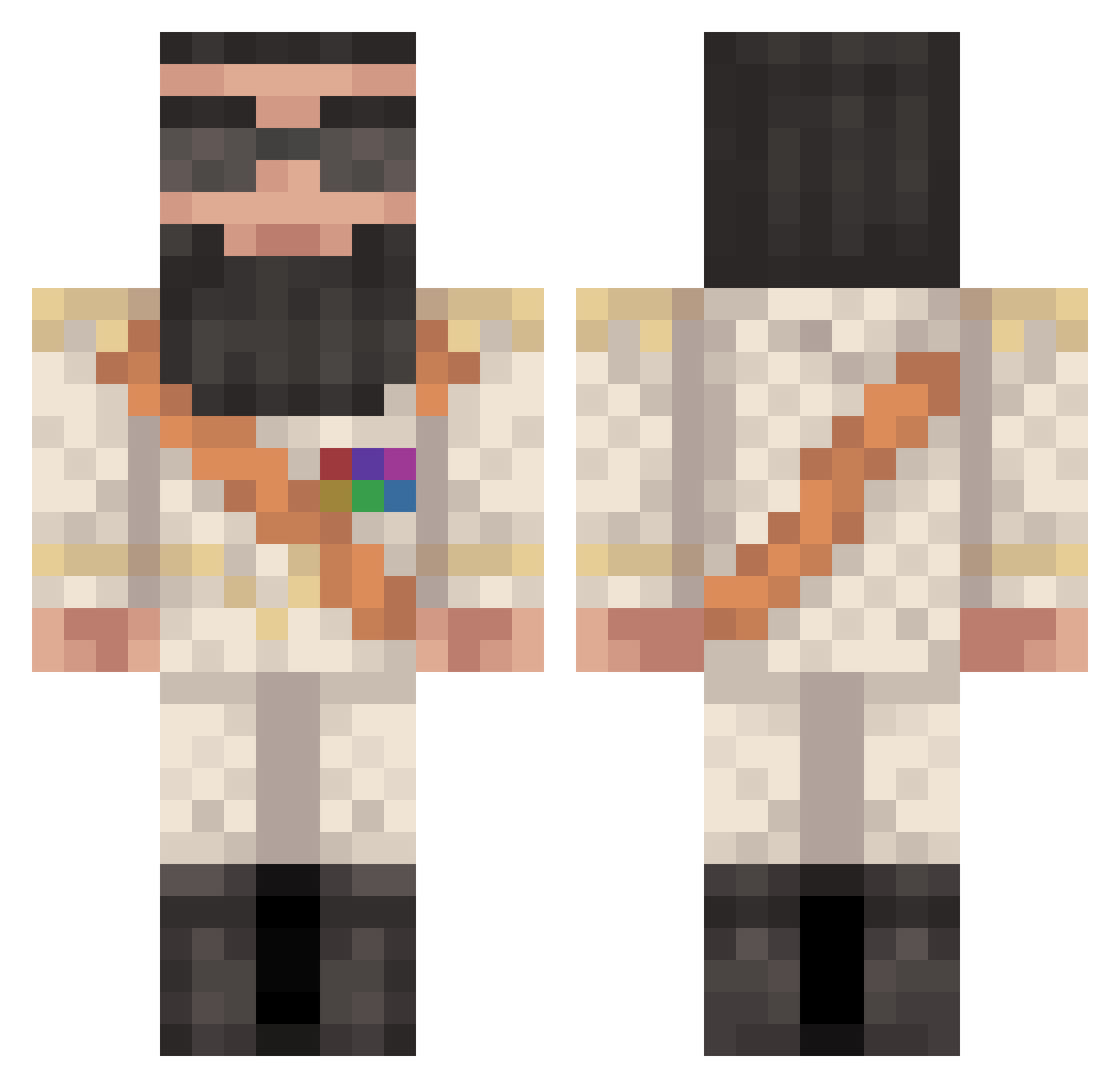
Other players with this skin (101)
Noostos was the 83rd player we have seen with this skin, first spotted on 02.10.2026. The same skin was seen on these players. Open a nickname to see their current skin and skin history.
 Kubiwoobee RcmpHorseOutside Arce_12 tth_miron JuicyPunch JoshiDerBlluterr Websterzer MrMan148 mentalspirits _PopePP Schleef2002 Danybroni DawsonTurner KingKongMing JunkyAcrobat2188 lqmp Jege98 SweatyMaggot _Acromion_ WeePhillup Skideli WIKTORKOZAK i69z xqnax420 Zidane91 MickMoel21 sven_sir JotaM9 Aleks___________ SurvivorGuru Moldof lenaic27 Julian_Tim Chupitobm R3cc4 ExtraEcho Drangar Dar_cuzo Gines_MG killer_Bean03 killlmefam rshcraig GeneralFoot55 j1031x SHAQUAN_WILLIAMS High_Recoil Roddiman ASSI3 Svinoeblo ThunderTurkey joe_byden_gaming eldominikanyolk1 Whiplasher199 OAF98 Mellik29 willthegreat1111 _W0mpy_ Hotbudder_14 ALK4T Mau144
More Saddam Hussein Minecraft skins
See all 9 Saddam Hussein skins
How to install the Noostos skin
- Press the Download button above to save the skin as a PNG file.
- Minecraft: Bedrock Edition (PE): open the Dressing Room from the main menu (or tap your character → Edit Character), go to Classic Skins → Owned, press the + (new skin) button, choose the downloaded PNG and pick the Classic (Steve) model. Works on PC and mobile; consoles cannot import custom skins.
- Minecraft: Java Edition: open the Minecraft Launcher, go to the Skins tab, click New Skin, load the PNG, pick the Classic (Steve) model and press Save & Use. You can also upload it at minecraft.net → Profile → Change Skin.
The skin does not show up after import - what should I do?
Restart Minecraft and open the Dressing Room again - imported skins sometimes appear only after a restart. Also make sure you selected the imported skin and picked the Classic (Steve) model.
Which model should I choose, Classic or Slim?
This skin is designed for the Classic (Steve) model. If you pick the wrong model, the arms of the skin will look stretched or squeezed.
Is the skin of Noostos free to download?
Yes. Press Download, save the PNG file and use it in Minecraft: Bedrock Edition or Java Edition - no payment or registration needed. The skin also works on multiplayer servers and Realms.
More skins
Looking for more? Go back to all Minecraft skins and check the top skins of the week, month and all time, or find any player's skin by nickname.