
Nestor18A - Minecraft Skins & Skin History
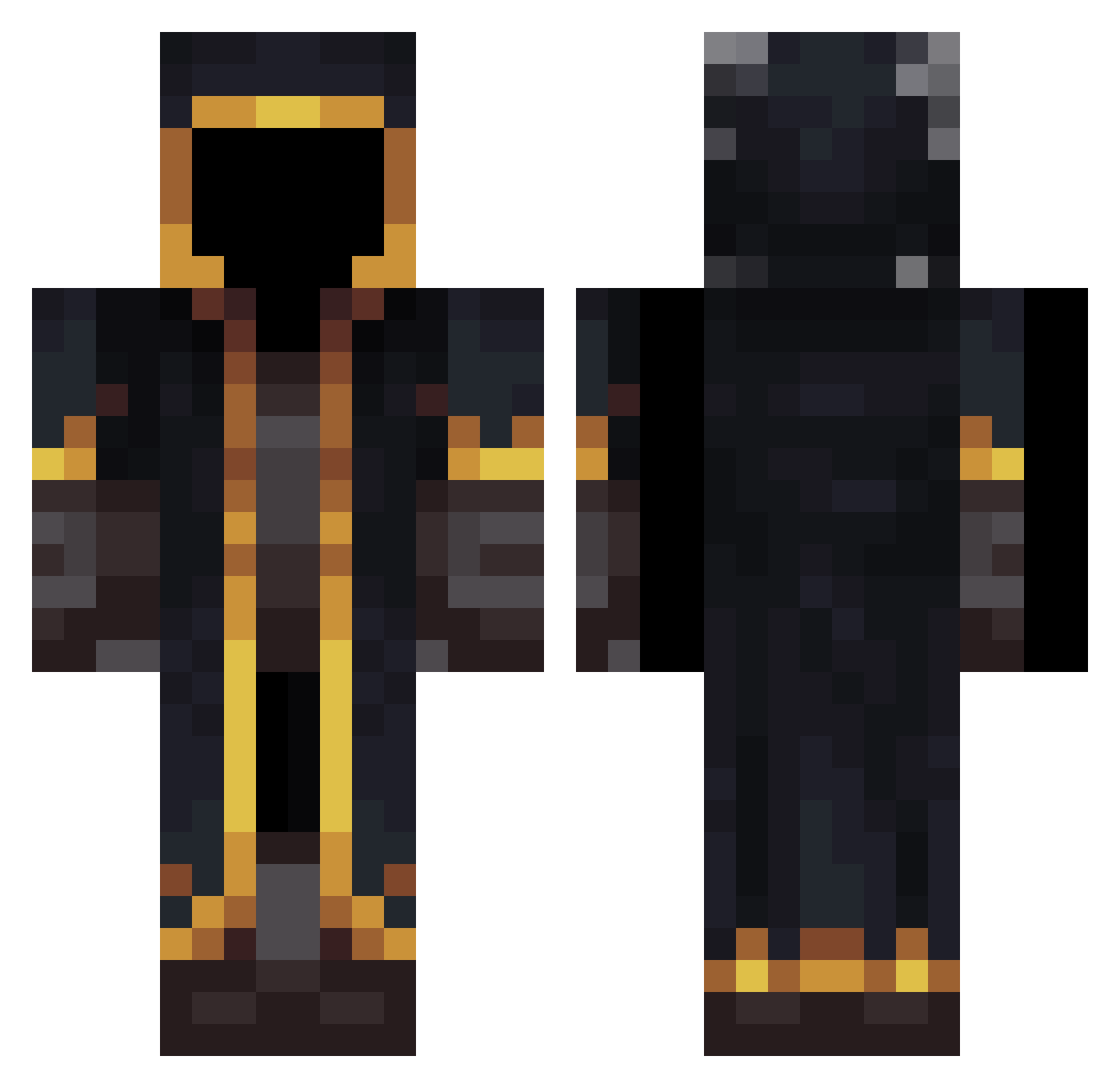
Current Minecraft skin of the player Nestor18A, loaded from the official Mojang API. Rotate the 3D model with your mouse or finger, then download the skin as a PNG file and use it in Minecraft: Bedrock Edition or Java Edition for free. When Nestor18A changes their skin, this page updates automatically and the old skin stays in the history below.
Other players with this skin (533)
Nestor18A was the 359th player we have seen with this skin, first spotted on 06.10.2026. The same skin was seen on these players. Open a nickname to see their current skin and skin history.
 ArruinaRacha Void_Wisp KerdDgn0453 art7emi Praetor_Marcus etropix Duusen Ressou MrStealYoGirl69 Kascx MLTrapz Czaruss5 TreFord88 blackrain4242 NP41 D2dagrave SmokeyySage ylezemkidia rattail99 Micheseee Syneticz hehebu Ariel5959 NEEZ7 sky_star3 helpful__ b1llal Itz_crypticz malondlek CrackInjector TinTin0402 THOMAS12ARG kyurem62 Er_miglior MightyForm AlxRx qCkk Fantiger_YT Matixx20 Milkhan Ciuffobaby11 Nachads MrEbag Zephyr28_ Cruz8900 Gavinator5001 Tipit8 Duhuoo NzX_KeVin BySergioo Sweddde domineter Lille888 MYxiu KhalidKashmir Itzvxre hectorgtzf kakita059 diego476j AlperShal
More Mage Minecraft skins
How to install the Nestor18A skin
- Press the Download button above to save the skin as a PNG file.
- Minecraft: Bedrock Edition (PE): open the Dressing Room from the main menu (or tap your character → Edit Character), go to Classic Skins → Owned, press the + (new skin) button, choose the downloaded PNG and pick the Classic (Steve) model. Works on PC and mobile; consoles cannot import custom skins.
- Minecraft: Java Edition: open the Minecraft Launcher, go to the Skins tab, click New Skin, load the PNG, pick the Classic (Steve) model and press Save & Use. You can also upload it at minecraft.net → Profile → Change Skin.
The skin does not show up after import - what should I do?
Restart Minecraft and open the Dressing Room again - imported skins sometimes appear only after a restart. Also make sure you selected the imported skin and picked the Classic (Steve) model.
Which model should I choose, Classic or Slim?
This skin is designed for the Classic (Steve) model. If you pick the wrong model, the arms of the skin will look stretched or squeezed.
Is the skin of Nestor18A free to download?
Yes. Press Download, save the PNG file and use it in Minecraft: Bedrock Edition or Java Edition - no payment or registration needed. The skin also works on multiplayer servers and Realms.
More skins
Looking for more? Go back to all Minecraft skins and check the top skins of the week, month and all time, or find any player's skin by nickname.