
NaughtyTwister - Minecraft Skins & Skin History
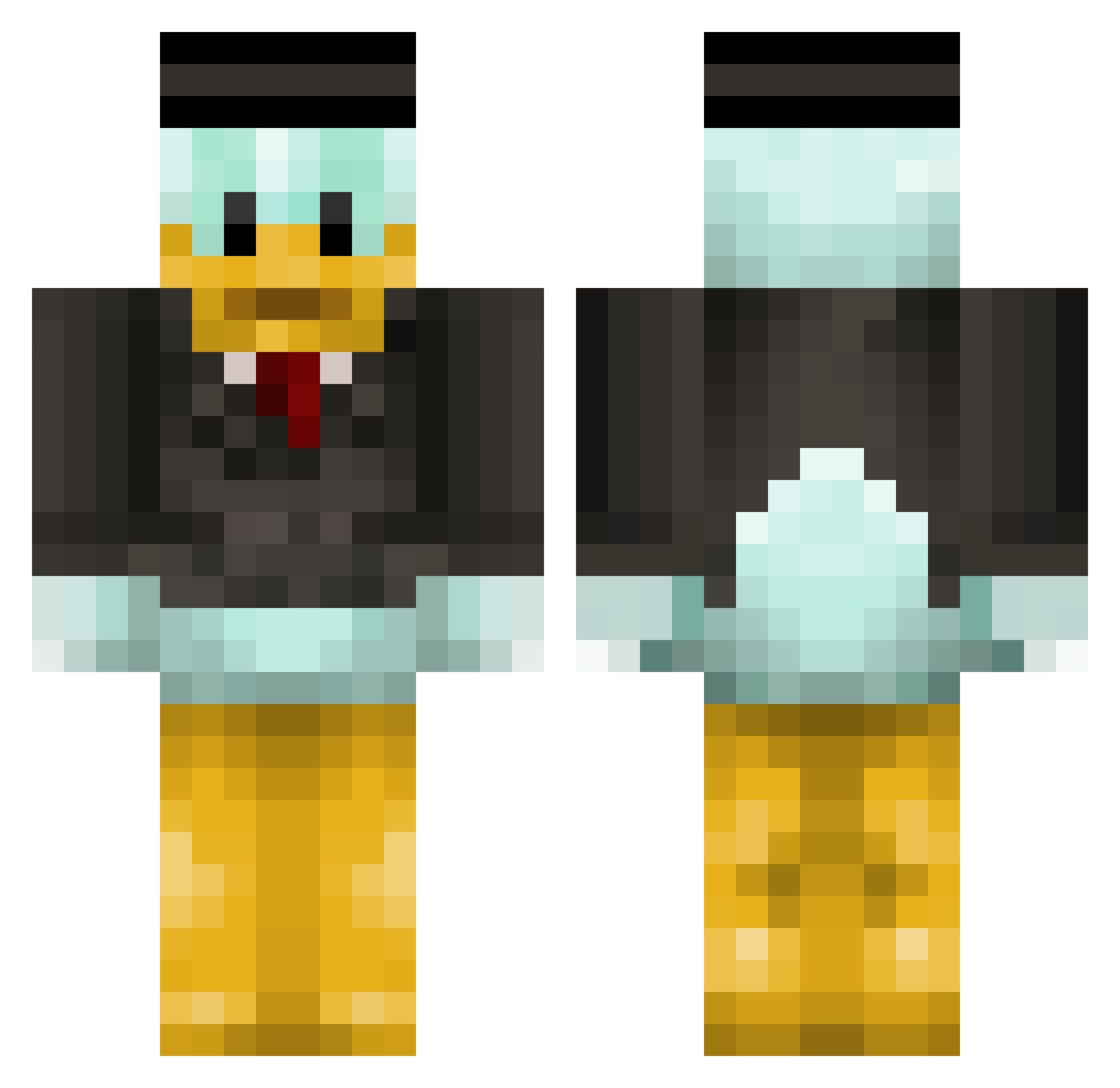
Current Minecraft skin of the player NaughtyTwister, loaded from the official Mojang API. Rotate the 3D model with your mouse or finger, then download the skin as a PNG file and use it in Minecraft: Bedrock Edition or Java Edition for free. When NaughtyTwister changes their skin, this page updates automatically and the old skin stays in the history below.
Other players with this skin (314)
NaughtyTwister was the 25th player we have seen with this skin, first spotted on 31.07.2026. The same skin was seen on these players. Open a nickname to see their current skin and skin history.
 DefProstyuHat Shasoky DanteStyl3zzz HarollAvilaR paperonTONY erisillo koryonpc Flyboy42880 SteeNX kipek9 Berko961 X_Lizard MisledtheBred wjabob K4STROX DOLAN1212 djlalffl ameaunt Wqeastr
 ILoveYouIsabela chengzicheng vSprai DonaldDuckey Jebbx14 MokryEmeryt Zas_1865 NothingMan0 MrHips Fartboy69 warszawiak66 RainyDro MoshMine MiniPouce69 vish96 JCaldy19 LusionTastic Johnhurt2007 LisaL_2006 AnanaasBigBoy CamBot_ Robbansilver waffelsauce Darkarpapi Carmelo956 Tannersauras NobodyLovesAlex valentin69 billyb1103 Storkuknn Olibur_96 avana1 Aitor336 katnissrock101 bullmagen _Pelmeshka26_ Pignon32 Jankk0 Michi_157 tawanzadz Roli3e
More Scrooge Mcduck Minecraft skins
See all 27 Scrooge Mcduck skins
How to install the NaughtyTwister skin
- Press the Download button above to save the skin as a PNG file.
- Minecraft: Bedrock Edition (PE): open the Dressing Room from the main menu (or tap your character → Edit Character), go to Classic Skins → Owned, press the + (new skin) button, choose the downloaded PNG and pick the Classic (Steve) model. Works on PC and mobile; consoles cannot import custom skins.
- Minecraft: Java Edition: open the Minecraft Launcher, go to the Skins tab, click New Skin, load the PNG, pick the Classic (Steve) model and press Save & Use. You can also upload it at minecraft.net → Profile → Change Skin.
The skin does not show up after import - what should I do?
Restart Minecraft and open the Dressing Room again - imported skins sometimes appear only after a restart. Also make sure you selected the imported skin and picked the Classic (Steve) model.
Which model should I choose, Classic or Slim?
This skin is designed for the Classic (Steve) model. If you pick the wrong model, the arms of the skin will look stretched or squeezed.
Is the skin of NaughtyTwister free to download?
Yes. Press Download, save the PNG file and use it in Minecraft: Bedrock Edition or Java Edition - no payment or registration needed. The skin also works on multiplayer servers and Realms.
More skins
Looking for more? Go back to all Minecraft skins and check the top skins of the week, month and all time, or find any player's skin by nickname.