
Nanami_Angel - Minecraft Skins & Skin History
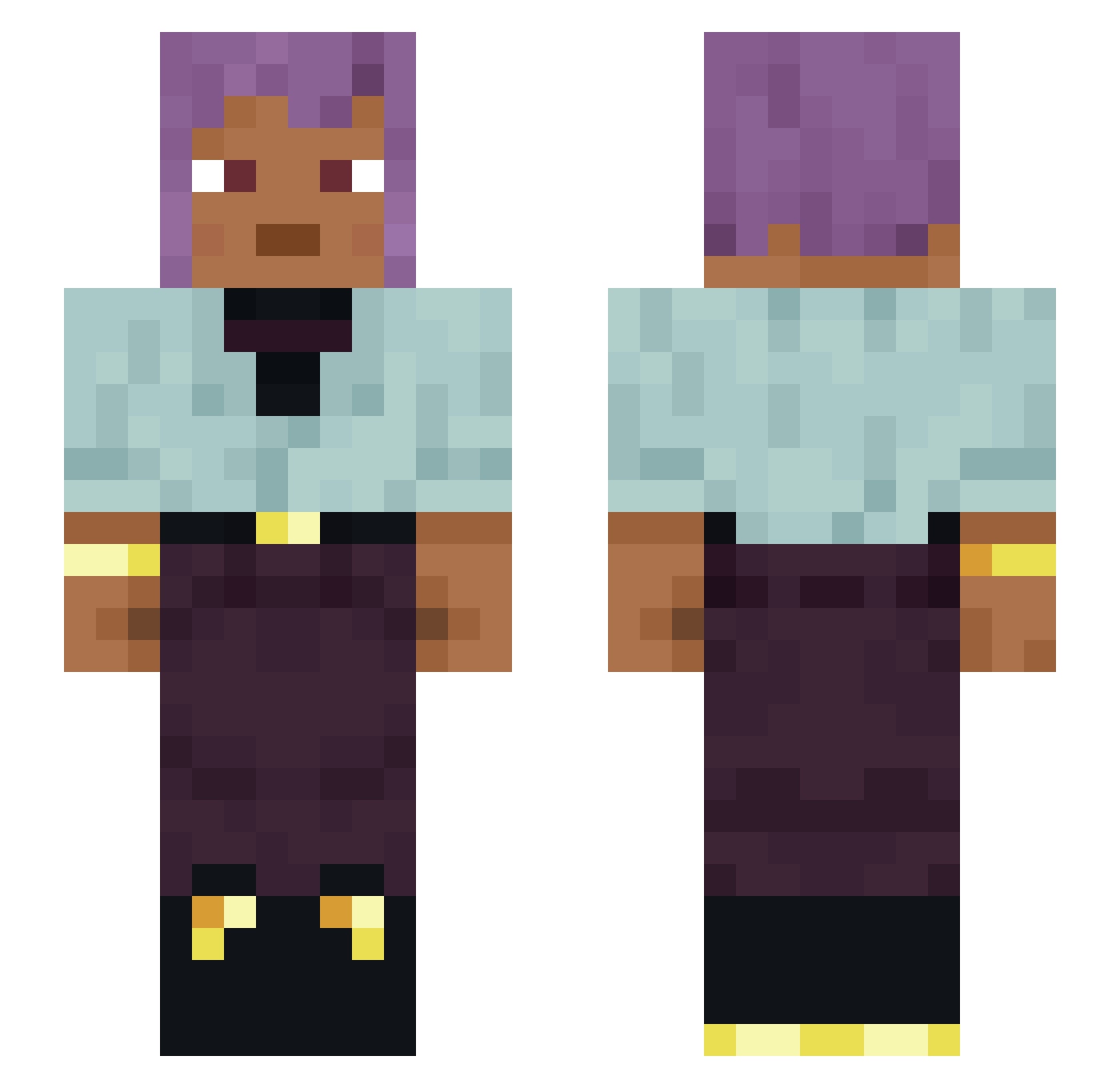
Current Minecraft skin of the player Nanami_Angel, loaded from the official Mojang API. Rotate the 3D model with your mouse or finger, then download the skin as a PNG file and use it in Minecraft: Bedrock Edition or Java Edition for free. When Nanami_Angel changes their skin, this page updates automatically and the old skin stays in the history below.
Other players with this skin (1124)
Nanami_Angel was the 392nd player we have seen with this skin, first spotted on 28.08.2026. The same skin was seen on these players. Open a nickname to see their current skin and skin history.
 NnHard SAVEGE21 Chronometer Varkas Volupt laudator obsidian210 Cosmixly Vinos styrofoam Diegomech
 Lunar_Client_
 ardino678 Araneids hamperer Fryers wagoneer ElPoto kartoshka339 boots6911 Pory mllook Souther floodgate BestOfMarocc Dogena TheFuzzyWan Frozenpie Mehmet1979568 Zindabad MargielaMob Skaatloux59 pantosophy Preimagination izessip Sensenich_2
 Spider340 Samezz Aethers Exonerates Canarsee Marvelously Momently Affectionately chamlet Lilsasyfinger JaDe_Gray
 ZapsClaps Outmost lRangers JumqBoost Parrah Memilew sidenan Eigil123 IntraCranial RoundRuthless612 PRDOLAA
 R4SEKING ReeseDog
How to install the Nanami_Angel skin
- Press the Download button above to save the skin as a PNG file.
- Minecraft: Bedrock Edition (PE): open the Dressing Room from the main menu (or tap your character → Edit Character), go to Classic Skins → Owned, press the + (new skin) button, choose the downloaded PNG and pick the Slim (Alex) model. Works on PC and mobile; consoles cannot import custom skins.
- Minecraft: Java Edition: open the Minecraft Launcher, go to the Skins tab, click New Skin, load the PNG, pick the Slim (Alex) model and press Save & Use. You can also upload it at minecraft.net → Profile → Change Skin.
The skin does not show up after import - what should I do?
Restart Minecraft and open the Dressing Room again - imported skins sometimes appear only after a restart. Also make sure you selected the imported skin and picked the Slim (Alex) model.
Which model should I choose, Classic or Slim?
This skin is designed for the Slim (Alex) model. If you pick the wrong model, the arms of the skin will look stretched or squeezed.
Is the skin of Nanami_Angel free to download?
Yes. Press Download, save the PNG file and use it in Minecraft: Bedrock Edition or Java Edition - no payment or registration needed. The skin also works on multiplayer servers and Realms.
More skins
Looking for more? Go back to all Minecraft skins and check the top skins of the week, month and all time, or find any player's skin by nickname.