
NR_jamal - Minecraft Skins & Skin History
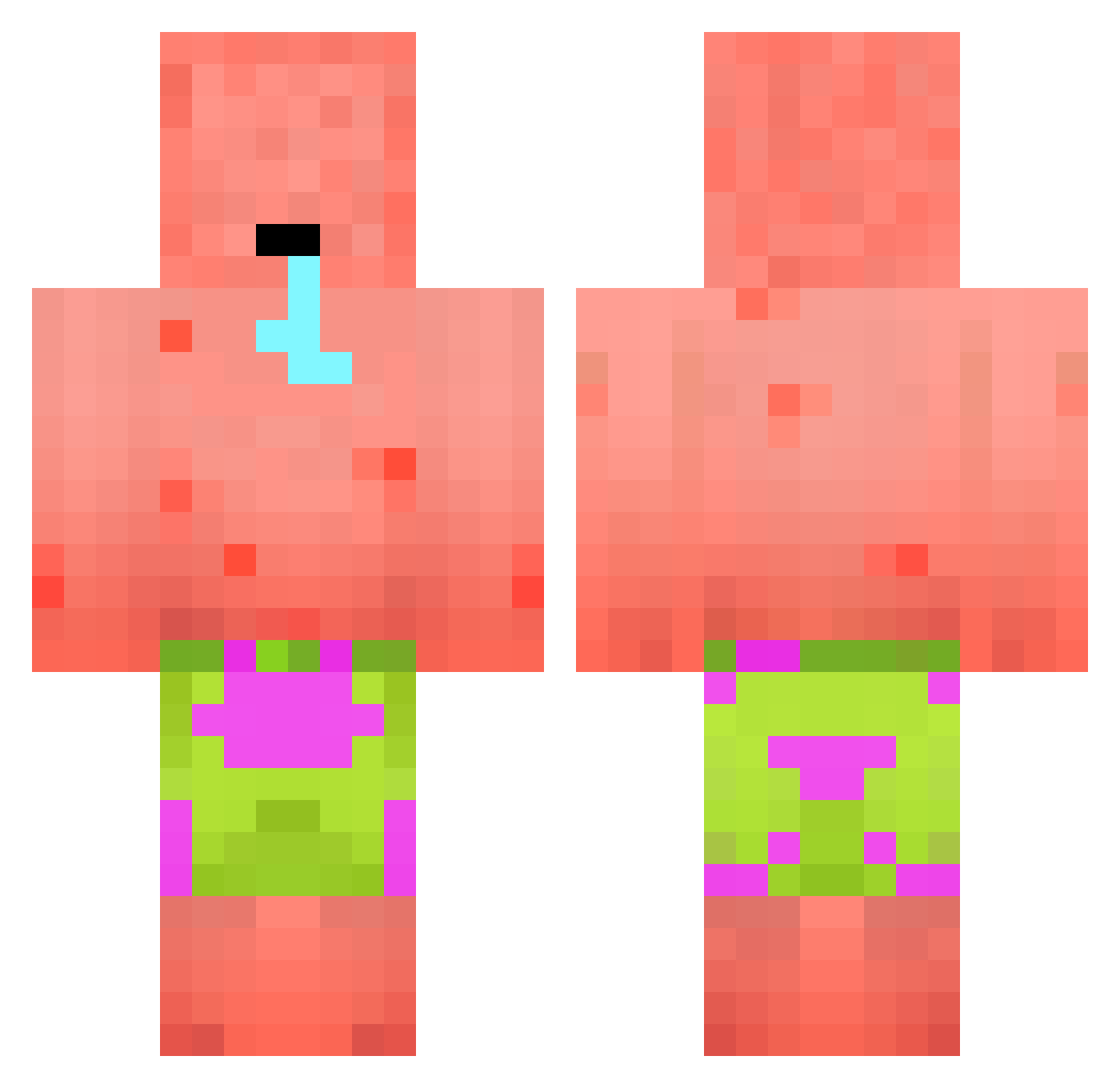
Current Minecraft skin of the player NR_jamal, loaded from the official Mojang API. Rotate the 3D model with your mouse or finger, then download the skin as a PNG file and use it in Minecraft: Bedrock Edition or Java Edition for free. When NR_jamal changes their skin, this page updates automatically and the old skin stays in the history below.
Other players with this skin (481)
NR_jamal was the 414th player we have seen with this skin, first spotted on 05.11.2026. The same skin was seen on these players. Open a nickname to see their current skin and skin history.
 ballcleaner2025 Radjagar halloww1 Alexander5006 Ch33s3_Burg3r_04 Xebec1999 hamza212121 xNeutr0n Quitpepapig OwoXD09 birgire FireExtremeX Legridon sheluvsdarkness GMasterFluff DIlax17 Dahlskab Lorwar Lemurensohn9735 Drasie1 Haerin_NJZ Bong0891 Litelponey SpeedyBoran69 fggplrasor LEVIS_c I_Bims1Larry Clibble Stalinisdad42 Lekoda_92 darvyn_s M38 Crappy420 SleepyTyrone08 KarlieFlower LotusErika chulbi hariwinl FiFrID Epfrules fatric tissuebox05 Dair2 EKClanMember SunkyKM2012 NovaLock direct_envy ren0607 W8A8W Tortovisq Duckila StevenSensei Popel_ ZockerEmi NeMo_FoReVeR haguto Uyg4rblt Onho92 OGordoDeFaro gomajiro
More Patrick Star Minecraft skins
See all 712 Patrick Star skins
How to install the NR_jamal skin
- Press the Download button above to save the skin as a PNG file.
- Minecraft: Bedrock Edition (PE): open the Dressing Room from the main menu (or tap your character → Edit Character), go to Classic Skins → Owned, press the + (new skin) button, choose the downloaded PNG and pick the Classic (Steve) model. Works on PC and mobile; consoles cannot import custom skins.
- Minecraft: Java Edition: open the Minecraft Launcher, go to the Skins tab, click New Skin, load the PNG, pick the Classic (Steve) model and press Save & Use. You can also upload it at minecraft.net → Profile → Change Skin.
The skin does not show up after import - what should I do?
Restart Minecraft and open the Dressing Room again - imported skins sometimes appear only after a restart. Also make sure you selected the imported skin and picked the Classic (Steve) model.
Which model should I choose, Classic or Slim?
This skin is designed for the Classic (Steve) model. If you pick the wrong model, the arms of the skin will look stretched or squeezed.
Is the skin of NR_jamal free to download?
Yes. Press Download, save the PNG file and use it in Minecraft: Bedrock Edition or Java Edition - no payment or registration needed. The skin also works on multiplayer servers and Realms.
More skins
Looking for more? Go back to all Minecraft skins and check the top skins of the week, month and all time, or find any player's skin by nickname.