
N04decajou - Minecraft Skins & Skin History
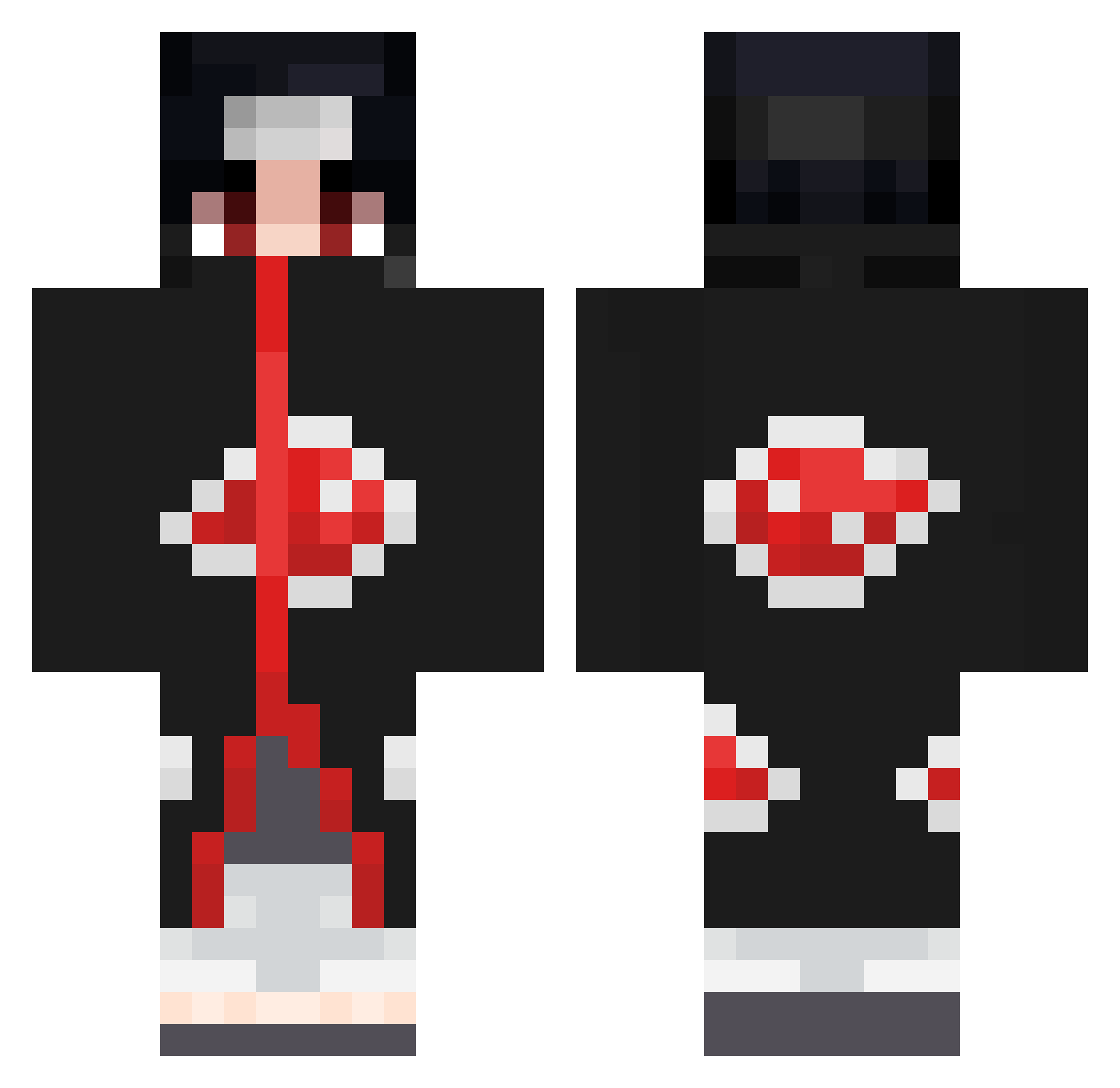
Current Minecraft skin of the player N04decajou, loaded from the official Mojang API. Rotate the 3D model with your mouse or finger, then download the skin as a PNG file and use it in Minecraft: Bedrock Edition or Java Edition for free. When N04decajou changes their skin, this page updates automatically and the old skin stays in the history below.
Other players with this skin (672)
N04decajou was the 543rd player we have seen with this skin, first spotted on 08.10.2026. The same skin was seen on these players. Open a nickname to see their current skin and skin history.
 elitestrike90 aqcuah xyrz1 CamalaHP Misuki04 _Samurai56 xXKarloXx Soulo_o Jexyor Enxrm_ Aouguo NamiUchiha magan19 TURGUT_OZAL Brxdzia FenderJack Miguelouche INxZia MinecraftAtreyu fujitex HisokaOG F3ZeR Anauka alexsanti99 Yanmatcamemm DavidGRe Oblepicha papagamer Maxon1321 Nushy03 Microtis Jacobyqu Lucas_222b VenturaX11 ELlauchita 808niclas chreiff GrehnikPoP micheal4817 Boda69 Craftdaddyv4 LuckyStar00 Starzrus IoZaArt chapatinn ItoTekko Mydiaa Goon_1946 hehekuromi Avvm bastyanplays Gofloke1 Fr3eZer_ PainDepiice230 SasukeUchia20_04 Sattkopp spectresea Uchiha_Asbeloxx Alfbob voidz_with_gucci
More Itachi Uchiha Minecraft skins
See all 318 Itachi Uchiha skins
How to install the N04decajou skin
- Press the Download button above to save the skin as a PNG file.
- Minecraft: Bedrock Edition (PE): open the Dressing Room from the main menu (or tap your character → Edit Character), go to Classic Skins → Owned, press the + (new skin) button, choose the downloaded PNG and pick the Classic (Steve) model. Works on PC and mobile; consoles cannot import custom skins.
- Minecraft: Java Edition: open the Minecraft Launcher, go to the Skins tab, click New Skin, load the PNG, pick the Classic (Steve) model and press Save & Use. You can also upload it at minecraft.net → Profile → Change Skin.
The skin does not show up after import - what should I do?
Restart Minecraft and open the Dressing Room again - imported skins sometimes appear only after a restart. Also make sure you selected the imported skin and picked the Classic (Steve) model.
Which model should I choose, Classic or Slim?
This skin is designed for the Classic (Steve) model. If you pick the wrong model, the arms of the skin will look stretched or squeezed.
Is the skin of N04decajou free to download?
Yes. Press Download, save the PNG file and use it in Minecraft: Bedrock Edition or Java Edition - no payment or registration needed. The skin also works on multiplayer servers and Realms.
More skins
Looking for more? Go back to all Minecraft skins and check the top skins of the week, month and all time, or find any player's skin by nickname.