
Mushroooooomm - Minecraft Skins & Skin History
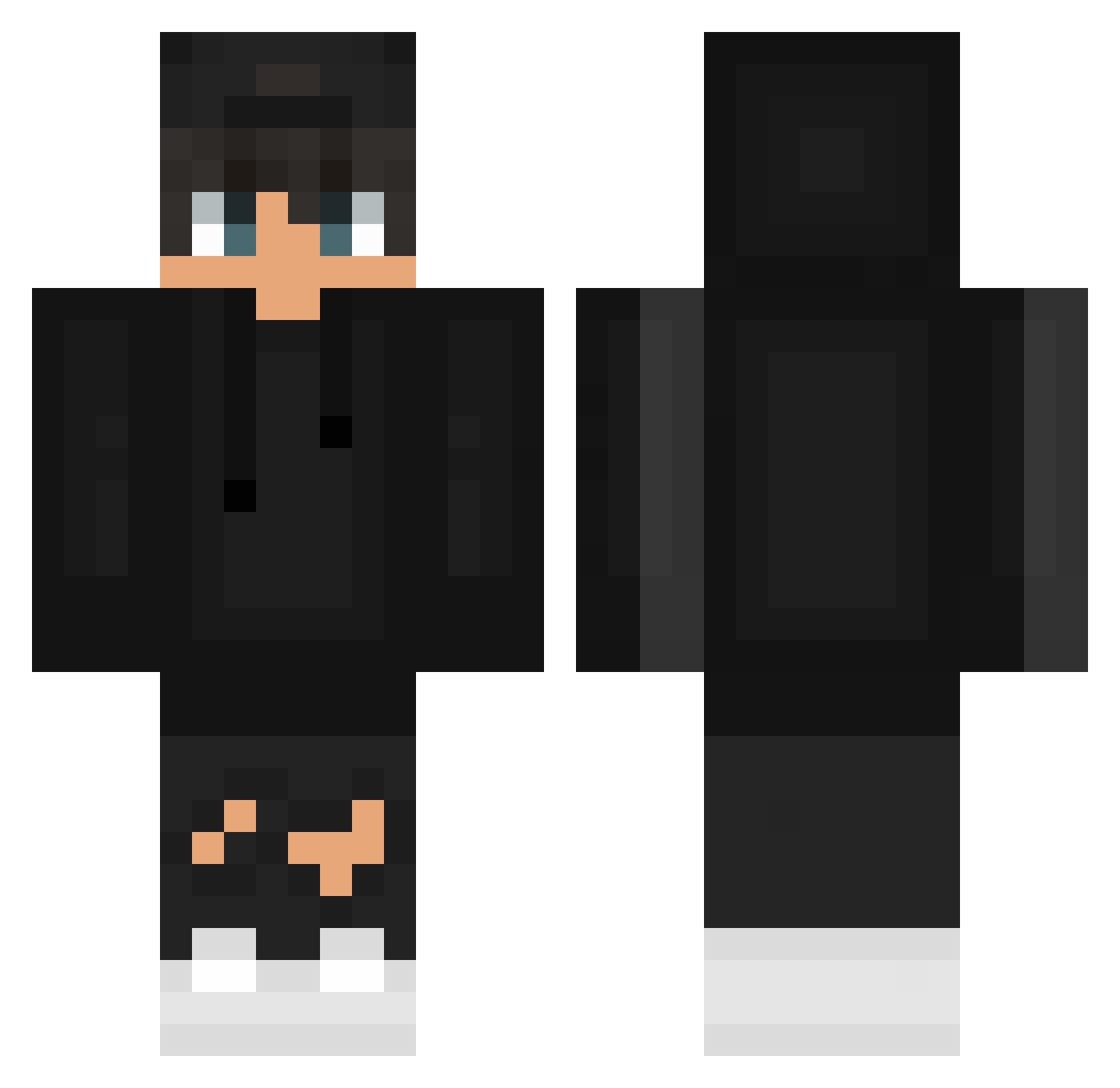
Current Minecraft skin of the player Mushroooooomm, loaded from the official Mojang API. Rotate the 3D model with your mouse or finger, then download the skin as a PNG file and use it in Minecraft: Bedrock Edition or Java Edition for free. When Mushroooooomm changes their skin, this page updates automatically and the old skin stays in the history below.
Other players with this skin (626)
Mushroooooomm was the 84th player we have seen with this skin, first spotted on 11.08.2026. The same skin was seen on these players. Open a nickname to see their current skin and skin history.
 NICOLITO0 hsufang Schwartzas Saynarra MarwROG Pamagg2 Jumax05 X_LLoyd_X demo1030 Itz_Fonkysek xNeUx121 Showingus Basse1508 WikAnd BroutoYT Xx_aliyt_Xx pablo_ner __Staubie__ Lukey_101 Fabsi51107
 YTSB737
 AlHasan_ HellCooler Poutful Norweg_1995 _sergiopchecoo Hopsa_Hopsa__ BARFRAINOW Nense_ LuanN4k xmanleo KuttThroax Asthys Thecrak10 V1C7OR_BQ AetherGhast SpedHead_ DauFocLaApa Soulmortal_ Thur027 helten6969 Mateus_Xl sippi213 Jeremi_PvP Fartix01 HenryG_123 Jirzy bartkowsky_ Eliam1 By_Legus NotSuffer bYkilleRHD10 zKERO974 pawlineq_yt ixLegendx 4RV3D Touraco PJRC mozon31 Sq1fx
How to install the Mushroooooomm skin
- Press the Download button above to save the skin as a PNG file.
- Minecraft: Bedrock Edition (PE): open the Dressing Room from the main menu (or tap your character → Edit Character), go to Classic Skins → Owned, press the + (new skin) button, choose the downloaded PNG and pick the Classic (Steve) model. Works on PC and mobile; consoles cannot import custom skins.
- Minecraft: Java Edition: open the Minecraft Launcher, go to the Skins tab, click New Skin, load the PNG, pick the Classic (Steve) model and press Save & Use. You can also upload it at minecraft.net → Profile → Change Skin.
The skin does not show up after import - what should I do?
Restart Minecraft and open the Dressing Room again - imported skins sometimes appear only after a restart. Also make sure you selected the imported skin and picked the Classic (Steve) model.
Which model should I choose, Classic or Slim?
This skin is designed for the Classic (Steve) model. If you pick the wrong model, the arms of the skin will look stretched or squeezed.
Is the skin of Mushroooooomm free to download?
Yes. Press Download, save the PNG file and use it in Minecraft: Bedrock Edition or Java Edition - no payment or registration needed. The skin also works on multiplayer servers and Realms.
More skins
Looking for more? Go back to all Minecraft skins and check the top skins of the week, month and all time, or find any player's skin by nickname.