
MrPaphs - Minecraft Skins & Skin History
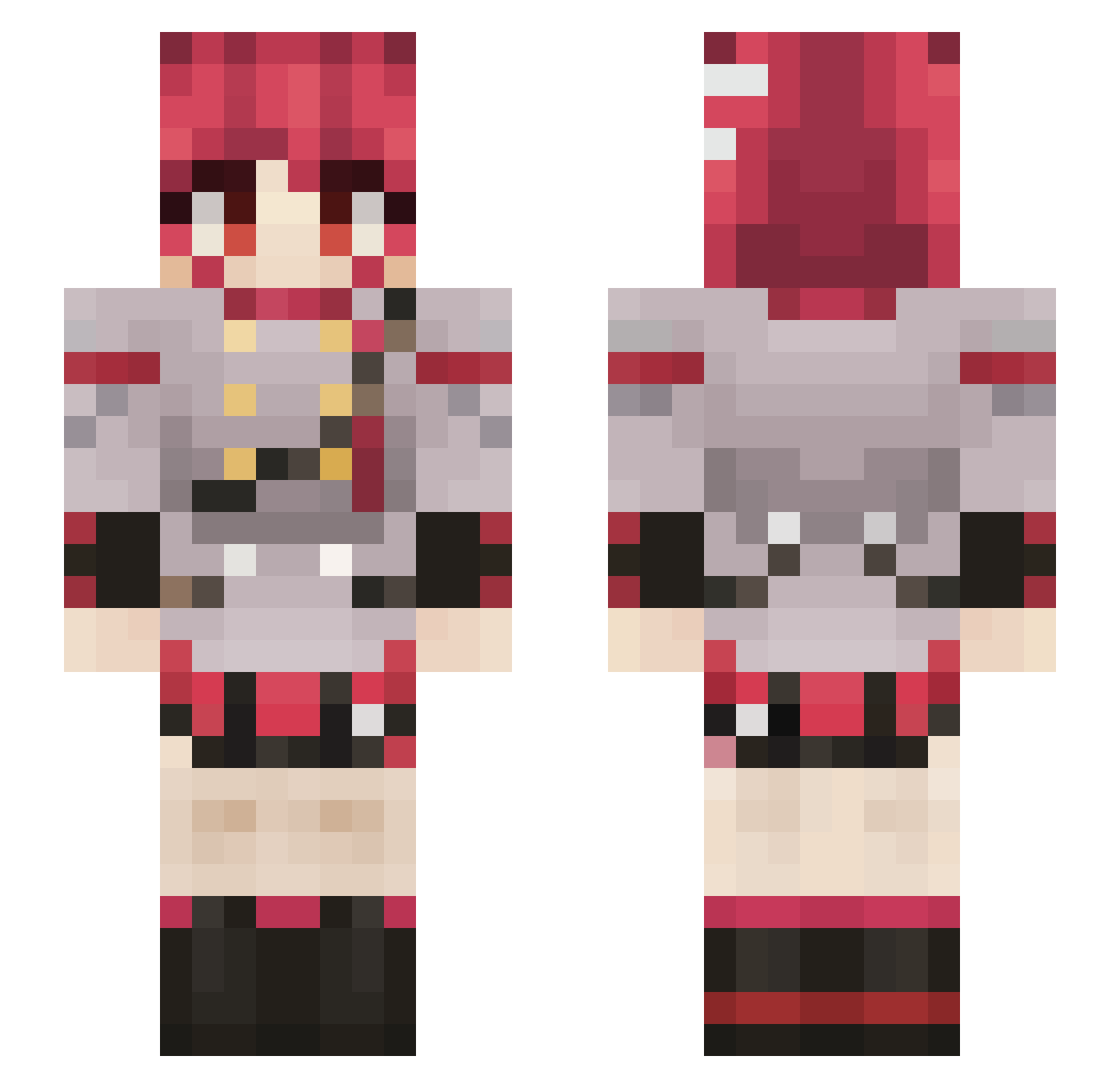
Current Minecraft skin of the player MrPaphs, loaded from the official Mojang API. Rotate the 3D model with your mouse or finger, then download the skin as a PNG file and use it in Minecraft: Bedrock Edition or Java Edition for free. When MrPaphs changes their skin, this page updates automatically and the old skin stays in the history below.
Other players with this skin (807)
MrPaphs was the 287th player we have seen with this skin, first spotted on 30.08.2026. The same skin was seen on these players. Open a nickname to see their current skin and skin history.
 Madotsuki22 Sol1210 Fawkz6339 FreePizza_ hawkNet CarsickSad ZoivAster ori21 wg_arauZ_07_27 cra_lucas KasaneTomos0401 silverCreeper356 Mr_Jonsss Sruve Angelo2211 Akise27 Oskilator52 theJohnminecraft acquiredCheeks RedaCX Lokaaaaaaas HonHon0329 LordRocky Shiona_ Folamber Sonic_TREX Kejniastyy puppyfoxxo Stkru JeViePie colon3ified ShadowJG DieselEnjoyer Aerodite_ RainBowCats69 To0sty joao_vianna13 ActualHondaCivic Peter3209 FartingPoo ThatCarLover IvanZombarevich JoseHwO OHishere42 Darth_Banee
 sal10312 KirbyRT101 DeToGure Ashperrr_ eatProvalone szerxs Drafty780 Lomo4 ANNEXED962 teto_teto_ _nuyaij Jakerina Horizon_61
 _Boingus_ Zein_Hiwaroshi
More Idol Minecraft skins
How to install the MrPaphs skin
- Press the Download button above to save the skin as a PNG file.
- Minecraft: Bedrock Edition (PE): open the Dressing Room from the main menu (or tap your character → Edit Character), go to Classic Skins → Owned, press the + (new skin) button, choose the downloaded PNG and pick the Slim (Alex) model. Works on PC and mobile; consoles cannot import custom skins.
- Minecraft: Java Edition: open the Minecraft Launcher, go to the Skins tab, click New Skin, load the PNG, pick the Slim (Alex) model and press Save & Use. You can also upload it at minecraft.net → Profile → Change Skin.
The skin does not show up after import - what should I do?
Restart Minecraft and open the Dressing Room again - imported skins sometimes appear only after a restart. Also make sure you selected the imported skin and picked the Slim (Alex) model.
Which model should I choose, Classic or Slim?
This skin is designed for the Slim (Alex) model. If you pick the wrong model, the arms of the skin will look stretched or squeezed.
Is the skin of MrPaphs free to download?
Yes. Press Download, save the PNG file and use it in Minecraft: Bedrock Edition or Java Edition - no payment or registration needed. The skin also works on multiplayer servers and Realms.
More skins
Looking for more? Go back to all Minecraft skins and check the top skins of the week, month and all time, or find any player's skin by nickname.