
Memong - Minecraft Skins & Skin History
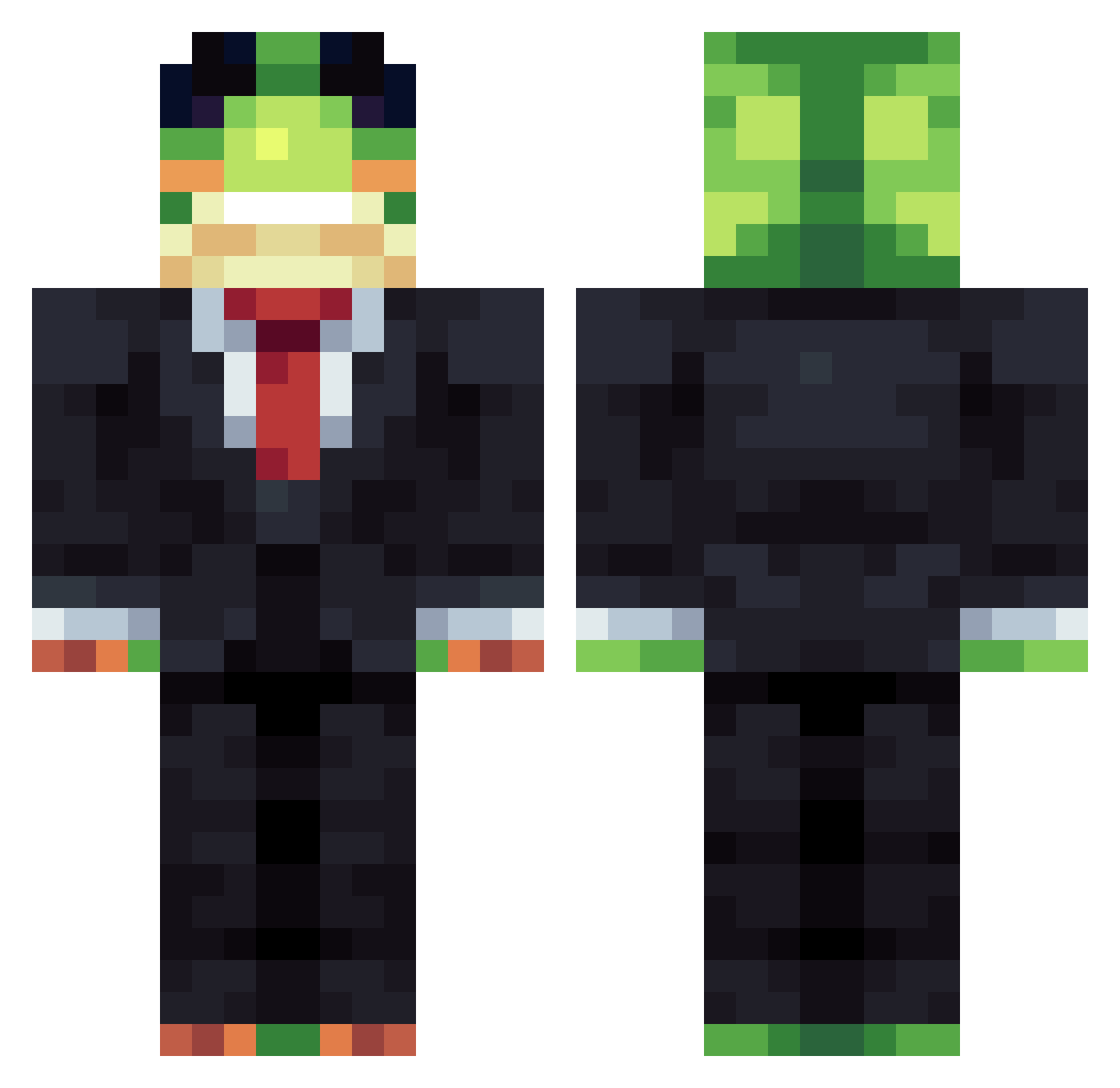
Current Minecraft skin of the player Memong, loaded from the official Mojang API. Rotate the 3D model with your mouse or finger, then download the skin as a PNG file and use it in Minecraft: Bedrock Edition or Java Edition for free. When Memong changes their skin, this page updates automatically and the old skin stays in the history below.
Other players with this skin (1159)
Memong was the 216th player we have seen with this skin, first spotted on 14.08.2026. The same skin was seen on these players. Open a nickname to see their current skin and skin history.
 Elisenfisen namoR0216 OJeezLovesMinors X_D4rkBl4de_X ArcLOL123 kaacper6537 LittleDemon567 MUBY_0616 Szimu WesleyComW Espada_06
 Echo55556 AlanzinSWAT Biump_ FreedCheese6006 wantingbranch18 JKenaj coconut534 BubbaPerez15 MikeLampp ImGuilherme001 Olecraft
 MaxFalke dominatorkamil lutard Il_Neo imjustamcplayer
 _Dancer__ gpk52 GlacialEcho skeletbot Mashbawt PingYi0923 HerbyKirby14 GOLDENCARD50570 Rust12121 Bober_Ja leewm1062 Nastus5522 Elishus
 qasd12 _frogyyy lil_rice1212 GunwooDDI gaete56 corndog1567 Lilfilter Exo7752 seed123890
 infiniteflamefan AlexwasTakenAlrY Danel777 Vietnamez kimbool2 MinsDaddy fenn111 rum4wd iamellaaa32 CucumberOcarina Tailgator
More Frog Minecraft skins
How to install the Memong skin
- Press the Download button above to save the skin as a PNG file.
- Minecraft: Bedrock Edition (PE): open the Dressing Room from the main menu (or tap your character → Edit Character), go to Classic Skins → Owned, press the + (new skin) button, choose the downloaded PNG and pick the Classic (Steve) model. Works on PC and mobile; consoles cannot import custom skins.
- Minecraft: Java Edition: open the Minecraft Launcher, go to the Skins tab, click New Skin, load the PNG, pick the Classic (Steve) model and press Save & Use. You can also upload it at minecraft.net → Profile → Change Skin.
The skin does not show up after import - what should I do?
Restart Minecraft and open the Dressing Room again - imported skins sometimes appear only after a restart. Also make sure you selected the imported skin and picked the Classic (Steve) model.
Which model should I choose, Classic or Slim?
This skin is designed for the Classic (Steve) model. If you pick the wrong model, the arms of the skin will look stretched or squeezed.
Is the skin of Memong free to download?
Yes. Press Download, save the PNG file and use it in Minecraft: Bedrock Edition or Java Edition - no payment or registration needed. The skin also works on multiplayer servers and Realms.
More skins
Looking for more? Go back to all Minecraft skins and check the top skins of the week, month and all time, or find any player's skin by nickname.