
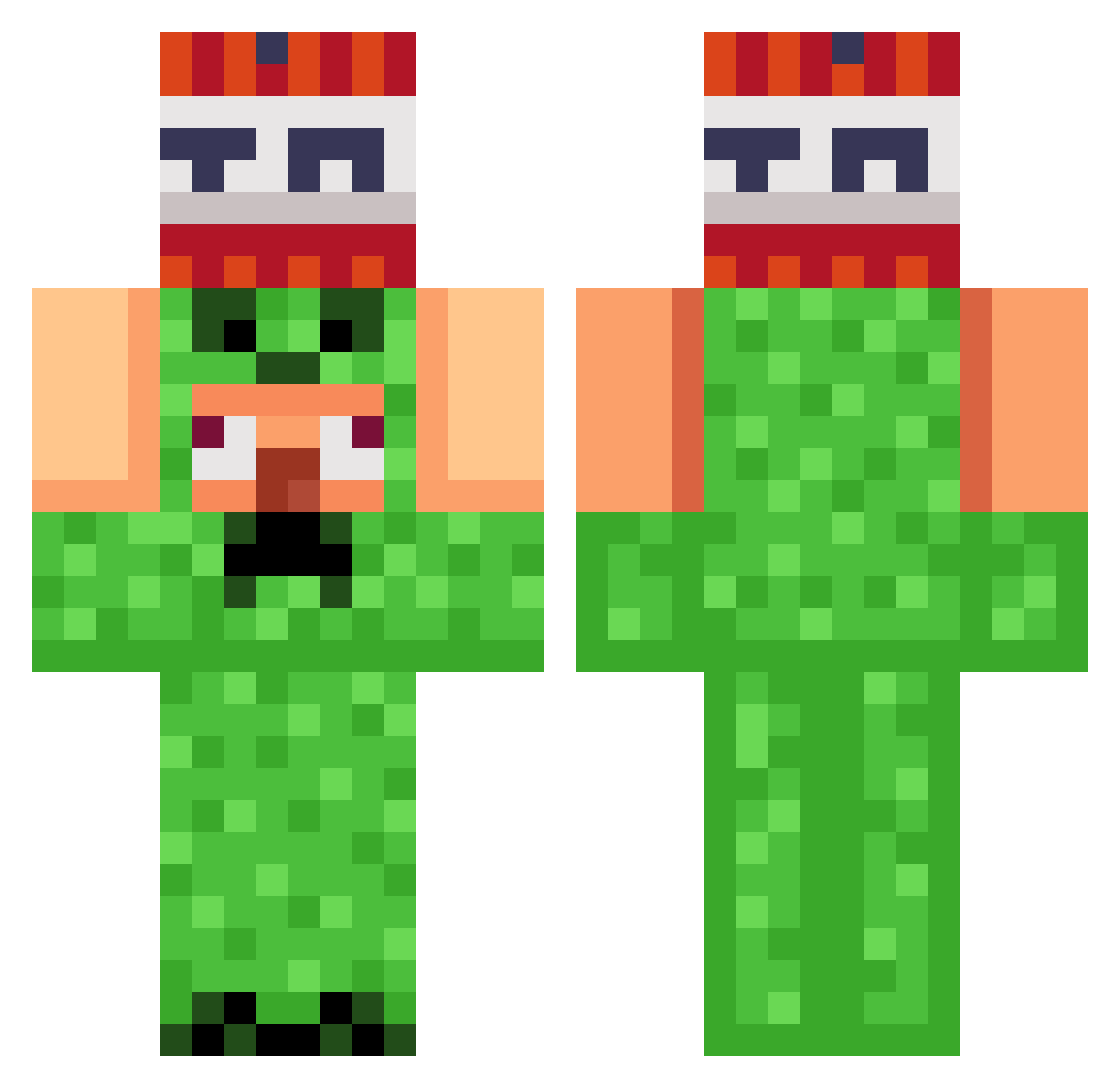
Current Minecraft skin of the player MelliePellie19, loaded from the official Mojang API. Rotate the 3D model with your mouse or finger, then download the skin as a PNG file and use it in Minecraft: Bedrock Edition or Java Edition for free. When MelliePellie19 changes their skin, this page updates automatically and the old skin stays in the history below.
Other players with this skin (787)
MelliePellie19 was the 686th player we have seen with this skin, first spotted on 06.10.2026. The same skin was seen on these players. Open a nickname to see their current skin and skin history.
 KetnMon Saibot_01 Ternex01 alex262 MaxRoket TheLeKone MrMaiSan Freddy_fatbear EliasNot2Simple lkar17 Edisonbazant FireXWater Mystic_1547 AstarothVonK JuliusRex6 G2_M2 DOM2121 SneaXqdh Mart_sniffer rebe924 pomponn_ sibong2222 noname12312313 Glitter_Fartz immewhere IdoHer SheLovesDxvid IlClooud 326juju BIW998 balifest31 Bionic_Builder JabaTheHuman Maze77 TheLegend2722 ArbiterOL BillyBobJoe911 MIHstranger Zmuffin111 NolanGamer18 CapitanMELEE FrankieLSX Lumin69 Mk_Alex_ Exoltix SalsaBoss12 JUNE0706 Electric_341 Quakki Blbailuo M4tut3 Escapesss dihslayer420 squirrelman19 Lixvese morgrai Florider2904 DaBigJ77 YAZAN_ALMUTIRI ghoulsoul
More TNT Minecraft skins
How to install the MelliePellie19 skin
- Press the Download button above to save the skin as a PNG file.
- Minecraft: Bedrock Edition (PE): open the Dressing Room from the main menu (or tap your character → Edit Character), go to Classic Skins → Owned, press the + (new skin) button, choose the downloaded PNG and pick the Classic (Steve) model. Works on PC and mobile; consoles cannot import custom skins.
- Minecraft: Java Edition: open the Minecraft Launcher, go to the Skins tab, click New Skin, load the PNG, pick the Classic (Steve) model and press Save & Use. You can also upload it at minecraft.net → Profile → Change Skin.
The skin does not show up after import - what should I do?
Restart Minecraft and open the Dressing Room again - imported skins sometimes appear only after a restart. Also make sure you selected the imported skin and picked the Classic (Steve) model.
Which model should I choose, Classic or Slim?
This skin is designed for the Classic (Steve) model. If you pick the wrong model, the arms of the skin will look stretched or squeezed.
Is the skin of MelliePellie19 free to download?
Yes. Press Download, save the PNG file and use it in Minecraft: Bedrock Edition or Java Edition - no payment or registration needed. The skin also works on multiplayer servers and Realms.
More skins
Looking for more? Go back to all Minecraft skins and check the top skins of the week, month and all time, or find any player's skin by nickname.