
MatejK012 - Minecraft Skins & Skin History
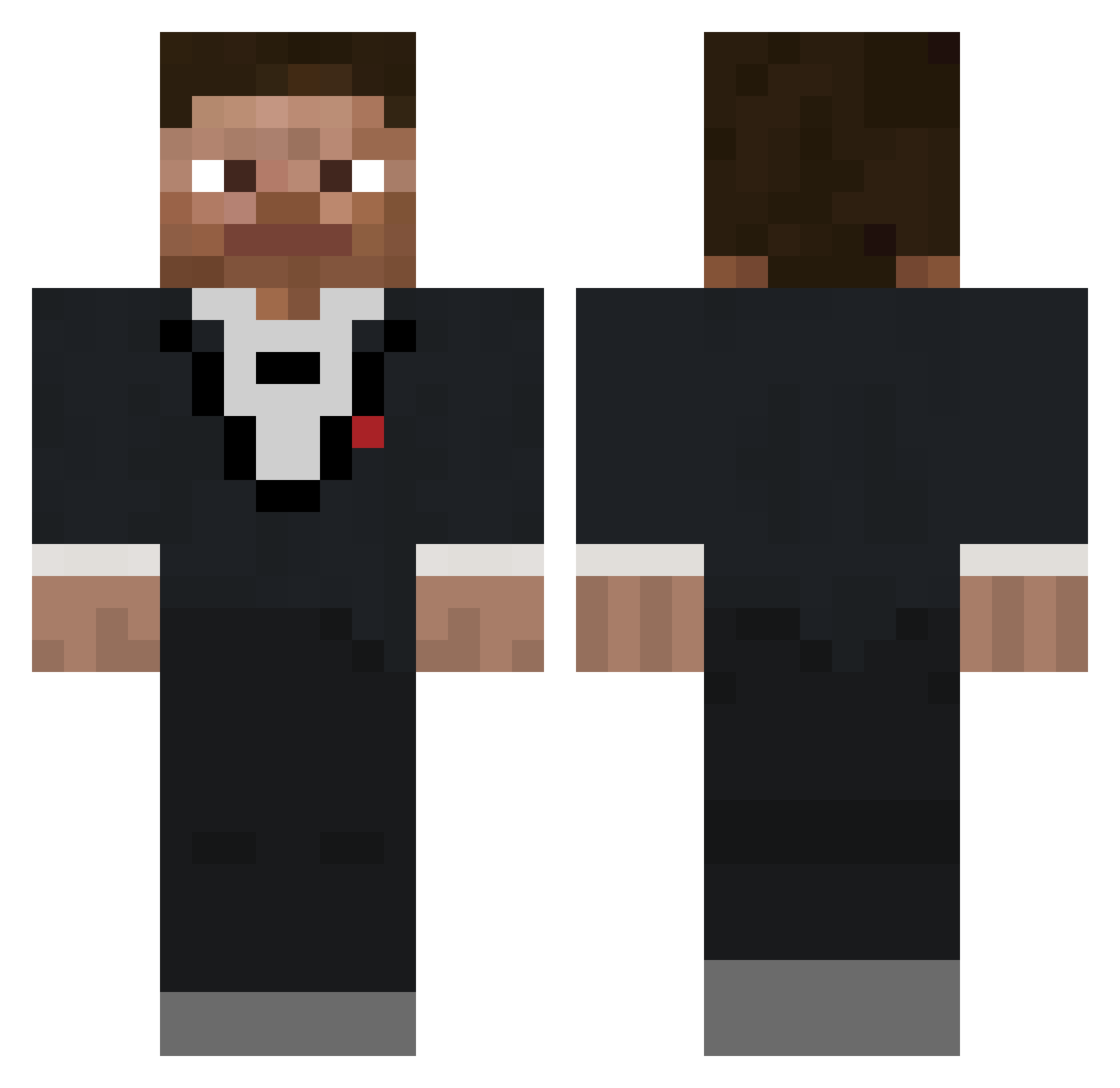
Current Minecraft skin of the player MatejK012, loaded from the official Mojang API. Rotate the 3D model with your mouse or finger, then download the skin as a PNG file and use it in Minecraft: Bedrock Edition or Java Edition for free. When MatejK012 changes their skin, this page updates automatically and the old skin stays in the history below.
Other players with this skin (649)
MatejK012 was the 311th player we have seen with this skin, first spotted on 14.09.2026. The same skin was seen on these players. Open a nickname to see their current skin and skin history.
 VARI3NT BossCHAMP22 Bossofcity BMclaren1970 LukeBHA10 bigq60 m_rtin11 HBeeZ nathanhearn TutiGames100 crazyjnt cjb1959 yospitzz RIKO304 icefrost51 kilkil1985 NoTGhoZtDan MagmaBiscuit1 BinOne_ etnog TheDunlop Convy32 Generalx11 Dereotu thecaptain97 uselsesock 7RT IndianaJonesX1 mr6z poopsock89 gyatn nickwamfy prizzmoo Samuraidawg jchapx1 Croxyyyy Mr_Eight_Ball Sselaman Bab1010 ZxFOX szat wfff frisiad2 lolzy349 edelnussi ChrippaBerg 6entt M_S_Gaming YerBoiIsBack albison21 William1754
 RetroOwL80 Krummbl mad0k4 RatherUnlucky Game2play_ Tehgan tuzynh snowwyrat Quex_YT
How to install the MatejK012 skin
- Press the Download button above to save the skin as a PNG file.
- Minecraft: Bedrock Edition (PE): open the Dressing Room from the main menu (or tap your character → Edit Character), go to Classic Skins → Owned, press the + (new skin) button, choose the downloaded PNG and pick the Classic (Steve) model. Works on PC and mobile; consoles cannot import custom skins.
- Minecraft: Java Edition: open the Minecraft Launcher, go to the Skins tab, click New Skin, load the PNG, pick the Classic (Steve) model and press Save & Use. You can also upload it at minecraft.net → Profile → Change Skin.
The skin does not show up after import - what should I do?
Restart Minecraft and open the Dressing Room again - imported skins sometimes appear only after a restart. Also make sure you selected the imported skin and picked the Classic (Steve) model.
Which model should I choose, Classic or Slim?
This skin is designed for the Classic (Steve) model. If you pick the wrong model, the arms of the skin will look stretched or squeezed.
Is the skin of MatejK012 free to download?
Yes. Press Download, save the PNG file and use it in Minecraft: Bedrock Edition or Java Edition - no payment or registration needed. The skin also works on multiplayer servers and Realms.
More skins
Looking for more? Go back to all Minecraft skins and check the top skins of the week, month and all time, or find any player's skin by nickname.