
Master6932 - Minecraft Skins & Skin History
Current Minecraft skin of the player Master6932, loaded from the official Mojang API. Rotate the 3D model with your mouse or finger, then download the skin as a PNG file and use it in Minecraft: Bedrock Edition or Java Edition for free. When Master6932 changes their skin, this page updates automatically and the old skin stays in the history below.
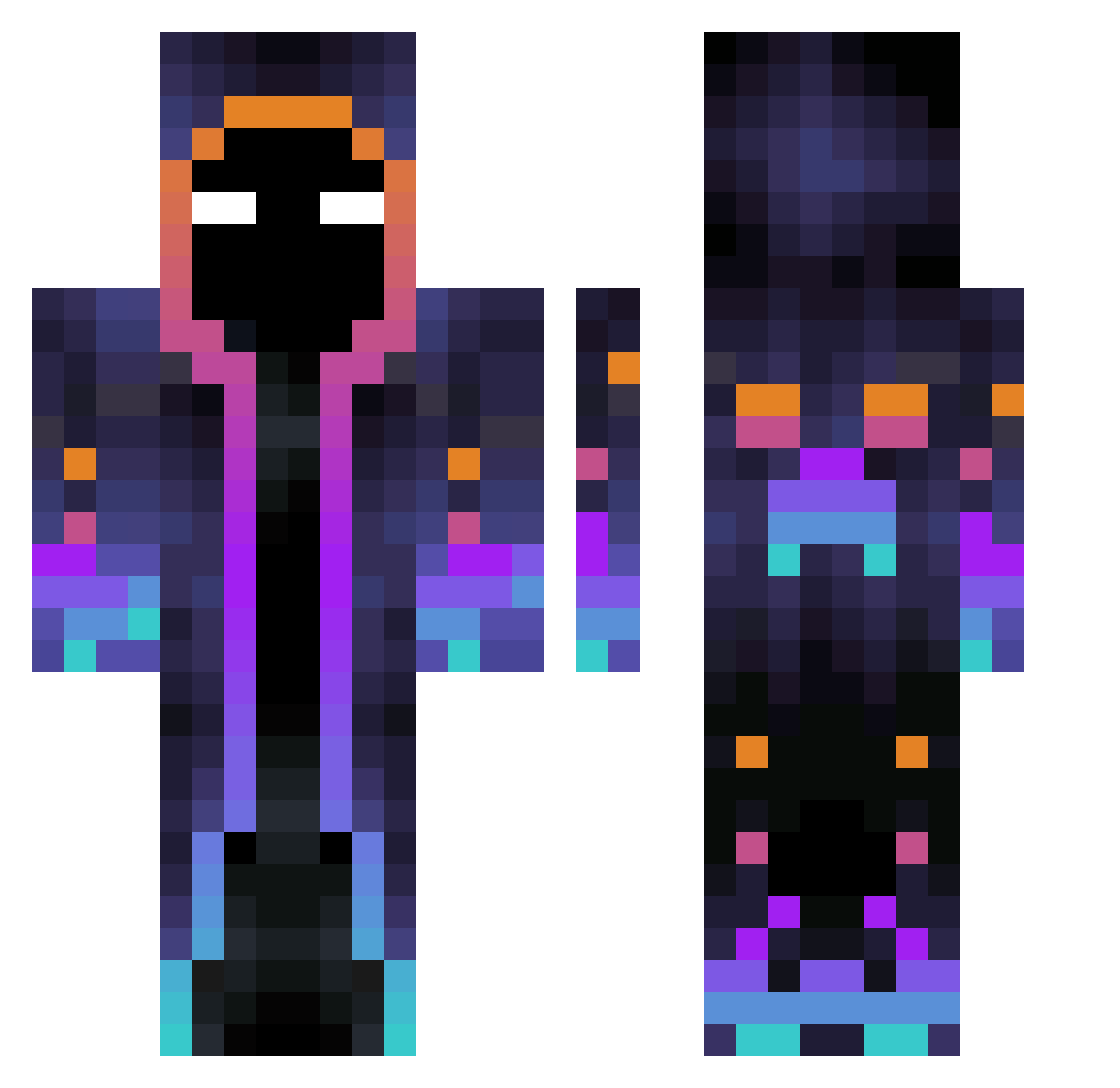
Other players with this skin (502)
Master6932 was the 33rd player we have seen with this skin, first spotted on 29.07.2026. The same skin was seen on these players. Open a nickname to see their current skin and skin history.
 thithan Ghost_Proxy ILikeToCharge
 Hrafna CoochieBuns ismaelv543 tendonten16 nucleis MelMel62 WePePro JackBadPanda mortal3577 Marcelpupa Planc_03 glugluglu dudu319 SametEker huysuztilki OrangeYJQ xinhhlianhh Zockerlas lovelostt Hooggyyy ZyroLove Opuli Basketoboul Jaidion Hotte_zockt MaxLo2006 amdaa nemesis9470
 Younblood07 TimiBoy15 richfen EndreBergum Antonelu123 Hydrix84 Leonardo28062013
 clashgametomax LP_BR Romeoo_69 PRANJAL01 Staszek3101
 GYUBUL Kieran05 Shinobiiq Lenntis1 Jeraldiio BerryOnBlack Gentox8 X_Jayz_X Zery00 Dj_AlexN Fruehh tmfbfbf Melopelaz Sail2077 meep_game_4545 orionprime Tekez20
More Galaxy Minecraft skins
How to install the Master6932 skin
- Press the Download button above to save the skin as a PNG file.
- Minecraft: Bedrock Edition (PE): open the Dressing Room from the main menu (or tap your character → Edit Character), go to Classic Skins → Owned, press the + (new skin) button, choose the downloaded PNG and pick the Classic (Steve) model. Works on PC and mobile; consoles cannot import custom skins.
- Minecraft: Java Edition: open the Minecraft Launcher, go to the Skins tab, click New Skin, load the PNG, pick the Classic (Steve) model and press Save & Use. You can also upload it at minecraft.net → Profile → Change Skin.
The skin does not show up after import - what should I do?
Restart Minecraft and open the Dressing Room again - imported skins sometimes appear only after a restart. Also make sure you selected the imported skin and picked the Classic (Steve) model.
Which model should I choose, Classic or Slim?
This skin is designed for the Classic (Steve) model. If you pick the wrong model, the arms of the skin will look stretched or squeezed.
Is the skin of Master6932 free to download?
Yes. Press Download, save the PNG file and use it in Minecraft: Bedrock Edition or Java Edition - no payment or registration needed. The skin also works on multiplayer servers and Realms.
More skins
Looking for more? Go back to all Minecraft skins and check the top skins of the week, month and all time, or find any player's skin by nickname.