
MG_NX - Minecraft Skins & Skin History
Current Minecraft skin of the player MG_NX, loaded from the official Mojang API. Rotate the 3D model with your mouse or finger, then download the skin as a PNG file and use it in Minecraft: Bedrock Edition or Java Edition for free. When MG_NX changes their skin, this page updates automatically and the old skin stays in the history below.
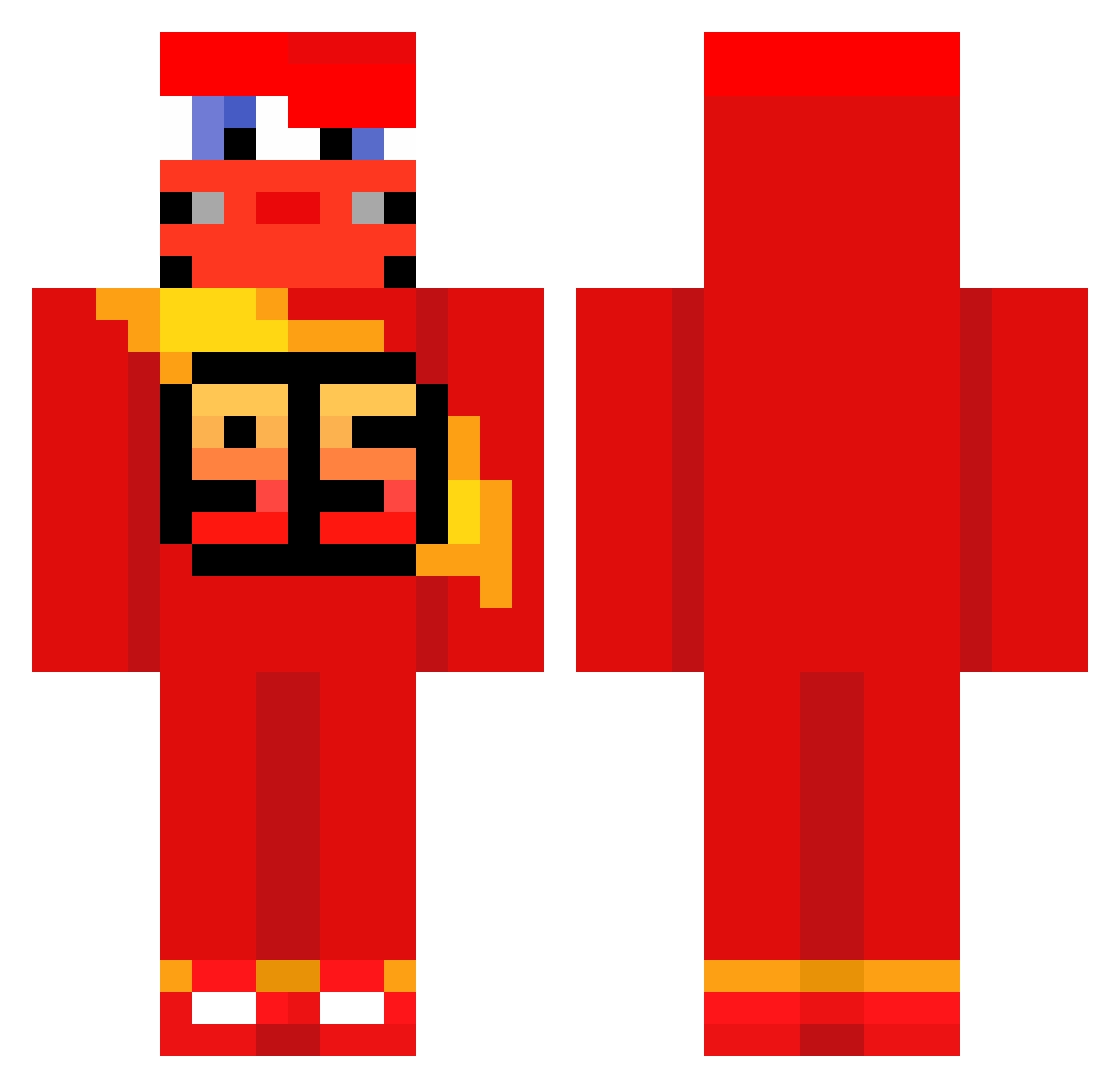
Other players with this skin (589)
MG_NX was the 46th player we have seen with this skin, first spotted on 29.07.2026. The same skin was seen on these players. Open a nickname to see their current skin and skin history.
 SkeletonJaeger27 TurboDan0608 calelovesastro reditubi Eddybb VOLT_PRIME_ Flooz7 Simple_999 Solid_Crabb _0_milafka_0_ BangsXIX Pureyll Il_Thom flaczekzakolacze ISADRI Fornaaa juzgggg CHAPARRON10 _WTTQ_ Julien2ab
 KirbyPastero SargentoCharles SrLarry069 nort0nro Stroopid bdawg95 Paddan123 jempyy axelosse kss1n Leonardus17 lil_didou ThrowingAura cheesebeater manufs98 dark_shinobi33 AyazRPG nksuresh Karuthar nicogrego99 SirSSchnuty M4NZUR24 Ebyrek56 BlackYT22 ToninVespin Garguu Fakemada hua0112 william_the_goat fgumo NITRESIK Betto95 WormyMcWormy69 Val19 Arruda9584 Jaozinbom smikai jordisala2002
 mCPoPo12 zShady_
More Lightning Mcqueen Minecraft skins
See all 110 Lightning Mcqueen skins
How to install the MG_NX skin
- Press the Download button above to save the skin as a PNG file.
- Minecraft: Bedrock Edition (PE): open the Dressing Room from the main menu (or tap your character → Edit Character), go to Classic Skins → Owned, press the + (new skin) button, choose the downloaded PNG and pick the Classic (Steve) model. Works on PC and mobile; consoles cannot import custom skins.
- Minecraft: Java Edition: open the Minecraft Launcher, go to the Skins tab, click New Skin, load the PNG, pick the Classic (Steve) model and press Save & Use. You can also upload it at minecraft.net → Profile → Change Skin.
The skin does not show up after import - what should I do?
Restart Minecraft and open the Dressing Room again - imported skins sometimes appear only after a restart. Also make sure you selected the imported skin and picked the Classic (Steve) model.
Which model should I choose, Classic or Slim?
This skin is designed for the Classic (Steve) model. If you pick the wrong model, the arms of the skin will look stretched or squeezed.
Is the skin of MG_NX free to download?
Yes. Press Download, save the PNG file and use it in Minecraft: Bedrock Edition or Java Edition - no payment or registration needed. The skin also works on multiplayer servers and Realms.
More skins
Looking for more? Go back to all Minecraft skins and check the top skins of the week, month and all time, or find any player's skin by nickname.