
Ludavi - Minecraft Skins & Skin History
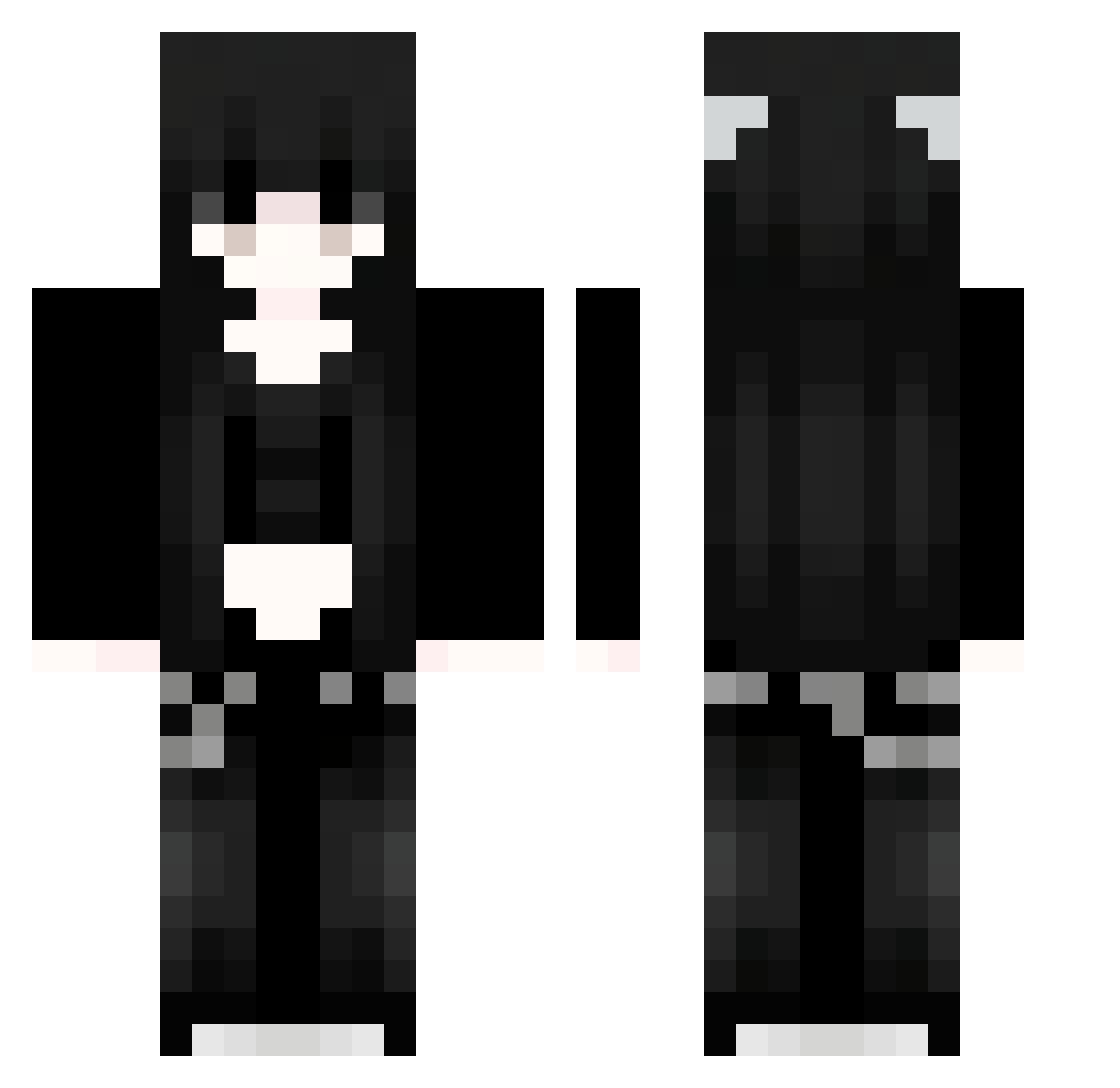
Current Minecraft skin of the player Ludavi, loaded from the official Mojang API. Rotate the 3D model with your mouse or finger, then download the skin as a PNG file and use it in Minecraft: Bedrock Edition or Java Edition for free. When Ludavi changes their skin, this page updates automatically and the old skin stays in the history below.
Other players with this skin (1061)
Ludavi was the 122nd player we have seen with this skin, first spotted on 09.08.2026. The same skin was seen on these players. Open a nickname to see their current skin and skin history.
 Roachu Sakura_npPkpo207 TSa552 pjhnb666 Sinon_419 Sakura_MCTBxo240 Siy726
 btrisgreat VST713 tZA442 Sakura_fnlYNq836 QYM666 XWg304 izm657 AIh526 qrO879 PhL148 IlU610 eHV495 SRq891 zKs433 Cringu Jvav_HCqknHcD285 LilBreadStick82 kfi898 tiara7707 vnVSQijegANUS731 Sakura_pvfXVS143 VQz841 JeM670 91_fSVOMakjbV396 itsnotokboomer Sakura_tlpqDw665 vNkjVfSnNMFtT564 NoO870 CfL430 BowieTingz RVI143 HIk601 bav158 yxG772 Zra539 hGl245 TdW765 91_ifyaBvuSCd355 CJo429 RpB264 bOp516 JiC823 xyv383 pHRZjjTBsQeKE945 kjM324 kaoshx_ TlD707 Sakura_Zrovek925 Hny108 yyJ77 yyY773 QVe361 YVH567
More Emo Minecraft skins
How to install the Ludavi skin
- Press the Download button above to save the skin as a PNG file.
- Minecraft: Bedrock Edition (PE): open the Dressing Room from the main menu (or tap your character → Edit Character), go to Classic Skins → Owned, press the + (new skin) button, choose the downloaded PNG and pick the Classic (Steve) model. Works on PC and mobile; consoles cannot import custom skins.
- Minecraft: Java Edition: open the Minecraft Launcher, go to the Skins tab, click New Skin, load the PNG, pick the Classic (Steve) model and press Save & Use. You can also upload it at minecraft.net → Profile → Change Skin.
The skin does not show up after import - what should I do?
Restart Minecraft and open the Dressing Room again - imported skins sometimes appear only after a restart. Also make sure you selected the imported skin and picked the Classic (Steve) model.
Which model should I choose, Classic or Slim?
This skin is designed for the Classic (Steve) model. If you pick the wrong model, the arms of the skin will look stretched or squeezed.
Is the skin of Ludavi free to download?
Yes. Press Download, save the PNG file and use it in Minecraft: Bedrock Edition or Java Edition - no payment or registration needed. The skin also works on multiplayer servers and Realms.
More skins
Looking for more? Go back to all Minecraft skins and check the top skins of the week, month and all time, or find any player's skin by nickname.