
LocalNutBuster - Minecraft Skins & Skin History
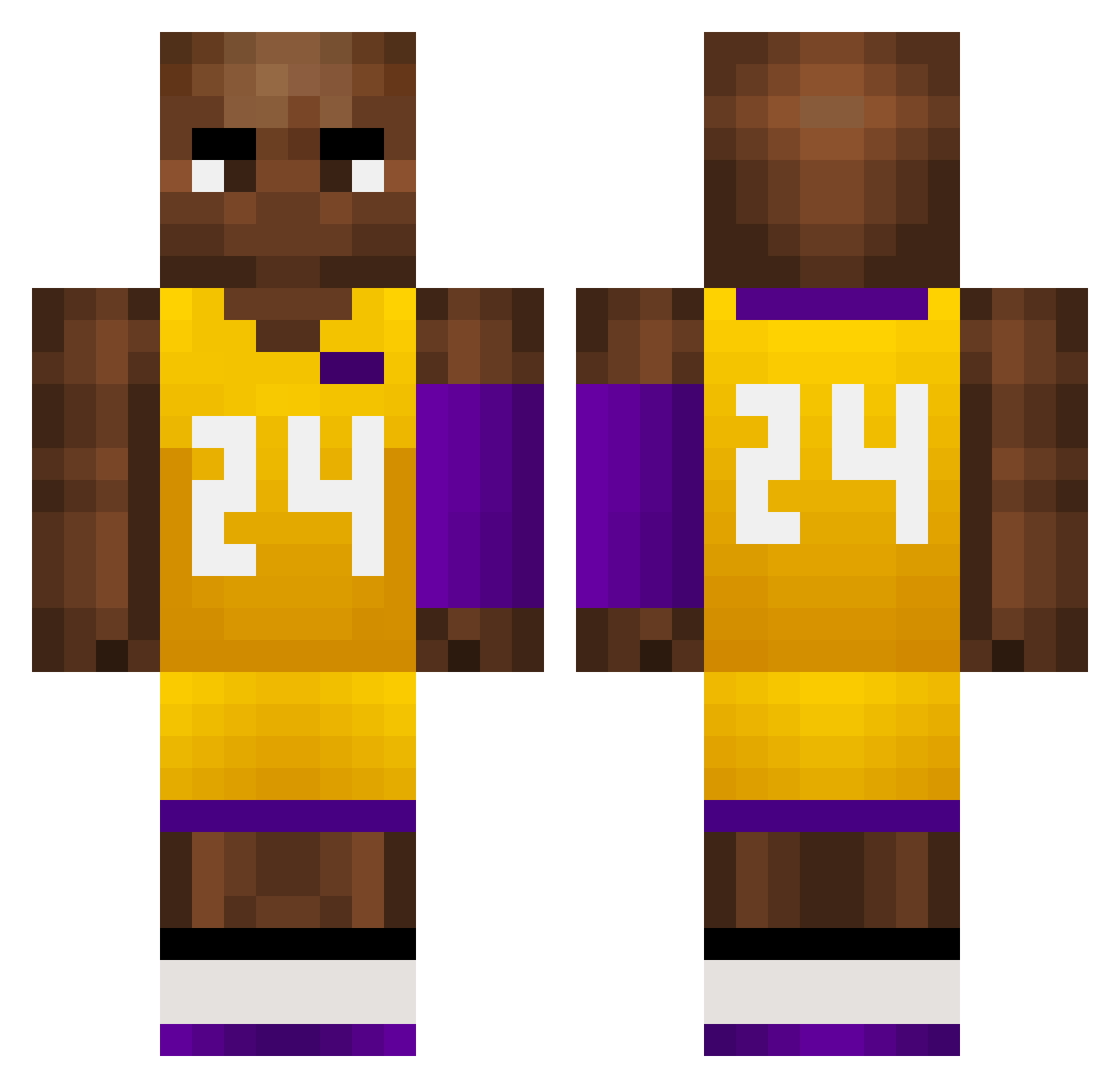
Current Minecraft skin of the player LocalNutBuster, loaded from the official Mojang API. Rotate the 3D model with your mouse or finger, then download the skin as a PNG file and use it in Minecraft: Bedrock Edition or Java Edition for free. When LocalNutBuster changes their skin, this page updates automatically and the old skin stays in the history below.
Other players with this skin (726)
LocalNutBuster was the 138th player we have seen with this skin, first spotted on 13.08.2026. The same skin was seen on these players. Open a nickname to see their current skin and skin history.
 rWd135 Galois216 Agriego_210 wide_chest LACM Mr___Prime RighteousGlizzy Casthor013 damn12138 Erny_17 XIaochuanSun_258 Romain3059 kicaaaaa Anita949 MCHaimer wyJ29 Brandodad Darkknife_2006_ bpAgent86 FilleS1 OQW92 K0be_Bryant Coleman_Han FATTUDD rossnthat LakersMan24 tchoukitchouk martzuode gkdamiris Clumsyjew22 luucao BadBoiTaco Why_do_birds_fly ChabelaPump CharZeon01 HUANG2007 smellguy1 DTx356 envislol hunnidkvillain Blackwiki Ryse_Rider JXthenoob A_Boogie21 cnl887 Cheffoholic FishermanPjoter DoN496 farkinston esmith300 NoCapz Lizardboy711 qcqcqcqc Luxony Kobe_24_08 duedue99 HipHopStarjesina knight257 XRdsb9527 NjO912
More Kobe Bryant Minecraft skins
How to install the LocalNutBuster skin
- Press the Download button above to save the skin as a PNG file.
- Minecraft: Bedrock Edition (PE): open the Dressing Room from the main menu (or tap your character → Edit Character), go to Classic Skins → Owned, press the + (new skin) button, choose the downloaded PNG and pick the Classic (Steve) model. Works on PC and mobile; consoles cannot import custom skins.
- Minecraft: Java Edition: open the Minecraft Launcher, go to the Skins tab, click New Skin, load the PNG, pick the Classic (Steve) model and press Save & Use. You can also upload it at minecraft.net → Profile → Change Skin.
The skin does not show up after import - what should I do?
Restart Minecraft and open the Dressing Room again - imported skins sometimes appear only after a restart. Also make sure you selected the imported skin and picked the Classic (Steve) model.
Which model should I choose, Classic or Slim?
This skin is designed for the Classic (Steve) model. If you pick the wrong model, the arms of the skin will look stretched or squeezed.
Is the skin of LocalNutBuster free to download?
Yes. Press Download, save the PNG file and use it in Minecraft: Bedrock Edition or Java Edition - no payment or registration needed. The skin also works on multiplayer servers and Realms.
More skins
Looking for more? Go back to all Minecraft skins and check the top skins of the week, month and all time, or find any player's skin by nickname.