
LichiGer - Minecraft Skins & Skin History
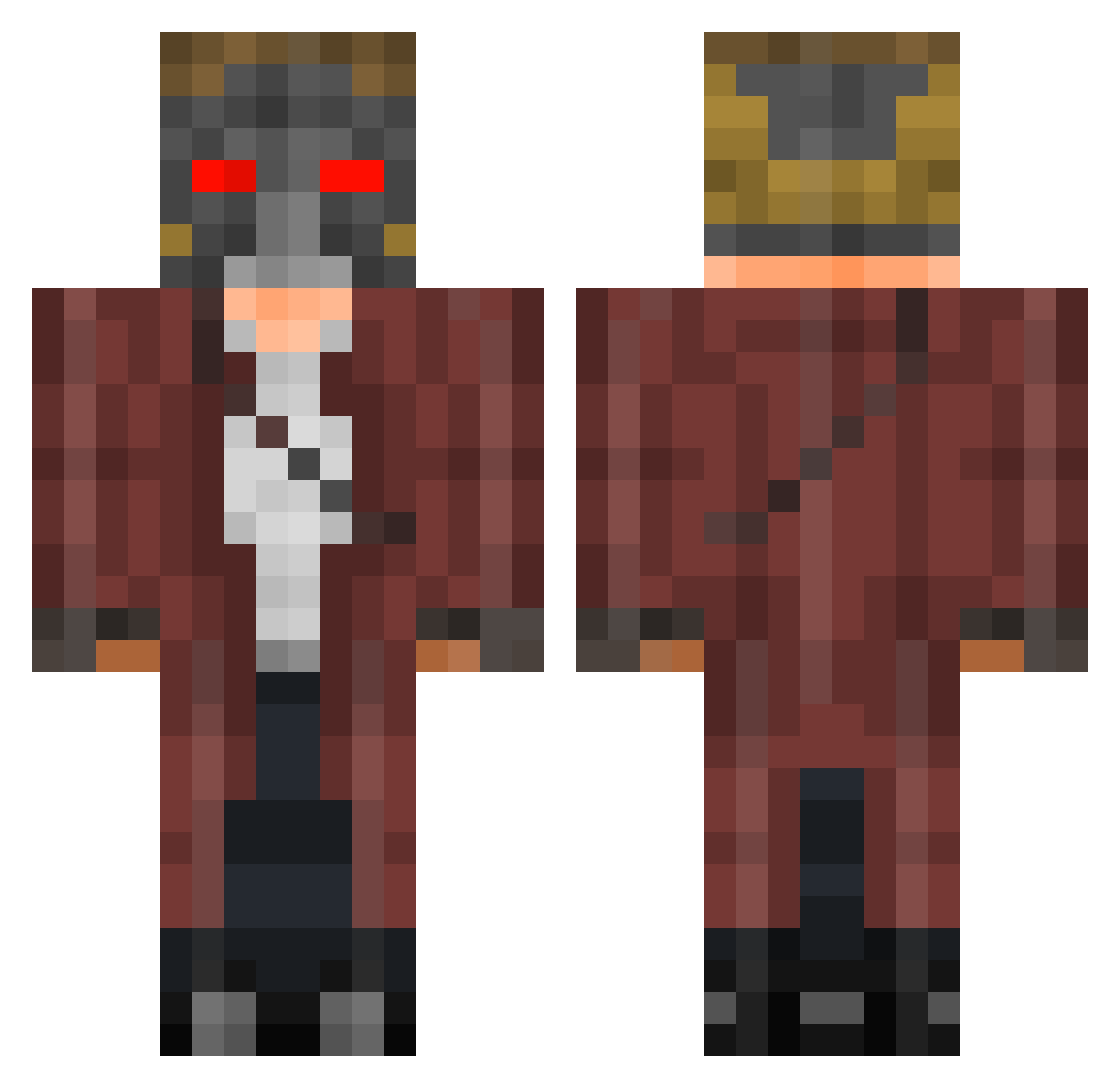
Current Minecraft skin of the player LichiGer, loaded from the official Mojang API. Rotate the 3D model with your mouse or finger, then download the skin as a PNG file and use it in Minecraft: Bedrock Edition or Java Edition for free. When LichiGer changes their skin, this page updates automatically and the old skin stays in the history below.
Other players with this skin (401)
LichiGer was the 362nd player we have seen with this skin, first spotted on 22.10.2026. The same skin was seen on these players. Open a nickname to see their current skin and skin history.
 portsayco JustRoyalty take1126 Ninjago372 The_Dutch_Knight RonaldWuschlap Cristiano_9810 blocknathan Bromley_Boy IamAngelRubio TheBurpingKing N00BTROLLER YaelYanez lphughes99 erico_craft smcth LordTomlin SAADSIDDIQUI AlexRubio512 FeveredBowl A_Magic_Coconut MCSniper31 ShakenHorchata ThebeastJordan ibitsu0529 WilliamGagnet matzimojo snarlup TraitorousXander DeatHadel imahugger tomrob001 blakesayzmoo TyYourShoes12 beaumec10 mcrhayley HarlockJoJo BeeBeeDoo Mighty_Edge Alex_0_9 Softis4 samu427 Gloton 323t Naitch Bolivia19 WMhurts QeyIIs xtrmSnapDown Scoopy16 sangsation ANARCHYGAMNG CourtingFish acurrence JJTopps mauale17 KingSosi Rick_Roller Alle1 HunterOfficials
More Star-Lord Minecraft skins
How to install the LichiGer skin
- Press the Download button above to save the skin as a PNG file.
- Minecraft: Bedrock Edition (PE): open the Dressing Room from the main menu (or tap your character → Edit Character), go to Classic Skins → Owned, press the + (new skin) button, choose the downloaded PNG and pick the Classic (Steve) model. Works on PC and mobile; consoles cannot import custom skins.
- Minecraft: Java Edition: open the Minecraft Launcher, go to the Skins tab, click New Skin, load the PNG, pick the Classic (Steve) model and press Save & Use. You can also upload it at minecraft.net → Profile → Change Skin.
The skin does not show up after import - what should I do?
Restart Minecraft and open the Dressing Room again - imported skins sometimes appear only after a restart. Also make sure you selected the imported skin and picked the Classic (Steve) model.
Which model should I choose, Classic or Slim?
This skin is designed for the Classic (Steve) model. If you pick the wrong model, the arms of the skin will look stretched or squeezed.
Is the skin of LichiGer free to download?
Yes. Press Download, save the PNG file and use it in Minecraft: Bedrock Edition or Java Edition - no payment or registration needed. The skin also works on multiplayer servers and Realms.
More skins
Looking for more? Go back to all Minecraft skins and check the top skins of the week, month and all time, or find any player's skin by nickname.