
Lextores - Minecraft Skins & Skin History
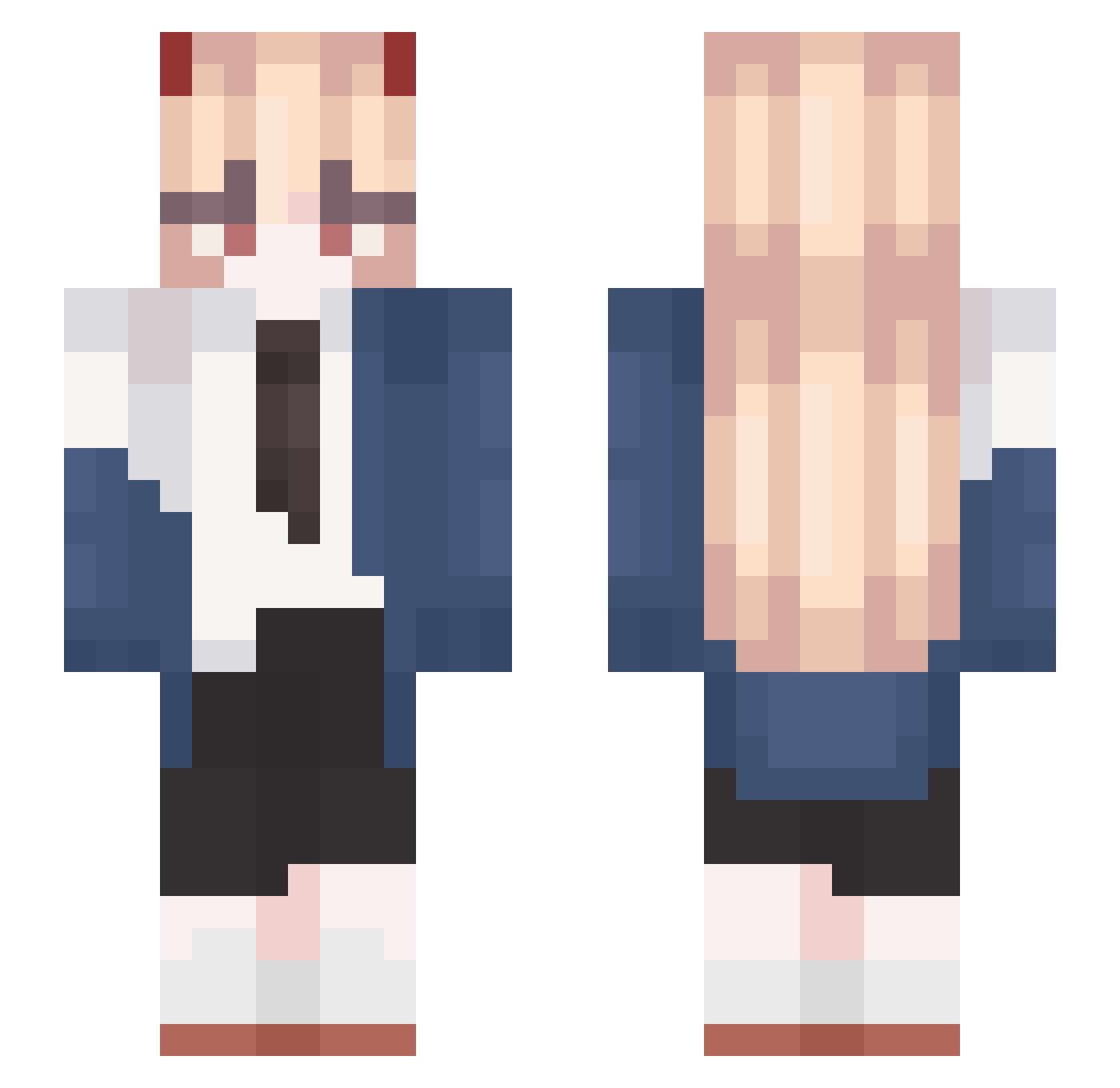
Current Minecraft skin of the player Lextores, loaded from the official Mojang API. Rotate the 3D model with your mouse or finger, then download the skin as a PNG file and use it in Minecraft: Bedrock Edition or Java Edition for free. When Lextores changes their skin, this page updates automatically and the old skin stays in the history below.
Other players with this skin (570)
Lextores was the 539th player we have seen with this skin, first spotted on 24.10.2026. The same skin was seen on these players. Open a nickname to see their current skin and skin history.
 coxuuo kilikanik MEI4S Rampagegun TqxicL dulkce TankFiku Shlorbert snnn__18 Melondi07 AliikcH Laikxmg lipps89btw Fatgab112 LisJamieMae EGPSYA4 JIAJIA_QWQ Mystia76 craftwo Skibidog Smnts R4zorG0D fatemelusine h1kiru _cheleste_ Murasame_01 FeuMasquee In_Seong_1006 wifresw lanshen52 SoncraftYTB Reyd1k Schabenn IamBori NyankoR1N ShinEiLeFemboy kamwin Doving_ Maddy_Line xiaoran_awa Yanayoko KaiserOnFire666 YAOYAOF1 milkman_cb Glamorous77 raindoots kobushiocx RUNBA256 RadicalEdster playboinandha lissbonita jaaaaabier Darkiigame ferdiad32 wsmzf bgndfc Fiqarus ADGai_ Aertnt cbw013
More Power Minecraft skins
How to install the Lextores skin
- Press the Download button above to save the skin as a PNG file.
- Minecraft: Bedrock Edition (PE): open the Dressing Room from the main menu (or tap your character → Edit Character), go to Classic Skins → Owned, press the + (new skin) button, choose the downloaded PNG and pick the Slim (Alex) model. Works on PC and mobile; consoles cannot import custom skins.
- Minecraft: Java Edition: open the Minecraft Launcher, go to the Skins tab, click New Skin, load the PNG, pick the Slim (Alex) model and press Save & Use. You can also upload it at minecraft.net → Profile → Change Skin.
The skin does not show up after import - what should I do?
Restart Minecraft and open the Dressing Room again - imported skins sometimes appear only after a restart. Also make sure you selected the imported skin and picked the Slim (Alex) model.
Which model should I choose, Classic or Slim?
This skin is designed for the Slim (Alex) model. If you pick the wrong model, the arms of the skin will look stretched or squeezed.
Is the skin of Lextores free to download?
Yes. Press Download, save the PNG file and use it in Minecraft: Bedrock Edition or Java Edition - no payment or registration needed. The skin also works on multiplayer servers and Realms.
More skins
Looking for more? Go back to all Minecraft skins and check the top skins of the week, month and all time, or find any player's skin by nickname.