
L1FaF0Raa - Minecraft Skins & Skin History
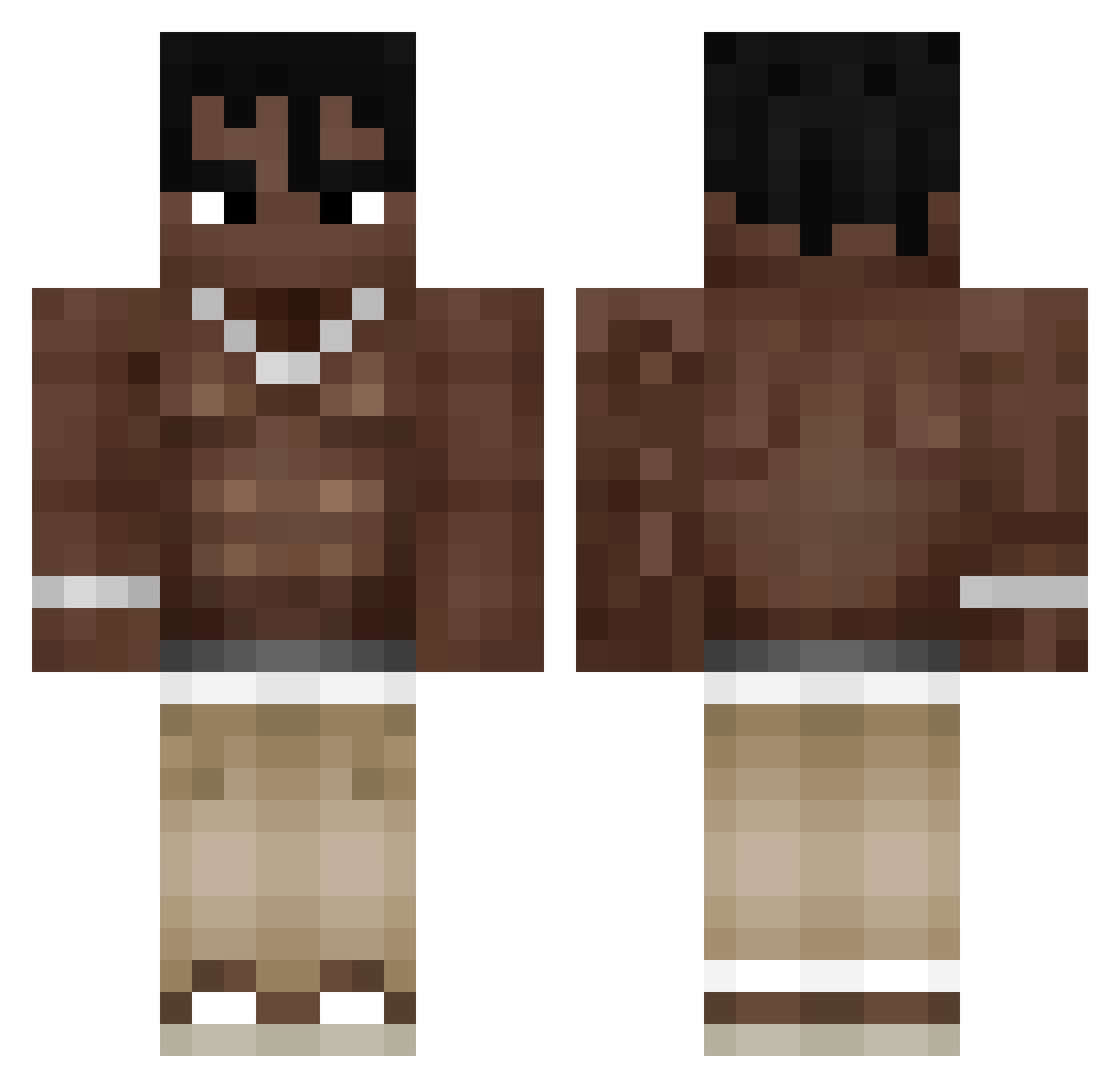
Current Minecraft skin of the player L1FaF0Raa, loaded from the official Mojang API. Rotate the 3D model with your mouse or finger, then download the skin as a PNG file and use it in Minecraft: Bedrock Edition or Java Edition for free. When L1FaF0Raa changes their skin, this page updates automatically and the old skin stays in the history below.
Other players with this skin (393)
L1FaF0Raa was the 333rd player we have seen with this skin, first spotted on 03.11.2026. The same skin was seen on these players. Open a nickname to see their current skin and skin history.
 4nt0lex FZSavage Railezzz iSnoow Lilly_55o Vale12k Tobi_bobi15 r1csi1 BU7UT furkanbabuss Auynn Plofix20 nAAZ10 GeorglBlz sebacho4 Dmehiel VajRuSS Technonegro Treyman721 RadinRst Mattlmaoo kookusss byDrixie Zizutdf PandikAtan Maksumko1 Mubagu nachoooo_01 freakypop Darius_Calv0 IkPakJouAan poncecinho Kuboqu juanbaporfiri Kakttus Fabiozzo RealTravisScott_ Lautilin pisitaa imr4nn zo1TnNz patrick_456 gimottie ggoma0 snok_696 ItsMaxel mamajoe_ twizzytoobusy Exaultion zombiegabo1 Krencis Nitatice73 Wojak01 _HyeRa BCM10 Soulless3 KeyboardLover cemycr0 Moti69 Niko69sazo
More Shirtless Minecraft skins
How to install the L1FaF0Raa skin
- Press the Download button above to save the skin as a PNG file.
- Minecraft: Bedrock Edition (PE): open the Dressing Room from the main menu (or tap your character → Edit Character), go to Classic Skins → Owned, press the + (new skin) button, choose the downloaded PNG and pick the Classic (Steve) model. Works on PC and mobile; consoles cannot import custom skins.
- Minecraft: Java Edition: open the Minecraft Launcher, go to the Skins tab, click New Skin, load the PNG, pick the Classic (Steve) model and press Save & Use. You can also upload it at minecraft.net → Profile → Change Skin.
The skin does not show up after import - what should I do?
Restart Minecraft and open the Dressing Room again - imported skins sometimes appear only after a restart. Also make sure you selected the imported skin and picked the Classic (Steve) model.
Which model should I choose, Classic or Slim?
This skin is designed for the Classic (Steve) model. If you pick the wrong model, the arms of the skin will look stretched or squeezed.
Is the skin of L1FaF0Raa free to download?
Yes. Press Download, save the PNG file and use it in Minecraft: Bedrock Edition or Java Edition - no payment or registration needed. The skin also works on multiplayer servers and Realms.
More skins
Looking for more? Go back to all Minecraft skins and check the top skins of the week, month and all time, or find any player's skin by nickname.