
Kzuann - Minecraft Skins & Skin History
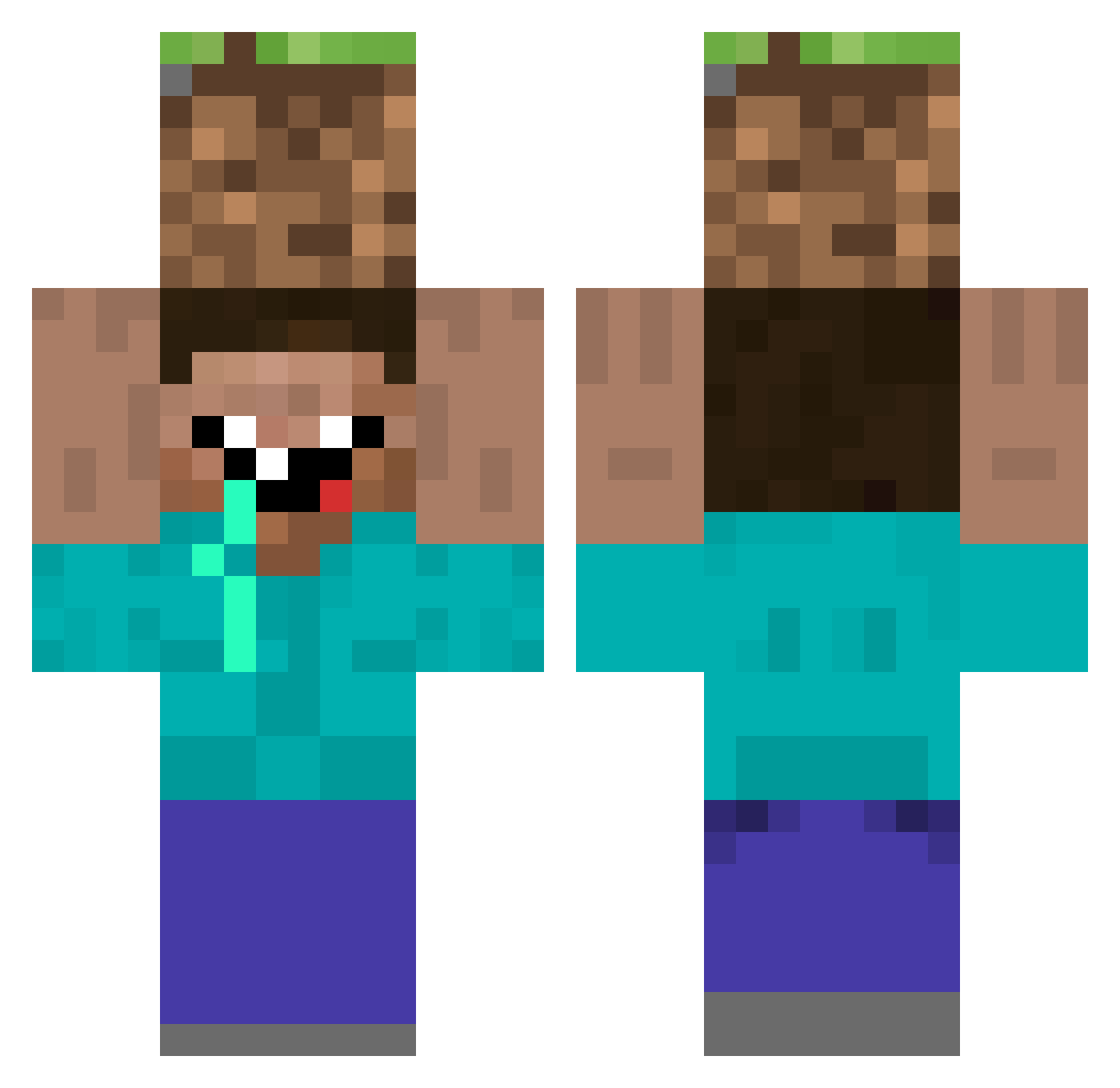
Current Minecraft skin of the player Kzuann, loaded from the official Mojang API. Rotate the 3D model with your mouse or finger, then download the skin as a PNG file and use it in Minecraft: Bedrock Edition or Java Edition for free. When Kzuann changes their skin, this page updates automatically and the old skin stays in the history below.
Other players with this skin (308)
Kzuann was the 117th player we have seen with this skin, first spotted on 02.09.2026. The same skin was seen on these players. Open a nickname to see their current skin and skin history.
 Alakaz42 wack5241 jepsnake bobderdummkopf Musashi086 Ru_rur MGRG y_r_u_gey Su_ZZang WHASSUPPP FenouilRedondant Alesitopai B72ROBIN Dillioney ched00 Chotacabras vhN117 CokaCola_is_good GBOI5622 LA_POSTE Yoldier Visulation uchangm Ionic_airFleX xMome Proxsan Max_Free Klohpapier assd5070 Kired21 jteclat negrite FahyZ WildstarK Pullmann Jangus11 Spaaacerz _SirBrot_ WWWWWhale pyxoo yasar3469 MERBA2SEGGIYA honeyhoneymon5 3izzo SadThursam mandarin0513 _LITTLE_NOAH 98vic HAR_VEY AssistantUR Duckie555 Vanois OneRandoBoi Shmegma6969 Justin_toni bastiidaa anadar 0ltssu Voldovis Enzami
More Dirt Block Minecraft skins
How to install the Kzuann skin
- Press the Download button above to save the skin as a PNG file.
- Minecraft: Bedrock Edition (PE): open the Dressing Room from the main menu (or tap your character → Edit Character), go to Classic Skins → Owned, press the + (new skin) button, choose the downloaded PNG and pick the Classic (Steve) model. Works on PC and mobile; consoles cannot import custom skins.
- Minecraft: Java Edition: open the Minecraft Launcher, go to the Skins tab, click New Skin, load the PNG, pick the Classic (Steve) model and press Save & Use. You can also upload it at minecraft.net → Profile → Change Skin.
The skin does not show up after import - what should I do?
Restart Minecraft and open the Dressing Room again - imported skins sometimes appear only after a restart. Also make sure you selected the imported skin and picked the Classic (Steve) model.
Which model should I choose, Classic or Slim?
This skin is designed for the Classic (Steve) model. If you pick the wrong model, the arms of the skin will look stretched or squeezed.
Is the skin of Kzuann free to download?
Yes. Press Download, save the PNG file and use it in Minecraft: Bedrock Edition or Java Edition - no payment or registration needed. The skin also works on multiplayer servers and Realms.
More skins
Looking for more? Go back to all Minecraft skins and check the top skins of the week, month and all time, or find any player's skin by nickname.