
KnucklesTails - Minecraft Skins & Skin History
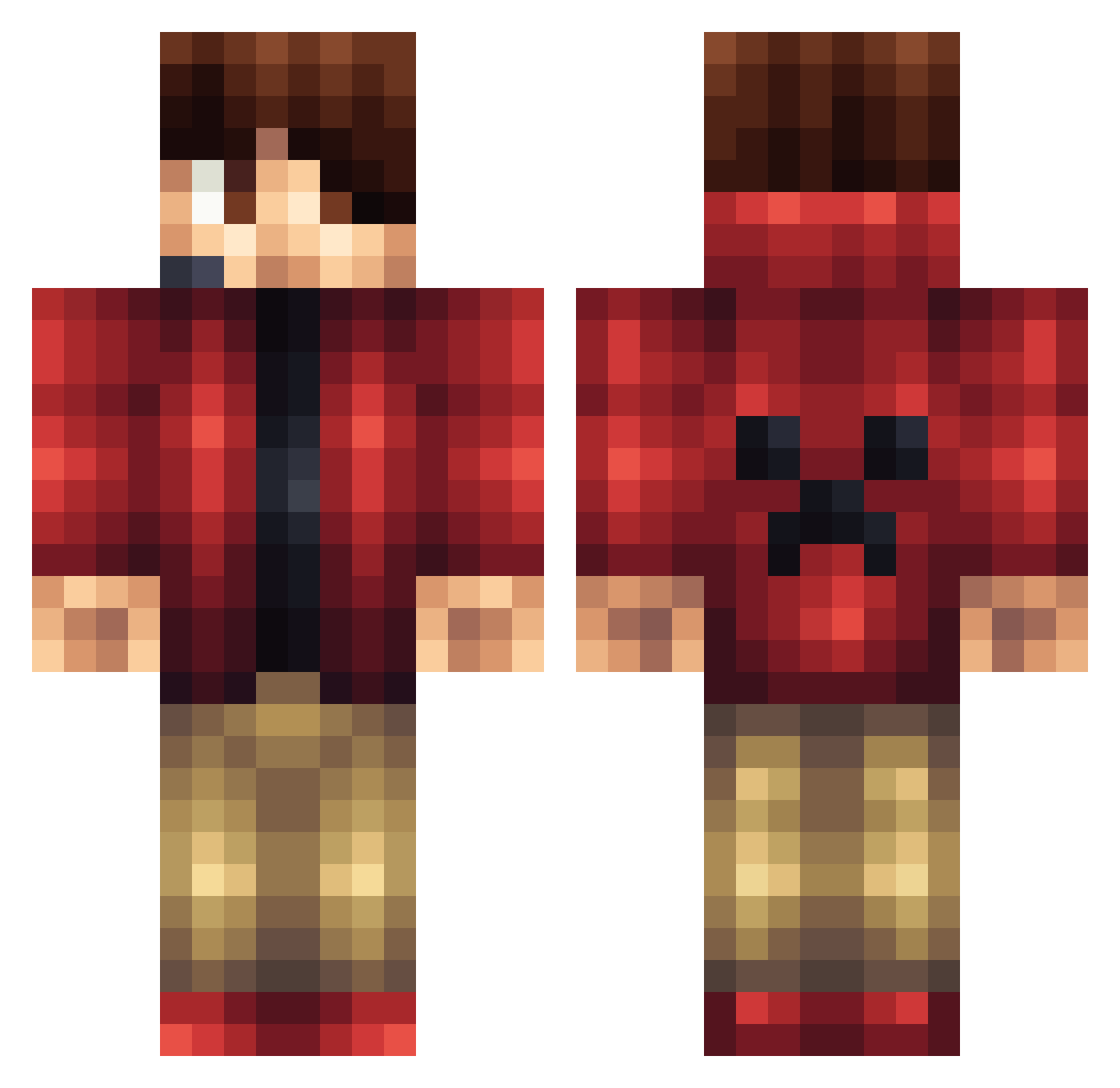
Current Minecraft skin of the player KnucklesTails, loaded from the official Mojang API. Rotate the 3D model with your mouse or finger, then download the skin as a PNG file and use it in Minecraft: Bedrock Edition or Java Edition for free. When KnucklesTails changes their skin, this page updates automatically and the old skin stays in the history below.
Other players with this skin (1166)
KnucklesTails was the 457th player we have seen with this skin, first spotted on 06.09.2026. The same skin was seen on these players. Open a nickname to see their current skin and skin history.
 isaiah1234567 Xtreamsurviver ochristiano Knechti3013 jackholmes2001 jakubef mika2h DarkDaysOfLife awesomebro255 XxtheDcmanxX Rickie1261 LordOfMonferrato yeray2002 chelseachelsea53 Yamsui Rockingthicc huanfalan ian7500 CRAWFISHFILMS afair04 popshop99 Eklipzz LouBoy2 pizza3323 couvillion huskymudkip9923 coolman1236 GibYaganatorFAK hawkeyebaxter deathspark123 Stexxcraft Damlamm Victor_Leung kentster009 the_kims TheTman10 ThexSIGGEx sebbej1 Jaggii Dominik2299 Ucmsbcworkman delgado90 skullpower68 St3lo_ elitehunter21 crossmanm4 Conner3652 AnselFlores craftingman2013 Slgi antdog808 iKenKnee Catchphrasu Basher421 B_Lino killerco1 jinyung3010 sethzilla23 Squid_zjp GreenNinjaJR
More Headset Minecraft skins
How to install the KnucklesTails skin
- Press the Download button above to save the skin as a PNG file.
- Minecraft: Bedrock Edition (PE): open the Dressing Room from the main menu (or tap your character → Edit Character), go to Classic Skins → Owned, press the + (new skin) button, choose the downloaded PNG and pick the Classic (Steve) model. Works on PC and mobile; consoles cannot import custom skins.
- Minecraft: Java Edition: open the Minecraft Launcher, go to the Skins tab, click New Skin, load the PNG, pick the Classic (Steve) model and press Save & Use. You can also upload it at minecraft.net → Profile → Change Skin.
The skin does not show up after import - what should I do?
Restart Minecraft and open the Dressing Room again - imported skins sometimes appear only after a restart. Also make sure you selected the imported skin and picked the Classic (Steve) model.
Which model should I choose, Classic or Slim?
This skin is designed for the Classic (Steve) model. If you pick the wrong model, the arms of the skin will look stretched or squeezed.
Is the skin of KnucklesTails free to download?
Yes. Press Download, save the PNG file and use it in Minecraft: Bedrock Edition or Java Edition - no payment or registration needed. The skin also works on multiplayer servers and Realms.
More skins
Looking for more? Go back to all Minecraft skins and check the top skins of the week, month and all time, or find any player's skin by nickname.