
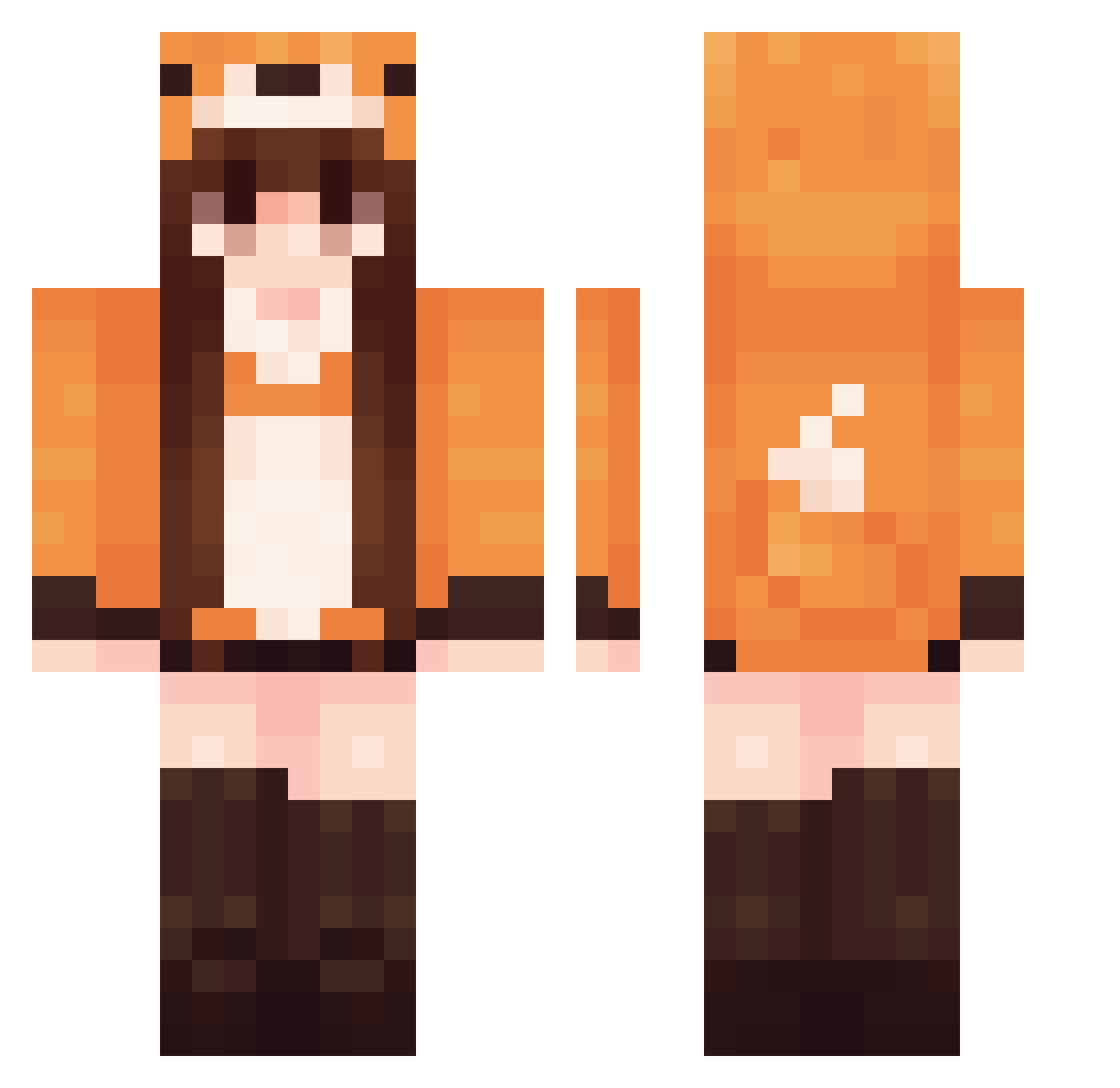
Current Minecraft skin of the player KiraAL03, loaded from the official Mojang API. Rotate the 3D model with your mouse or finger, then download the skin as a PNG file and use it in Minecraft: Bedrock Edition or Java Edition for free. When KiraAL03 changes their skin, this page updates automatically and the old skin stays in the history below.
Other players with this skin (441)
KiraAL03 was the 272nd player we have seen with this skin, first spotted on 17.09.2026. The same skin was seen on these players. Open a nickname to see their current skin and skin history.
 its_just_anni schaschaaa babs321 SkittlesAristeia madiIovesu vampireispr0 wimsome Nymphibia ababcy WYATTYYDS KatG2012 FenixFantasma SweetHeart4 Dramalama24 xpto34567 Nitrojennny 32ko Fleyaa boarstein BadFoxAoi lilizzz88 nanying PPPP19 LoicLemieuxCrete kuroplayer lala6363 21mada Cloudymoon__ QTambuwu Ahmumu FennekMaus GalaxySawick icyfoxxy My_Song MitaX44 saku0920 lisllein Zenaro01 LaBrad02 SeLveX KellyIsThere PeachPup SWAAAAAAA UnicornBomba_Roo scheknjuli Bellabug1025 Ghosty030 Tallygirl2014 Torellek WH0TFM0LLY ripumaru Martunerea Filoyang
 Lisitca light0fish jsy1234 swagytulip sekijin_o Lulluci LA_CHINA_
More Fox Tail Minecraft skins
How to install the KiraAL03 skin
- Press the Download button above to save the skin as a PNG file.
- Minecraft: Bedrock Edition (PE): open the Dressing Room from the main menu (or tap your character → Edit Character), go to Classic Skins → Owned, press the + (new skin) button, choose the downloaded PNG and pick the Classic (Steve) model. Works on PC and mobile; consoles cannot import custom skins.
- Minecraft: Java Edition: open the Minecraft Launcher, go to the Skins tab, click New Skin, load the PNG, pick the Classic (Steve) model and press Save & Use. You can also upload it at minecraft.net → Profile → Change Skin.
The skin does not show up after import - what should I do?
Restart Minecraft and open the Dressing Room again - imported skins sometimes appear only after a restart. Also make sure you selected the imported skin and picked the Classic (Steve) model.
Which model should I choose, Classic or Slim?
This skin is designed for the Classic (Steve) model. If you pick the wrong model, the arms of the skin will look stretched or squeezed.
Is the skin of KiraAL03 free to download?
Yes. Press Download, save the PNG file and use it in Minecraft: Bedrock Edition or Java Edition - no payment or registration needed. The skin also works on multiplayer servers and Realms.
More skins
Looking for more? Go back to all Minecraft skins and check the top skins of the week, month and all time, or find any player's skin by nickname.