
Khorneplum - Minecraft Skins & Skin History
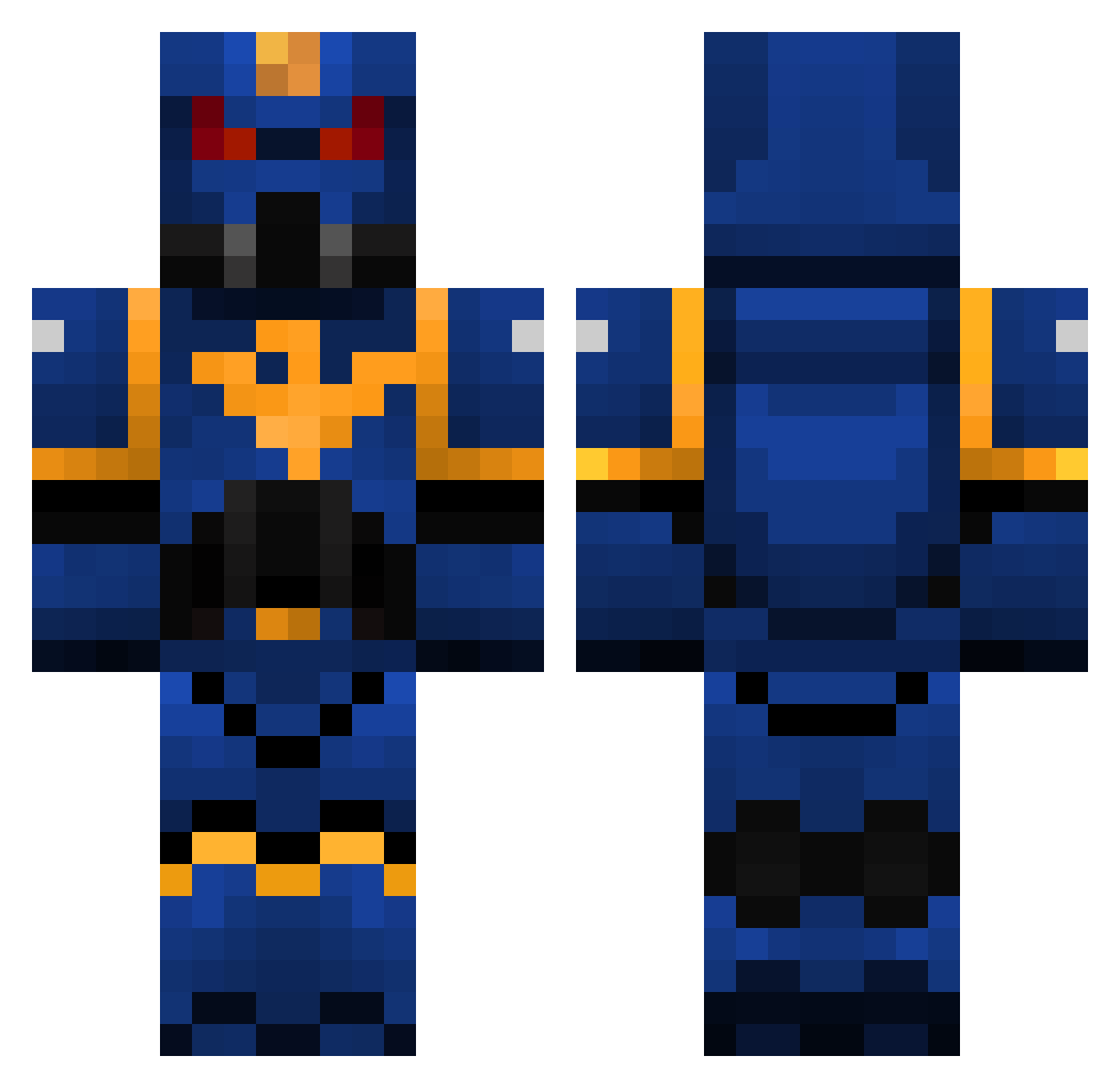
Current Minecraft skin of the player Khorneplum, loaded from the official Mojang API. Rotate the 3D model with your mouse or finger, then download the skin as a PNG file and use it in Minecraft: Bedrock Edition or Java Edition for free. When Khorneplum changes their skin, this page updates automatically and the old skin stays in the history below.
Other players with this skin (111)
Khorneplum was the 37th player we have seen with this skin, first spotted on 02.09.2026. The same skin was seen on these players. Open a nickname to see their current skin and skin history.
 PotatoSniper117 GravitonPrime Elleboa75 JForsy Mayhem945 shreder6100 CamtheSSJ
 Alpha_X_ BulletKing115 ivalvo Aegwadar S1xxer Assaultkiller FortniteB34st224 QuiZan12 warframe1020 cobwxbsz KevDevEv Darkrex522 Volilosh Schwarm_ Grilled_Pasta Seraphim47 Anubisknight Onortatas Bumblebee600 Kraisie thanksj Faby_Io DumLuk23 Erythropus Scrankster SerCrim Sicks gt_1987 Endofyou Phamsa_Ex KO1Prime PaoFutiti kermitshermit42 3Nice3 YsatayaGnida rufioxx knightfall97 CatoSicarius2 Sa1tySquid Nerverios RadOof Laaryna Primaalpharius Slicer0202 Muzyq2 dariusxps EatableGarbadge onortas w0nd Daindon enderbox104 ACCU1337 SilentStorm935
More Warhammer 40k Minecraft skins
See all 43 Warhammer 40k skins
How to install the Khorneplum skin
- Press the Download button above to save the skin as a PNG file.
- Minecraft: Bedrock Edition (PE): open the Dressing Room from the main menu (or tap your character → Edit Character), go to Classic Skins → Owned, press the + (new skin) button, choose the downloaded PNG and pick the Classic (Steve) model. Works on PC and mobile; consoles cannot import custom skins.
- Minecraft: Java Edition: open the Minecraft Launcher, go to the Skins tab, click New Skin, load the PNG, pick the Classic (Steve) model and press Save & Use. You can also upload it at minecraft.net → Profile → Change Skin.
The skin does not show up after import - what should I do?
Restart Minecraft and open the Dressing Room again - imported skins sometimes appear only after a restart. Also make sure you selected the imported skin and picked the Classic (Steve) model.
Which model should I choose, Classic or Slim?
This skin is designed for the Classic (Steve) model. If you pick the wrong model, the arms of the skin will look stretched or squeezed.
Is the skin of Khorneplum free to download?
Yes. Press Download, save the PNG file and use it in Minecraft: Bedrock Edition or Java Edition - no payment or registration needed. The skin also works on multiplayer servers and Realms.
More skins
Looking for more? Go back to all Minecraft skins and check the top skins of the week, month and all time, or find any player's skin by nickname.