
Kaleb16z - Minecraft Skins & Skin History
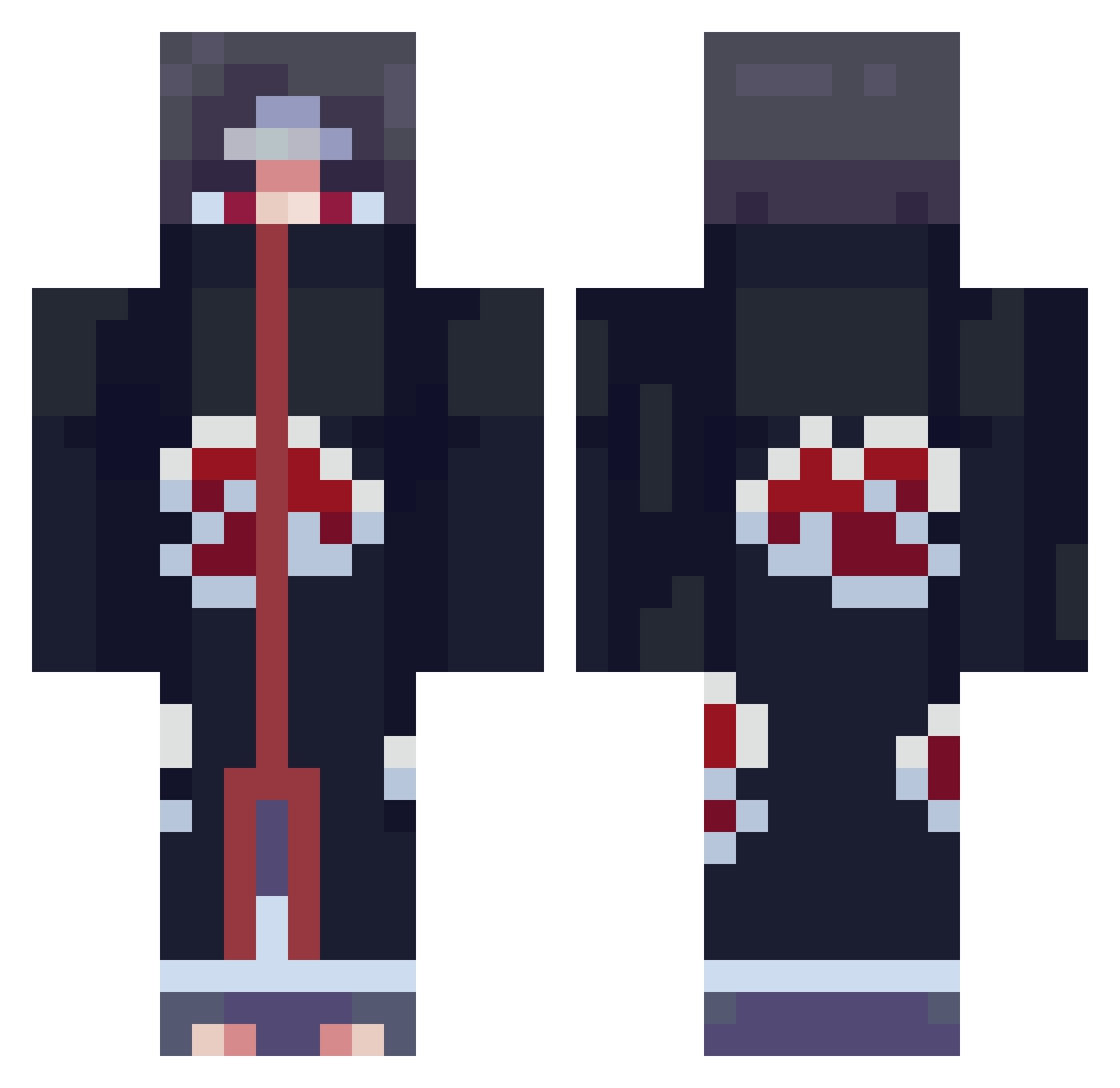
Current Minecraft skin of the player Kaleb16z, loaded from the official Mojang API. Rotate the 3D model with your mouse or finger, then download the skin as a PNG file and use it in Minecraft: Bedrock Edition or Java Edition for free. When Kaleb16z changes their skin, this page updates automatically and the old skin stays in the history below.
Other players with this skin (663)
Kaleb16z was the 258th player we have seen with this skin, first spotted on 27.08.2026. The same skin was seen on these players. Open a nickname to see their current skin and skin history.
 Starkillgamer01 turbigoo Rensblacka Soul_Soda Rawwbe PollyMC
 GhostDragon91 DizzyGlizzyWave oshin555 Rext_Zero bobby261996 JacobHatesSiri Firowl PanMaklowicz orangepanda52 BeSt_OnE1 xDerLois 5hag0 MacTheMan1032 S4nJac0bo IesaM Unslaved_ X2_Fam Nosh_4 Syrhiux SavageCube053 MarvinTheG AbYusef TengoFreeEnIbiza 8kidsoul8 freeey Bunz621 tupert IKEYSMALLZ antho2112 Vodka_OwO Flametator MintGuy0 Jaykeepa9 M4theus_7 dtrain4242
 xzx1821 znkiwnl Amextaf UItachi2 jjlee _Mando ZeusDoG3 Vz72 RobertDail Masribo migue01114 Semjon1231 gqbriel_zoldyck dannyazure Rainehail NDRuity NIGHTMARE720 gompang0211 oGonJo
More Itachi Uchiha Minecraft skins
See all 307 Itachi Uchiha skins
How to install the Kaleb16z skin
- Press the Download button above to save the skin as a PNG file.
- Minecraft: Bedrock Edition (PE): open the Dressing Room from the main menu (or tap your character → Edit Character), go to Classic Skins → Owned, press the + (new skin) button, choose the downloaded PNG and pick the Classic (Steve) model. Works on PC and mobile; consoles cannot import custom skins.
- Minecraft: Java Edition: open the Minecraft Launcher, go to the Skins tab, click New Skin, load the PNG, pick the Classic (Steve) model and press Save & Use. You can also upload it at minecraft.net → Profile → Change Skin.
The skin does not show up after import - what should I do?
Restart Minecraft and open the Dressing Room again - imported skins sometimes appear only after a restart. Also make sure you selected the imported skin and picked the Classic (Steve) model.
Which model should I choose, Classic or Slim?
This skin is designed for the Classic (Steve) model. If you pick the wrong model, the arms of the skin will look stretched or squeezed.
Is the skin of Kaleb16z free to download?
Yes. Press Download, save the PNG file and use it in Minecraft: Bedrock Edition or Java Edition - no payment or registration needed. The skin also works on multiplayer servers and Realms.
More skins
Looking for more? Go back to all Minecraft skins and check the top skins of the week, month and all time, or find any player's skin by nickname.