
JuniorRDLS - Minecraft Skins & Skin History
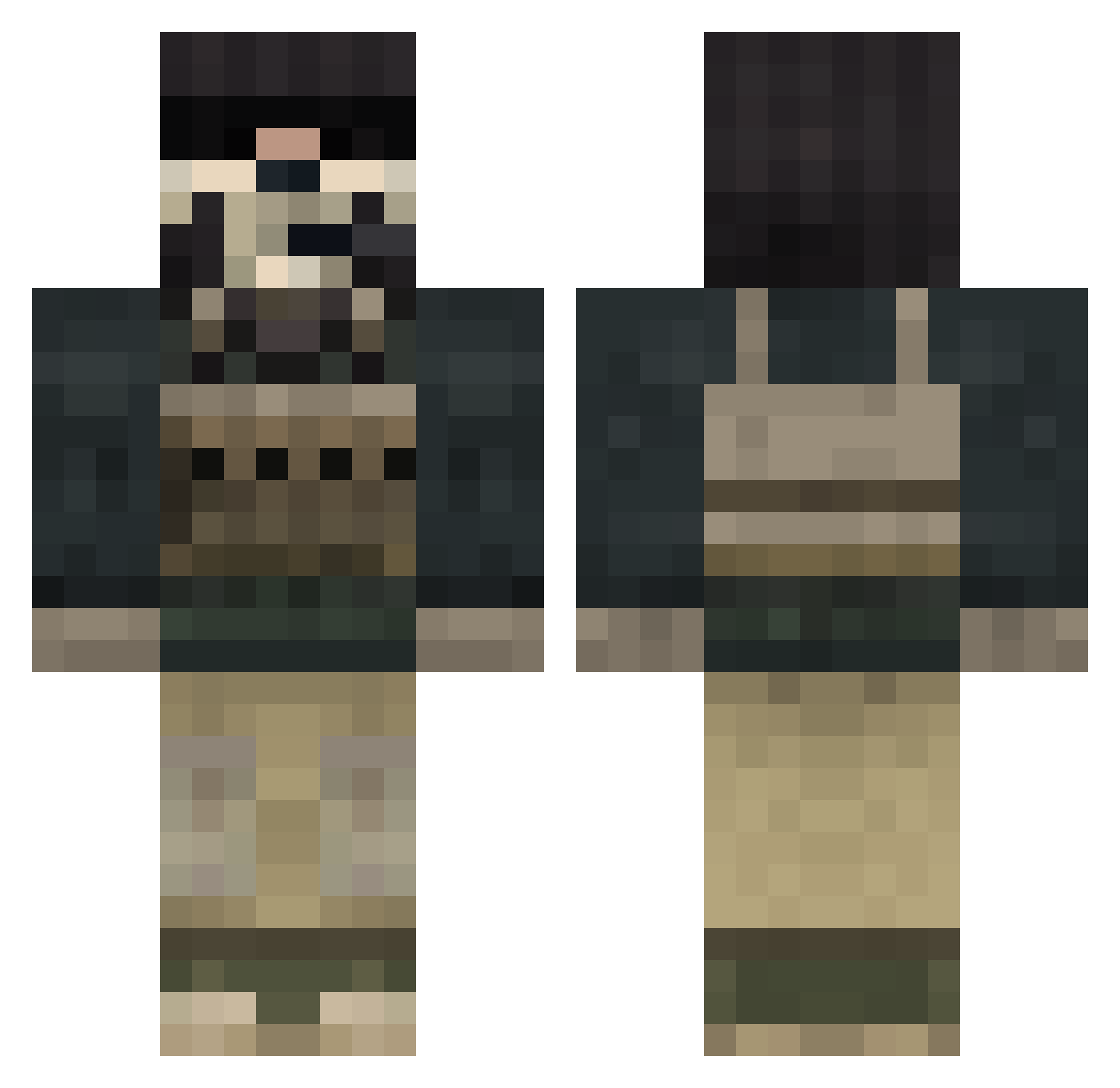
Current Minecraft skin of the player JuniorRDLS, loaded from the official Mojang API. Rotate the 3D model with your mouse or finger, then download the skin as a PNG file and use it in Minecraft: Bedrock Edition or Java Edition for free. When JuniorRDLS changes their skin, this page updates automatically and the old skin stays in the history below.
Other players with this skin (124)
JuniorRDLS was the 117th player we have seen with this skin, first spotted on 28.10.2026. The same skin was seen on these players. Open a nickname to see their current skin and skin history.
 AnderSBT retro_founder BigBeastyBatman Johanit Kullrad JustConbo SSPIIDER calebrryy Fsimonv16 DaddyKale69 piotr7899 moose867 GodfatherDiamond siydxx Nickberry97 YoungBarnOwl B2K_Ultimate Nerfmaster1212 AUGUSA Ghost14060 ProMuffin10 Danielkostenko BVRE ChelseaB90 1MNY pablo597 AzzaTV Youngdog04 GenesisBear khj1007 MgamerA12 Juan_P1st0l4s WelcomeToAA pan_tupta okawachieFake Oliver230710 boogiepop35 YDJ666 Just_Yes Dreaded_Knight8 Ghost_Crusader ghost_cod Fisalb10 Waifuhunter146 Marjibad StarSun1999 Leonidpss NotsoAnonymous GrimReaper_2004 AdmiralKotch Nukenoid SkyX1213 GoHamorGoHome SgtJackson UnknownGhostXx sjoel xManosanx Ghost__2007 lockerman23 Rogneberries
More Call Of Duty Minecraft skins
See all 163 Call Of Duty skins
How to install the JuniorRDLS skin
- Press the Download button above to save the skin as a PNG file.
- Minecraft: Bedrock Edition (PE): open the Dressing Room from the main menu (or tap your character → Edit Character), go to Classic Skins → Owned, press the + (new skin) button, choose the downloaded PNG and pick the Classic (Steve) model. Works on PC and mobile; consoles cannot import custom skins.
- Minecraft: Java Edition: open the Minecraft Launcher, go to the Skins tab, click New Skin, load the PNG, pick the Classic (Steve) model and press Save & Use. You can also upload it at minecraft.net → Profile → Change Skin.
The skin does not show up after import - what should I do?
Restart Minecraft and open the Dressing Room again - imported skins sometimes appear only after a restart. Also make sure you selected the imported skin and picked the Classic (Steve) model.
Which model should I choose, Classic or Slim?
This skin is designed for the Classic (Steve) model. If you pick the wrong model, the arms of the skin will look stretched or squeezed.
Is the skin of JuniorRDLS free to download?
Yes. Press Download, save the PNG file and use it in Minecraft: Bedrock Edition or Java Edition - no payment or registration needed. The skin also works on multiplayer servers and Realms.
More skins
Looking for more? Go back to all Minecraft skins and check the top skins of the week, month and all time, or find any player's skin by nickname.