
JudahBear2005 - Minecraft Skins & Skin History
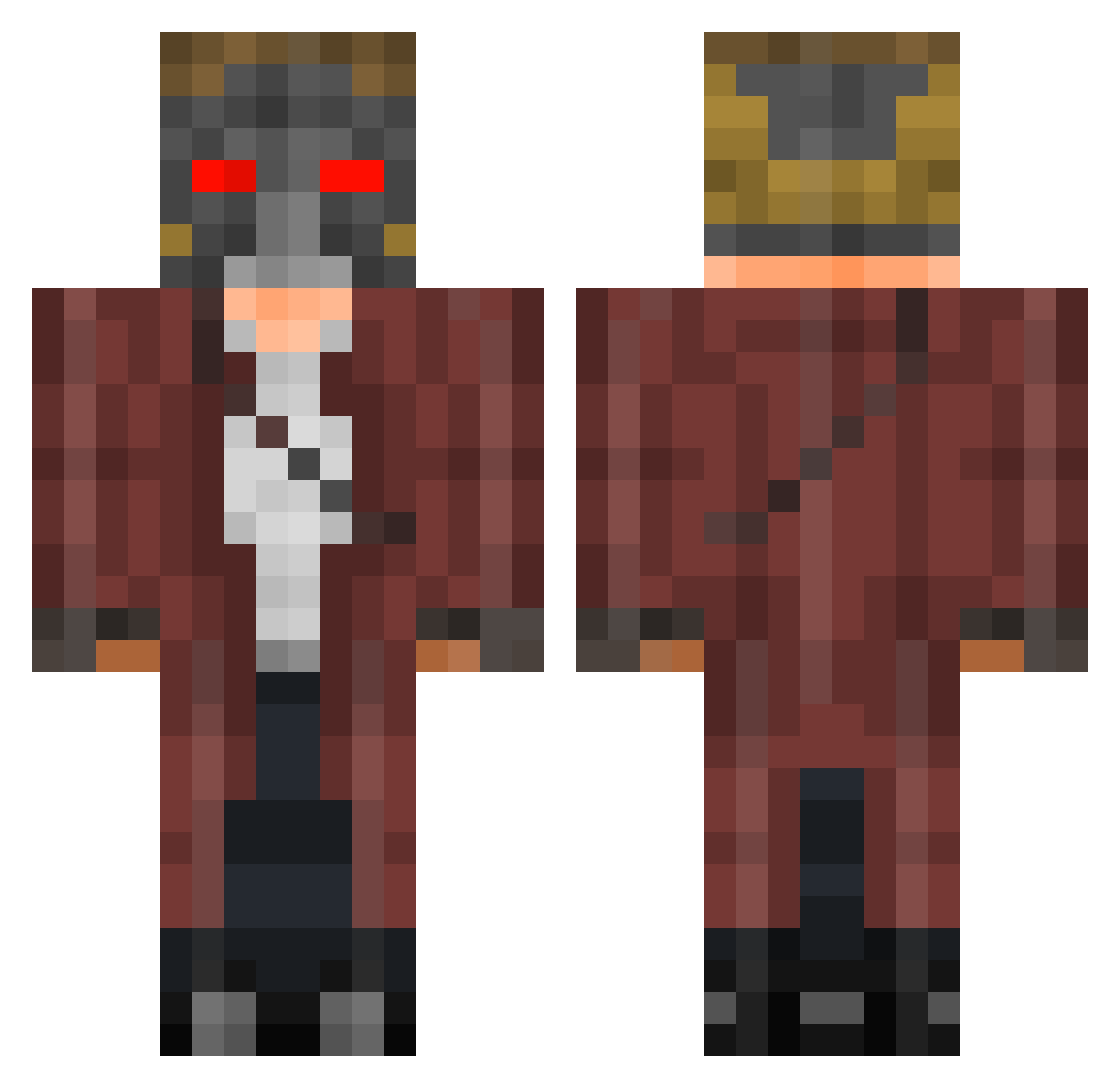
Current Minecraft skin of the player JudahBear2005, loaded from the official Mojang API. Rotate the 3D model with your mouse or finger, then download the skin as a PNG file and use it in Minecraft: Bedrock Edition or Java Edition for free. When JudahBear2005 changes their skin, this page updates automatically and the old skin stays in the history below.
Other players with this skin (401)
JudahBear2005 was the 160th player we have seen with this skin, first spotted on 02.09.2026. The same skin was seen on these players. Open a nickname to see their current skin and skin history.
 BamaScott crosseyed_mary Star_Lord69 Just_Some_Bloke readybagel Unigamerpc BruhMomento14 timrai bernardthealien nowleeeZ Renman99 HitchhikerRiskie Player_Kids davidm2 iPro_Donglord BigBird999 moskiTHOR lividbishop MURBAS TheEpicJohnny gsg_StarLord HelborBebou Tyshiiro Proxifier SO_IP Bot_Lutax BenUsherB Uriel45 JCPIZZAHUT37 EnderMaster2002 michstar Johnson202 LeSharker maxiiimome _Gold3nWaR keitory Boondoggle WNBA TheReggaePanda sean4243 Silentfell kiffness bigboyxxx huppypuppy Omnirok CosmicGuardian TheSafrion Blaze7736 MagnusZ4 NitroBlastX07 BigLancerBoi737 Corey0418 Jim48 blazinggaming511 DJRocster Rainbow_Raptor42 Tricksh0t15 iliannoam iannarel tpxtiger
More Star-Lord Minecraft skins
How to install the JudahBear2005 skin
- Press the Download button above to save the skin as a PNG file.
- Minecraft: Bedrock Edition (PE): open the Dressing Room from the main menu (or tap your character → Edit Character), go to Classic Skins → Owned, press the + (new skin) button, choose the downloaded PNG and pick the Classic (Steve) model. Works on PC and mobile; consoles cannot import custom skins.
- Minecraft: Java Edition: open the Minecraft Launcher, go to the Skins tab, click New Skin, load the PNG, pick the Classic (Steve) model and press Save & Use. You can also upload it at minecraft.net → Profile → Change Skin.
The skin does not show up after import - what should I do?
Restart Minecraft and open the Dressing Room again - imported skins sometimes appear only after a restart. Also make sure you selected the imported skin and picked the Classic (Steve) model.
Which model should I choose, Classic or Slim?
This skin is designed for the Classic (Steve) model. If you pick the wrong model, the arms of the skin will look stretched or squeezed.
Is the skin of JudahBear2005 free to download?
Yes. Press Download, save the PNG file and use it in Minecraft: Bedrock Edition or Java Edition - no payment or registration needed. The skin also works on multiplayer servers and Realms.
More skins
Looking for more? Go back to all Minecraft skins and check the top skins of the week, month and all time, or find any player's skin by nickname.