
Jojogel - Minecraft Skins & Skin History
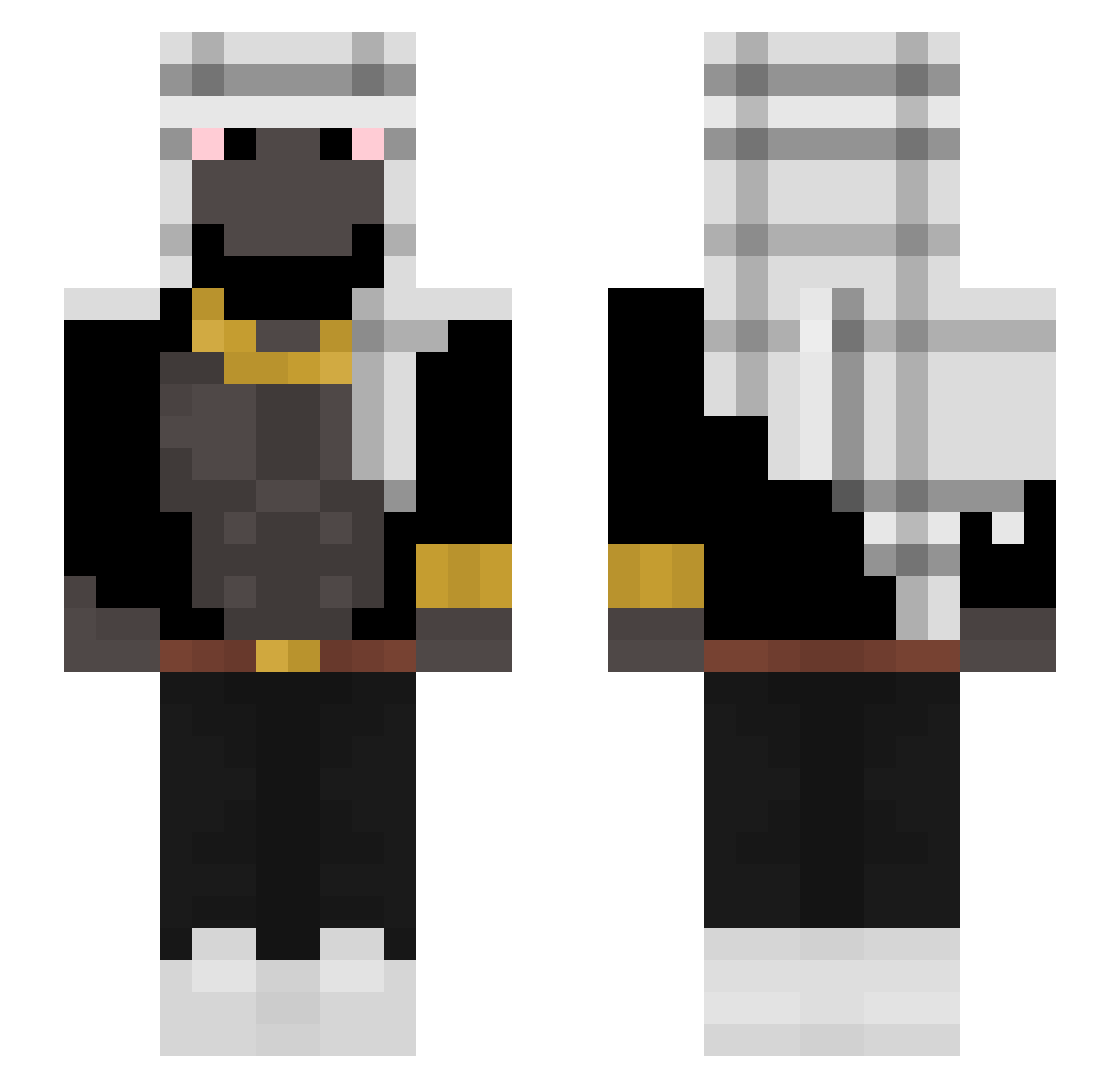
Current Minecraft skin of the player Jojogel, loaded from the official Mojang API. Rotate the 3D model with your mouse or finger, then download the skin as a PNG file and use it in Minecraft: Bedrock Edition or Java Edition for free. When Jojogel changes their skin, this page updates automatically and the old skin stays in the history below.
Other players with this skin (297)
Jojogel was the 81st player we have seen with this skin, first spotted on 21.08.2026. The same skin was seen on these players. Open a nickname to see their current skin and skin history.
 Akw_ sueh_ Jcnbros BumBum90 xqeer OktanTakaStacja an1song sovamesta cbhiroshi dogbomb57 Imkaan1243 GinormousNut ginominatore ogkm4life Matias62842 Trayse Tesaface skatinhodededo12 NextCreature89 Rasmus_Abe BigOualid S3creee Yo_shhh PEDEFILEDIDDY HusnainTheGOAT Kum3r1 hugobleepbloop sigmaxander TalanBones922 SedateLeopard97 HwanJunho MihaiSefu Opuxal Bunkys Gastrit HectorBrave mee_oskar Brands2704 FelizxYT nefernightz K1wzy Ninjeko YonfriGod KamelTurken Bluekiller109 Viiciio abdulini Trixying Elevqtor Konssa hellflow GolabGangster BarongKingZ DerPostbote88 PhiloGHG NedAfDenCykel 11SEPTEMBRE2OO1 spacejay1 itsQush DrPogge
More Shemagh Minecraft skins
How to install the Jojogel skin
- Press the Download button above to save the skin as a PNG file.
- Minecraft: Bedrock Edition (PE): open the Dressing Room from the main menu (or tap your character → Edit Character), go to Classic Skins → Owned, press the + (new skin) button, choose the downloaded PNG and pick the Slim (Alex) model. Works on PC and mobile; consoles cannot import custom skins.
- Minecraft: Java Edition: open the Minecraft Launcher, go to the Skins tab, click New Skin, load the PNG, pick the Slim (Alex) model and press Save & Use. You can also upload it at minecraft.net → Profile → Change Skin.
The skin does not show up after import - what should I do?
Restart Minecraft and open the Dressing Room again - imported skins sometimes appear only after a restart. Also make sure you selected the imported skin and picked the Slim (Alex) model.
Which model should I choose, Classic or Slim?
This skin is designed for the Slim (Alex) model. If you pick the wrong model, the arms of the skin will look stretched or squeezed.
Is the skin of Jojogel free to download?
Yes. Press Download, save the PNG file and use it in Minecraft: Bedrock Edition or Java Edition - no payment or registration needed. The skin also works on multiplayer servers and Realms.
More skins
Looking for more? Go back to all Minecraft skins and check the top skins of the week, month and all time, or find any player's skin by nickname.