
Joge - Minecraft Skins & Skin History
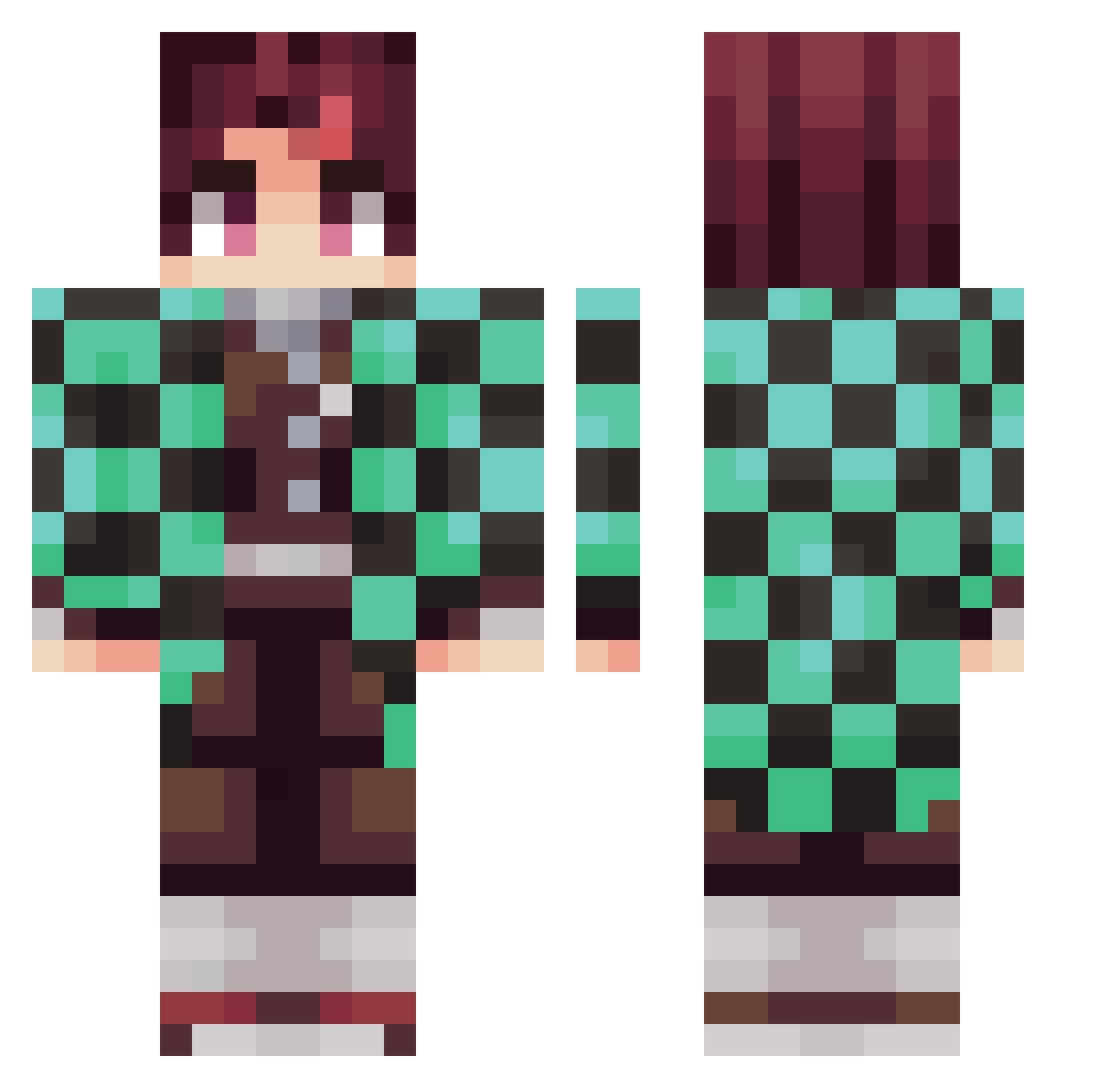
Current Minecraft skin of the player Joge, loaded from the official Mojang API. Rotate the 3D model with your mouse or finger, then download the skin as a PNG file and use it in Minecraft: Bedrock Edition or Java Edition for free. When Joge changes their skin, this page updates automatically and the old skin stays in the history below.
Other players with this skin (281)
Joge was the 261st player we have seen with this skin, first spotted on 24.10.2026. The same skin was seen on these players. Open a nickname to see their current skin and skin history.
 21airball Papi_Pope bigboibyron Dikkal0418 Hbaba98 JASON_1210 stokes22b AyceYT Short_Stop_ KAMATAN_JP Babypig2 MRTOSTER24 Brockolee16 opticcc FunkiAcid Soichi55 GodPJ Hellokmj Mark_Bruh Chrisho2387 potatosnjuice LOKII320 surucchigames Monjlro MoreInk83441614 zCoDorme TutiNoia HoaX_88 MannyISC plaurent RodNas_ Ridler182 madison4405 bayan_4 FishyKK _frogzz natsu_gamer Sumiito00 MurderOnWarior LimJongGil intCheckPrimeNum BrittleBaguette theEmporer11 JawnLuke RubiksSphere Jihoo_kwon Daddy_Woody1 legendofyoface _rameng Generic_C4 Quentin9098 Lukas1415 yarin_yaari DjEclectic stonekeeper36 Aquallusion CamiRose1 jiwoo5264 HowMuchWhatDo LDADAW
More Tanjiro Kamado Minecraft skins
See all 436 Tanjiro Kamado skins
How to install the Joge skin
- Press the Download button above to save the skin as a PNG file.
- Minecraft: Bedrock Edition (PE): open the Dressing Room from the main menu (or tap your character → Edit Character), go to Classic Skins → Owned, press the + (new skin) button, choose the downloaded PNG and pick the Classic (Steve) model. Works on PC and mobile; consoles cannot import custom skins.
- Minecraft: Java Edition: open the Minecraft Launcher, go to the Skins tab, click New Skin, load the PNG, pick the Classic (Steve) model and press Save & Use. You can also upload it at minecraft.net → Profile → Change Skin.
The skin does not show up after import - what should I do?
Restart Minecraft and open the Dressing Room again - imported skins sometimes appear only after a restart. Also make sure you selected the imported skin and picked the Classic (Steve) model.
Which model should I choose, Classic or Slim?
This skin is designed for the Classic (Steve) model. If you pick the wrong model, the arms of the skin will look stretched or squeezed.
Is the skin of Joge free to download?
Yes. Press Download, save the PNG file and use it in Minecraft: Bedrock Edition or Java Edition - no payment or registration needed. The skin also works on multiplayer servers and Realms.
More skins
Looking for more? Go back to all Minecraft skins and check the top skins of the week, month and all time, or find any player's skin by nickname.