
JoanofArc11 - Minecraft Skins & Skin History
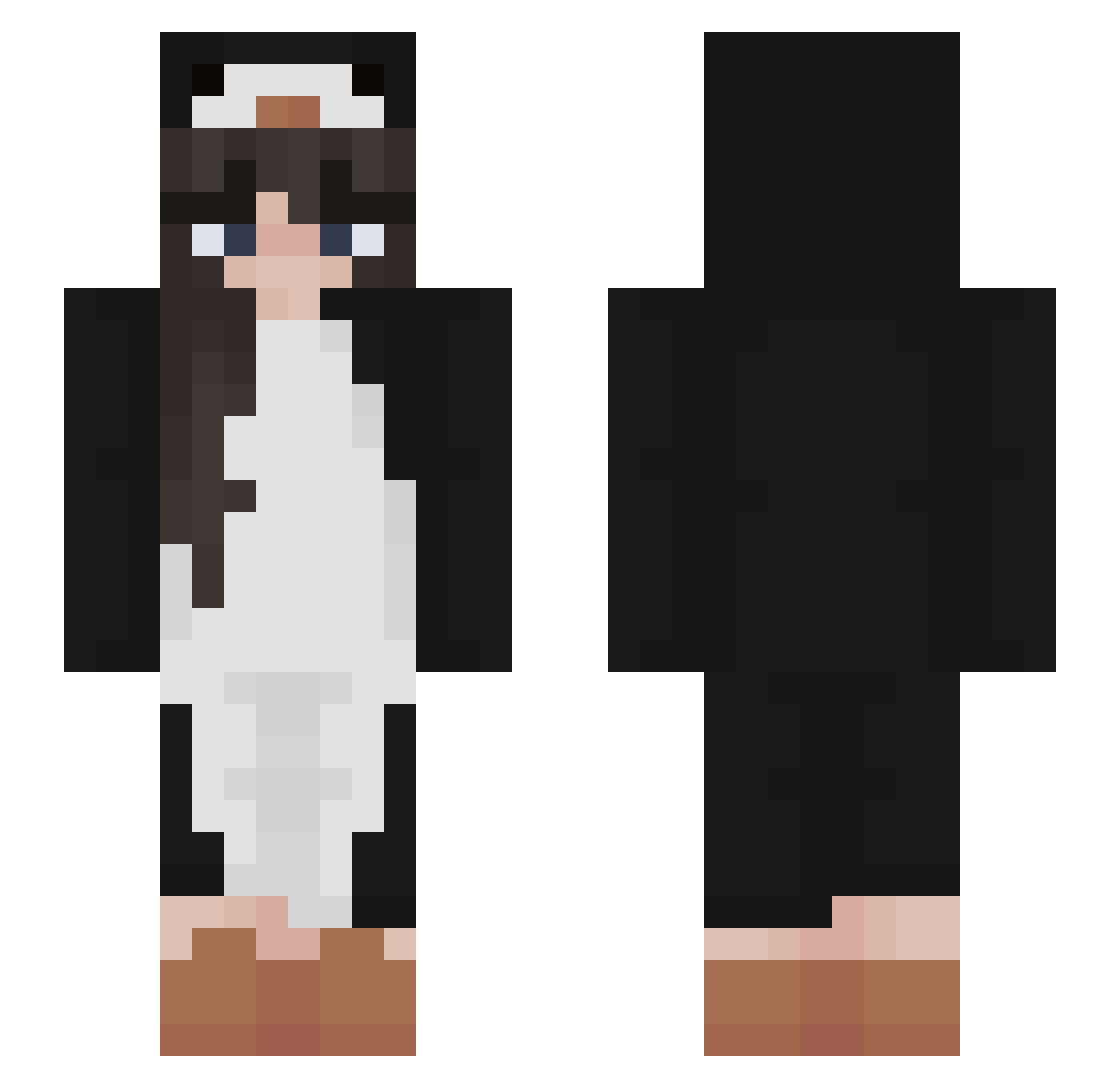
Current Minecraft skin of the player JoanofArc11, loaded from the official Mojang API. Rotate the 3D model with your mouse or finger, then download the skin as a PNG file and use it in Minecraft: Bedrock Edition or Java Edition for free. When JoanofArc11 changes their skin, this page updates automatically and the old skin stays in the history below.
Other players with this skin (503)
JoanofArc11 was the 134th player we have seen with this skin, first spotted on 27.08.2026. The same skin was seen on these players. Open a nickname to see their current skin and skin history.
 Babyzeze Nuuuee Kuraq555 Anisies _LU_07 CoolSteve928 MoyejasN peachsoj Ultra2806 iLoveLyza Anna36 SUSHIDA_AKIRA Kaittlinn BlueDrago79 Kaxzie_ capybaralol Temakiih Kara_23 pinkpinkturtle Clockmaker Davocraft12 iwjwj OrangeCat7267 sashimii1 o0Freeze0o Cheekykitten11 SophiaZ7 gentoopenguin9 andreax122 taro_august QuiteSafe Hakuei_ JustCheesecake ilikemen__ xanhurts_ Raffinnaom_ mypurplelighter amdo_game Kajusha MummyRed vkvvl thatscasi RAMUNE103 Beverly98 ISimpForBarcki sunsetshea drewieee
 XxPeach_ oamordasuavida mirrxge MayasPapaya LaurenzoEddy vaiura Dolco META2213 Janina_oever_YT florasfate LostMyIGN kj_type01 pupu233
More Animal Onesie Minecraft skins
See all 2228 Animal Onesie skins
How to install the JoanofArc11 skin
- Press the Download button above to save the skin as a PNG file.
- Minecraft: Bedrock Edition (PE): open the Dressing Room from the main menu (or tap your character → Edit Character), go to Classic Skins → Owned, press the + (new skin) button, choose the downloaded PNG and pick the Slim (Alex) model. Works on PC and mobile; consoles cannot import custom skins.
- Minecraft: Java Edition: open the Minecraft Launcher, go to the Skins tab, click New Skin, load the PNG, pick the Slim (Alex) model and press Save & Use. You can also upload it at minecraft.net → Profile → Change Skin.
The skin does not show up after import - what should I do?
Restart Minecraft and open the Dressing Room again - imported skins sometimes appear only after a restart. Also make sure you selected the imported skin and picked the Slim (Alex) model.
Which model should I choose, Classic or Slim?
This skin is designed for the Slim (Alex) model. If you pick the wrong model, the arms of the skin will look stretched or squeezed.
Is the skin of JoanofArc11 free to download?
Yes. Press Download, save the PNG file and use it in Minecraft: Bedrock Edition or Java Edition - no payment or registration needed. The skin also works on multiplayer servers and Realms.
More skins
Looking for more? Go back to all Minecraft skins and check the top skins of the week, month and all time, or find any player's skin by nickname.