
Jmarac3gaming - Minecraft Skins & Skin History
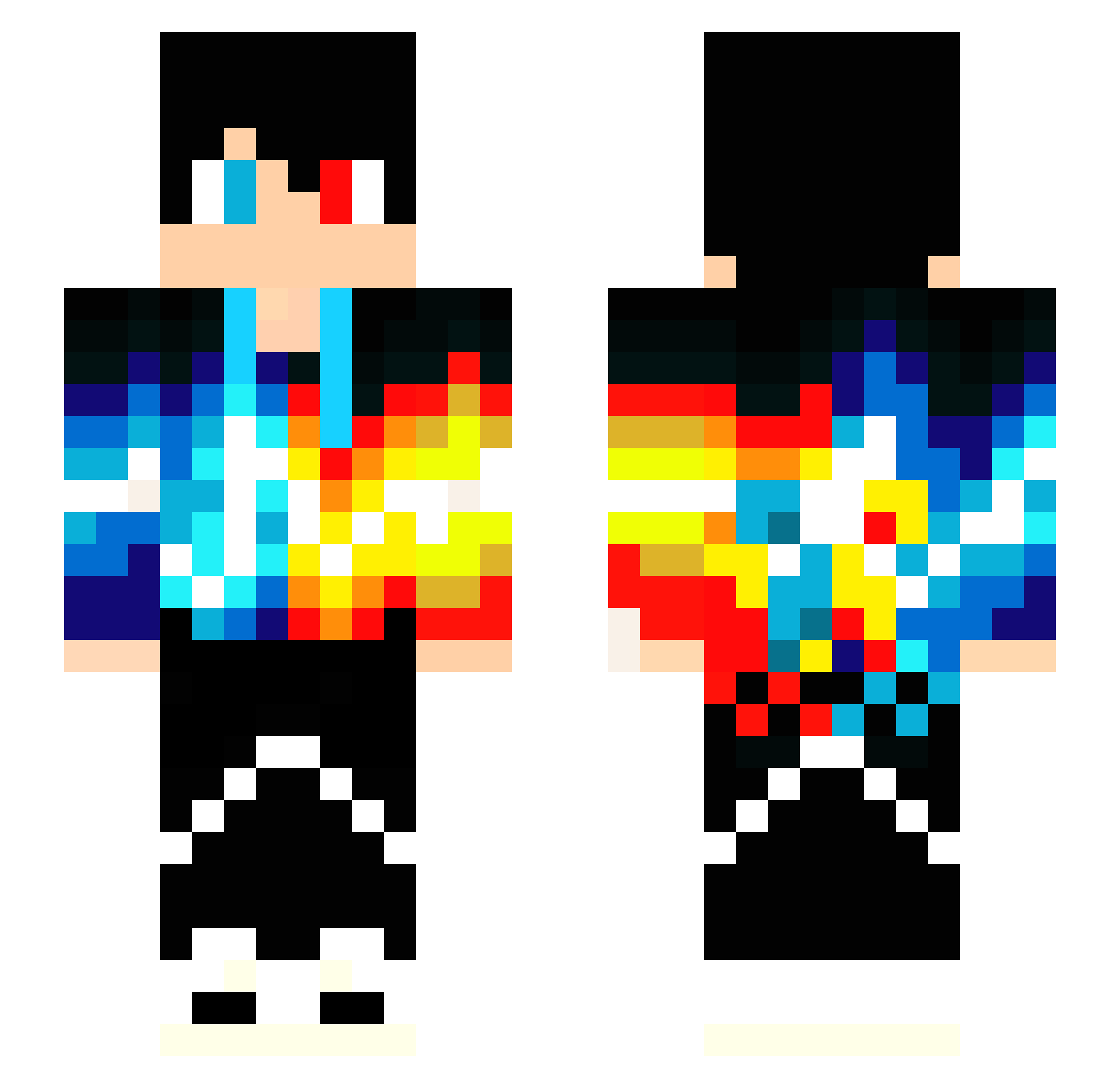
Current Minecraft skin of the player Jmarac3gaming, loaded from the official Mojang API. Rotate the 3D model with your mouse or finger, then download the skin as a PNG file and use it in Minecraft: Bedrock Edition or Java Edition for free. When Jmarac3gaming changes their skin, this page updates automatically and the old skin stays in the history below.
Other players with this skin (171)
Jmarac3gaming was the 20th player we have seen with this skin, first spotted on 07.08.2026. The same skin was seen on these players. Open a nickname to see their current skin and skin history.
 naulbrg32 Backhaus307 Vecchiola2 Janaaay Stxxx_Junior xXDragonSlyerXx JustMuskay Swisssboy rushil2008 Chase1234 luke3002 Indicolite Partyshocker jaron100 profi4k akmal354 Patze22 Skiltell JaMiWei AzizhanBalaban coolio123 FallingAngel666 Blockbuster8t LandofHunter DillPickle0o0 S3A89E batti00 Drbr TheUnusualOne Happy_Bubba Felipe_Ferreira Andreusca23 Skraj RayaneLeBg03 JenteDePauw edventureboy Rafaek31 Dzen11 ldoglanden STEVE1403 Xavier0312 BlazePlayz llMyth vovanzuk765 thepropo derdkraftertwix merontahir zxx123 VvSnailOuOvV Tomasdias2009 NACKz adonismoreno3 Matanos123 Sua_BIO chab__ turkiyeicinsavas ItzMachine superkessel11 iAmKloud AustinC20
More Heterochromia Minecraft skins
See all 542 Heterochromia skins
How to install the Jmarac3gaming skin
- Press the Download button above to save the skin as a PNG file.
- Minecraft: Bedrock Edition (PE): open the Dressing Room from the main menu (or tap your character → Edit Character), go to Classic Skins → Owned, press the + (new skin) button, choose the downloaded PNG and pick the Slim (Alex) model. Works on PC and mobile; consoles cannot import custom skins.
- Minecraft: Java Edition: open the Minecraft Launcher, go to the Skins tab, click New Skin, load the PNG, pick the Slim (Alex) model and press Save & Use. You can also upload it at minecraft.net → Profile → Change Skin.
The skin does not show up after import - what should I do?
Restart Minecraft and open the Dressing Room again - imported skins sometimes appear only after a restart. Also make sure you selected the imported skin and picked the Slim (Alex) model.
Which model should I choose, Classic or Slim?
This skin is designed for the Slim (Alex) model. If you pick the wrong model, the arms of the skin will look stretched or squeezed.
Is the skin of Jmarac3gaming free to download?
Yes. Press Download, save the PNG file and use it in Minecraft: Bedrock Edition or Java Edition - no payment or registration needed. The skin also works on multiplayer servers and Realms.
More skins
Looking for more? Go back to all Minecraft skins and check the top skins of the week, month and all time, or find any player's skin by nickname.