
Jinbuuu - Minecraft Skins & Skin History
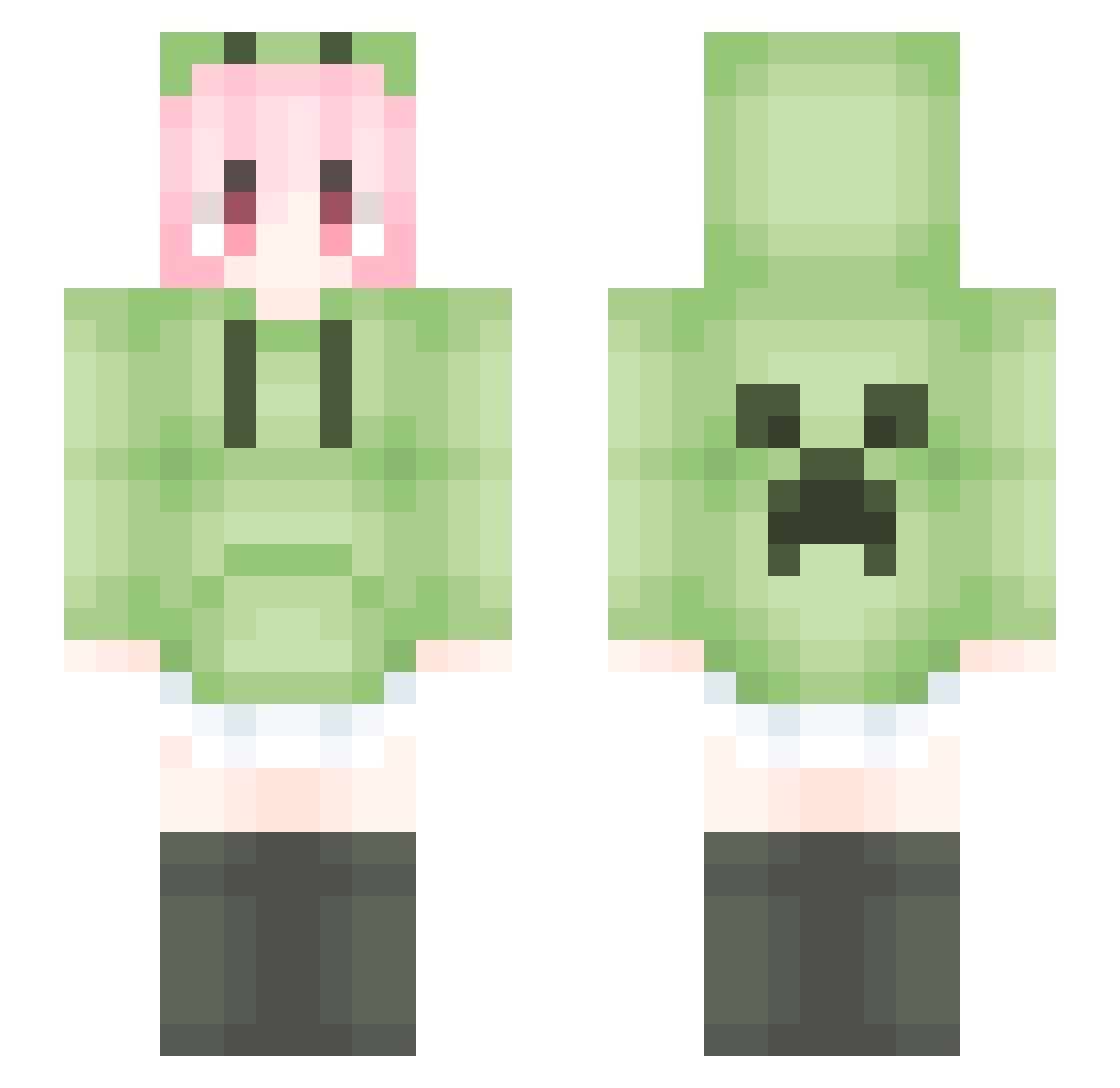
Current Minecraft skin of the player Jinbuuu, loaded from the official Mojang API. Rotate the 3D model with your mouse or finger, then download the skin as a PNG file and use it in Minecraft: Bedrock Edition or Java Edition for free. When Jinbuuu changes their skin, this page updates automatically and the old skin stays in the history below.
Other players with this skin (1385)
Jinbuuu was the 36th player we have seen with this skin, first spotted on 24.07.2026. The same skin was seen on these players. Open a nickname to see their current skin and skin history.
 MyFutureLover HTAvocadoo 46581 56jthy6 Emerald54088 yaoyao0126 Daitu06 User233 nbhdr1 apeng23 WoSiliu EvelynnaSeaya Ctz355 ysz1314 heika7 RuTiKa ewwsde Miss_Zhou dududa1111 Baozi1209 Whale_000000000 Sprintzzz_13 Sreres Plxppcz AndWind xianyu2233 shenghui6 lacerta395 KL_hyp_PVP ishtarovo dcty Nercerance CodenameXY Mastermind2233 cunccc 5ut6m
 52SanJiu1314 Nie3104 XingzaiYY LiquidBounceB118 Hnmxkfz ofrever haokeng_233 ArisGreyrat Duan_3_1_3zCPar Nofall___ Evanshao YinYa04 MinecraftXIAO66 WANGXIQIAN pinbowl XiNian___ LiquidBounceB92 Dr_jayi XHDong
 PresbyterJv LYC69 LiquidBounceB79 ydmy_qwer Simple1225
More Anime Girl Minecraft skins
See all 11176 Anime Girl skins
How to install the Jinbuuu skin
- Press the Download button above to save the skin as a PNG file.
- Minecraft: Bedrock Edition (PE): open the Dressing Room from the main menu (or tap your character → Edit Character), go to Classic Skins → Owned, press the + (new skin) button, choose the downloaded PNG and pick the Slim (Alex) model. Works on PC and mobile; consoles cannot import custom skins.
- Minecraft: Java Edition: open the Minecraft Launcher, go to the Skins tab, click New Skin, load the PNG, pick the Slim (Alex) model and press Save & Use. You can also upload it at minecraft.net → Profile → Change Skin.
The skin does not show up after import - what should I do?
Restart Minecraft and open the Dressing Room again - imported skins sometimes appear only after a restart. Also make sure you selected the imported skin and picked the Slim (Alex) model.
Which model should I choose, Classic or Slim?
This skin is designed for the Slim (Alex) model. If you pick the wrong model, the arms of the skin will look stretched or squeezed.
Is the skin of Jinbuuu free to download?
Yes. Press Download, save the PNG file and use it in Minecraft: Bedrock Edition or Java Edition - no payment or registration needed. The skin also works on multiplayer servers and Realms.
More skins
Looking for more? Go back to all Minecraft skins and check the top skins of the week, month and all time, or find any player's skin by nickname.