
JIKAIA - Minecraft Skins & Skin History
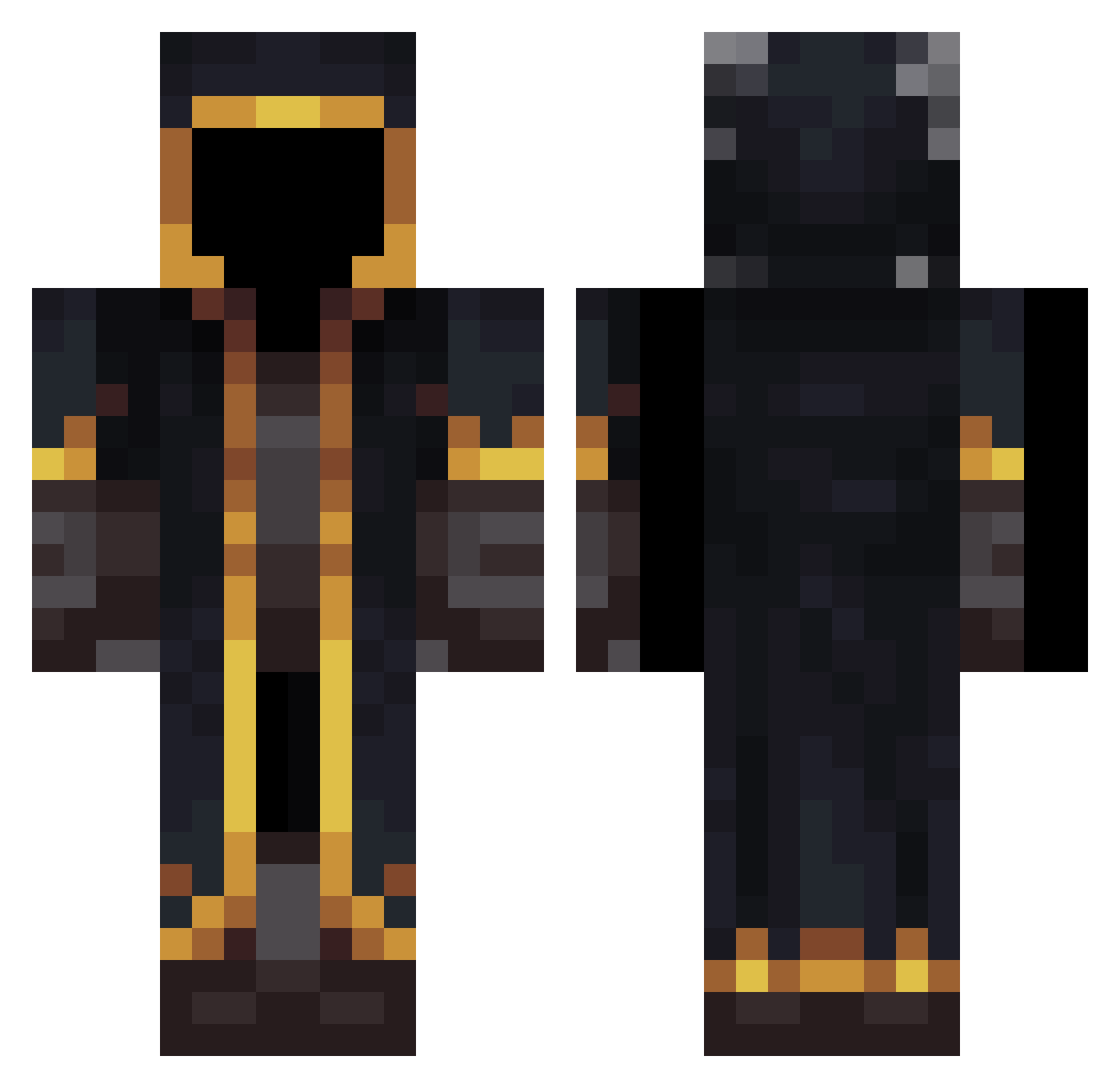
Current Minecraft skin of the player JIKAIA, loaded from the official Mojang API. Rotate the 3D model with your mouse or finger, then download the skin as a PNG file and use it in Minecraft: Bedrock Edition or Java Edition for free. When JIKAIA changes their skin, this page updates automatically and the old skin stays in the history below.
Other players with this skin (485)
JIKAIA was the 205th player we have seen with this skin, first spotted on 03.09.2026. The same skin was seen on these players. Open a nickname to see their current skin and skin history.
 Cheesycheese1225 profeta07 LucasStorm dream1329 ZooM143 SilentAntt FartMaster210 TheNewGalaxy Sanesss_ Luderk154 GoldenClaw01 SweetKind LukAdin PSYCODELIC13 Presente98 Achmaga HernieP Eternal16k rii_3 cloto001 James0830 Untitled_Pixel_ EbyPrinces kylar201 messiyyds DAZUO778 sector306 Nameless2474 Terminator_06 Tazmi123 The_PandaPlay Jasonnnnnnnnnn_ JBlack007 zutkuzk KinnTM remmber ryansjo H4dnagy
 Dunnnno delta5by5123 KROSTY_2003 RsMoonburn chenyun15 chichimanchinman Pedroo22 DrParser zyro8493
 polishguy143 CheekyRat Levi2908 Manni0702 Beans575 Rambini14 BoldriniEnzo Dankel22 kailun_02 Notmyproblem1295 Yabbieo Colinlemineur voyaka63
More Mage Minecraft skins
How to install the JIKAIA skin
- Press the Download button above to save the skin as a PNG file.
- Minecraft: Bedrock Edition (PE): open the Dressing Room from the main menu (or tap your character → Edit Character), go to Classic Skins → Owned, press the + (new skin) button, choose the downloaded PNG and pick the Classic (Steve) model. Works on PC and mobile; consoles cannot import custom skins.
- Minecraft: Java Edition: open the Minecraft Launcher, go to the Skins tab, click New Skin, load the PNG, pick the Classic (Steve) model and press Save & Use. You can also upload it at minecraft.net → Profile → Change Skin.
The skin does not show up after import - what should I do?
Restart Minecraft and open the Dressing Room again - imported skins sometimes appear only after a restart. Also make sure you selected the imported skin and picked the Classic (Steve) model.
Which model should I choose, Classic or Slim?
This skin is designed for the Classic (Steve) model. If you pick the wrong model, the arms of the skin will look stretched or squeezed.
Is the skin of JIKAIA free to download?
Yes. Press Download, save the PNG file and use it in Minecraft: Bedrock Edition or Java Edition - no payment or registration needed. The skin also works on multiplayer servers and Realms.
More skins
Looking for more? Go back to all Minecraft skins and check the top skins of the week, month and all time, or find any player's skin by nickname.