
J0N_K - Minecraft Skins & Skin History
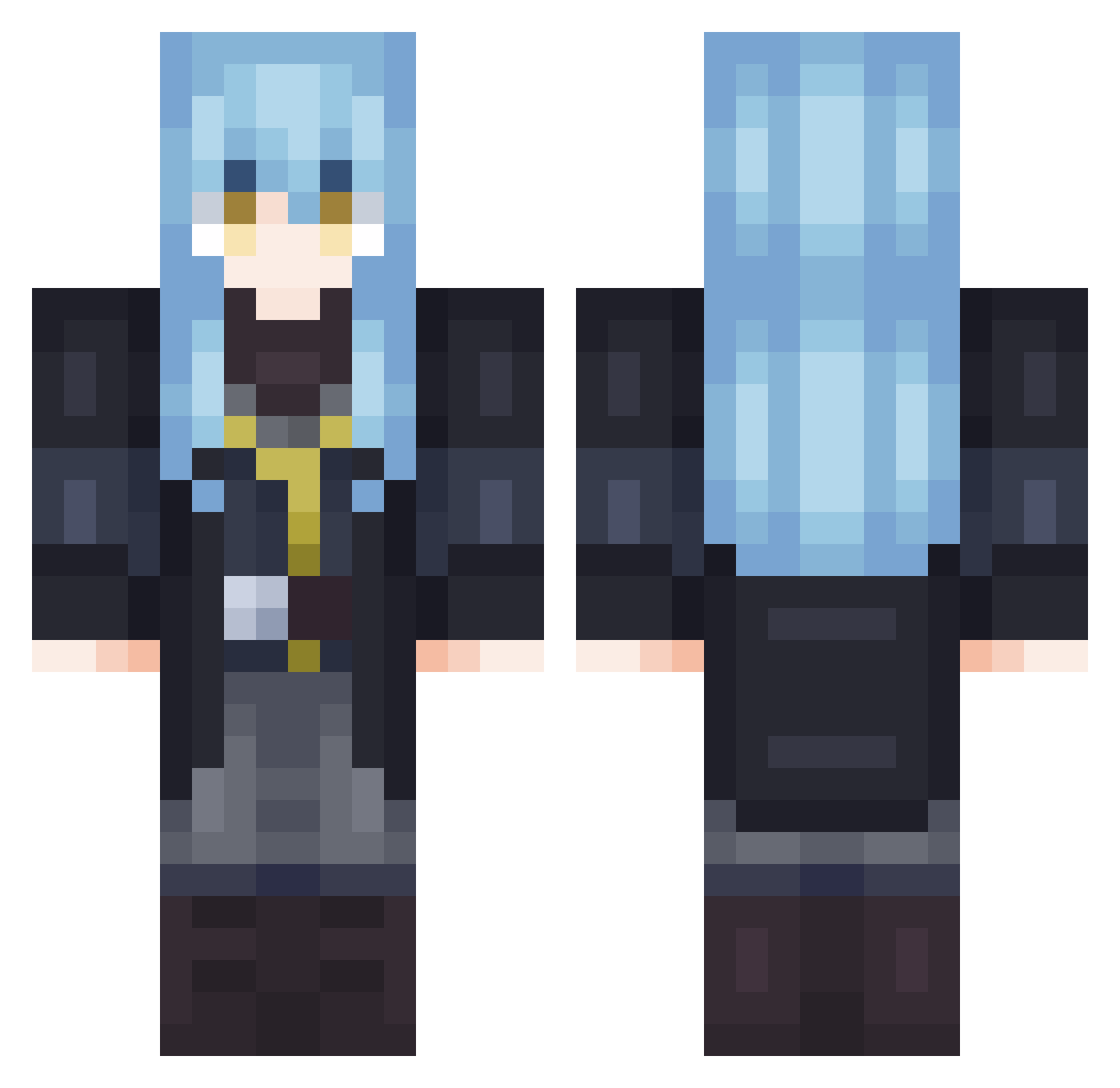
Current Minecraft skin of the player J0N_K, loaded from the official Mojang API. Rotate the 3D model with your mouse or finger, then download the skin as a PNG file and use it in Minecraft: Bedrock Edition or Java Edition for free. When J0N_K changes their skin, this page updates automatically and the old skin stays in the history below.
Other players with this skin (702)
J0N_K was the 232nd player we have seen with this skin, first spotted on 29.08.2026. The same skin was seen on these players. Open a nickname to see their current skin and skin history.
 5DakkaDaha Kan_ape Tudorcat Wow4ik123 AFlatSnake
 WheatoWheato nouke Rimuru_TempestXD MrSlimesy Diaz0202 Kazumaty ooga__ Veyhener Lipkamix xAL18x NappingCrow akikukeo Akiyuu1 Noekkii TheJackal32 PrimeNiya_VN czarnyKie321 NovahGod NatelPlayer Shepherdly Artorias07 GREENGROW123 believequeen PatTheRat123 uhu114 Silentmoustache
 Renovain Joaquin0402 jiakilo SakuyaGX lilbobert2005 Rimuru1427 Calvao55 I3iRDo4 miyolaa ChocoMJ1 ziggtempest Skairi14 Ehnaan
 LucielAmv MaxxiiM ManchySalinja Nicopacu23 Mianekok Chaosemperator Aruh08
 1vwl7e9 RafaOMG67 Vaiper_Gaiper Flaen4309 Remi_uwu Rell1k0 SK4N ImSauceMan ZUM0RITO
More Rimuru Tempest Minecraft skins
See all 251 Rimuru Tempest skins
How to install the J0N_K skin
- Press the Download button above to save the skin as a PNG file.
- Minecraft: Bedrock Edition (PE): open the Dressing Room from the main menu (or tap your character → Edit Character), go to Classic Skins → Owned, press the + (new skin) button, choose the downloaded PNG and pick the Classic (Steve) model. Works on PC and mobile; consoles cannot import custom skins.
- Minecraft: Java Edition: open the Minecraft Launcher, go to the Skins tab, click New Skin, load the PNG, pick the Classic (Steve) model and press Save & Use. You can also upload it at minecraft.net → Profile → Change Skin.
The skin does not show up after import - what should I do?
Restart Minecraft and open the Dressing Room again - imported skins sometimes appear only after a restart. Also make sure you selected the imported skin and picked the Classic (Steve) model.
Which model should I choose, Classic or Slim?
This skin is designed for the Classic (Steve) model. If you pick the wrong model, the arms of the skin will look stretched or squeezed.
Is the skin of J0N_K free to download?
Yes. Press Download, save the PNG file and use it in Minecraft: Bedrock Edition or Java Edition - no payment or registration needed. The skin also works on multiplayer servers and Realms.
More skins
Looking for more? Go back to all Minecraft skins and check the top skins of the week, month and all time, or find any player's skin by nickname.