
ItsZak7 - Minecraft Skins & Skin History
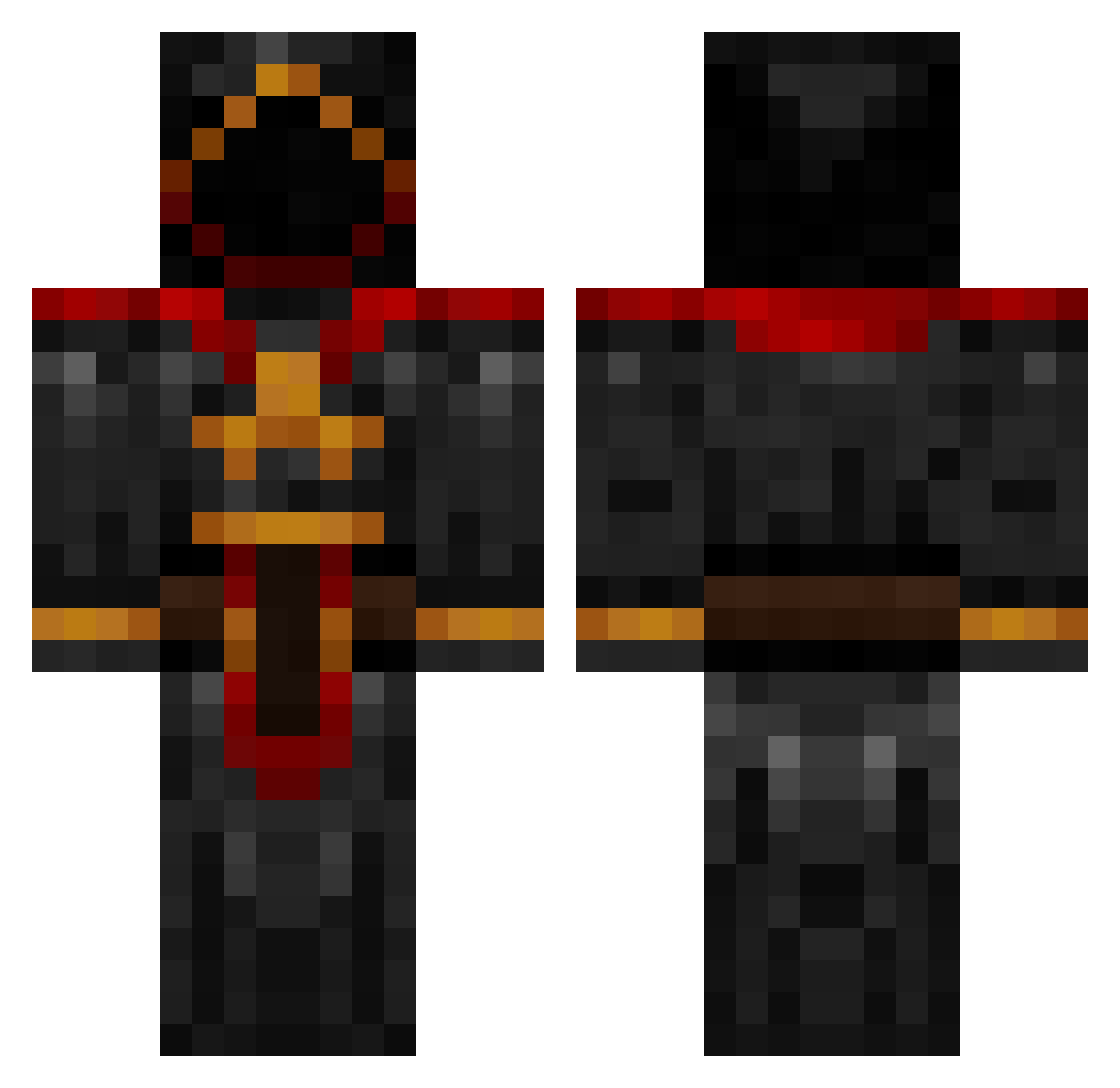
Current Minecraft skin of the player ItsZak7, loaded from the official Mojang API. Rotate the 3D model with your mouse or finger, then download the skin as a PNG file and use it in Minecraft: Bedrock Edition or Java Edition for free. When ItsZak7 changes their skin, this page updates automatically and the old skin stays in the history below.
Other players with this skin (984)
ItsZak7 was the 908th player we have seen with this skin, first spotted on 03.11.2026. The same skin was seen on these players. Open a nickname to see their current skin and skin history.
 daures99 Morfidus oliven_xXx_ TURTLEBOOGIE TheQuackMan Davomeister superman95727 HotzenKlotz69 Sniperby Xevryll fairpaddy Brynsi cnkndmr XtremBuilder kill5jc Invictah Mindsoup mphebus GodlessTech Bluer CL2002 Schtickel ToysSaber nick3075 bigdaddybru Effigie13 killkid443 Kingmilitia Bie9 Kaluba15 Woebin Vidster cslater echo2315 Creep456 Rezo650 SiggHugg Rapunzel17 LS040 LM5HParadox GODF Keydra Alpha246 WolverineSlayer nutball1999 AztecTom Zer0Tolerance minehecker Daloose jasonthunder12 king83c10 Maxcustard Brotatomash Wutangs obosho larswinter13ALT3 Vain_Glory Dovahkiin72 BananaBullet Krownex
More Cultist Minecraft skins
How to install the ItsZak7 skin
- Press the Download button above to save the skin as a PNG file.
- Minecraft: Bedrock Edition (PE): open the Dressing Room from the main menu (or tap your character → Edit Character), go to Classic Skins → Owned, press the + (new skin) button, choose the downloaded PNG and pick the Classic (Steve) model. Works on PC and mobile; consoles cannot import custom skins.
- Minecraft: Java Edition: open the Minecraft Launcher, go to the Skins tab, click New Skin, load the PNG, pick the Classic (Steve) model and press Save & Use. You can also upload it at minecraft.net → Profile → Change Skin.
The skin does not show up after import - what should I do?
Restart Minecraft and open the Dressing Room again - imported skins sometimes appear only after a restart. Also make sure you selected the imported skin and picked the Classic (Steve) model.
Which model should I choose, Classic or Slim?
This skin is designed for the Classic (Steve) model. If you pick the wrong model, the arms of the skin will look stretched or squeezed.
Is the skin of ItsZak7 free to download?
Yes. Press Download, save the PNG file and use it in Minecraft: Bedrock Edition or Java Edition - no payment or registration needed. The skin also works on multiplayer servers and Realms.
More skins
Looking for more? Go back to all Minecraft skins and check the top skins of the week, month and all time, or find any player's skin by nickname.