
IamMrBunny - Minecraft Skins & Skin History
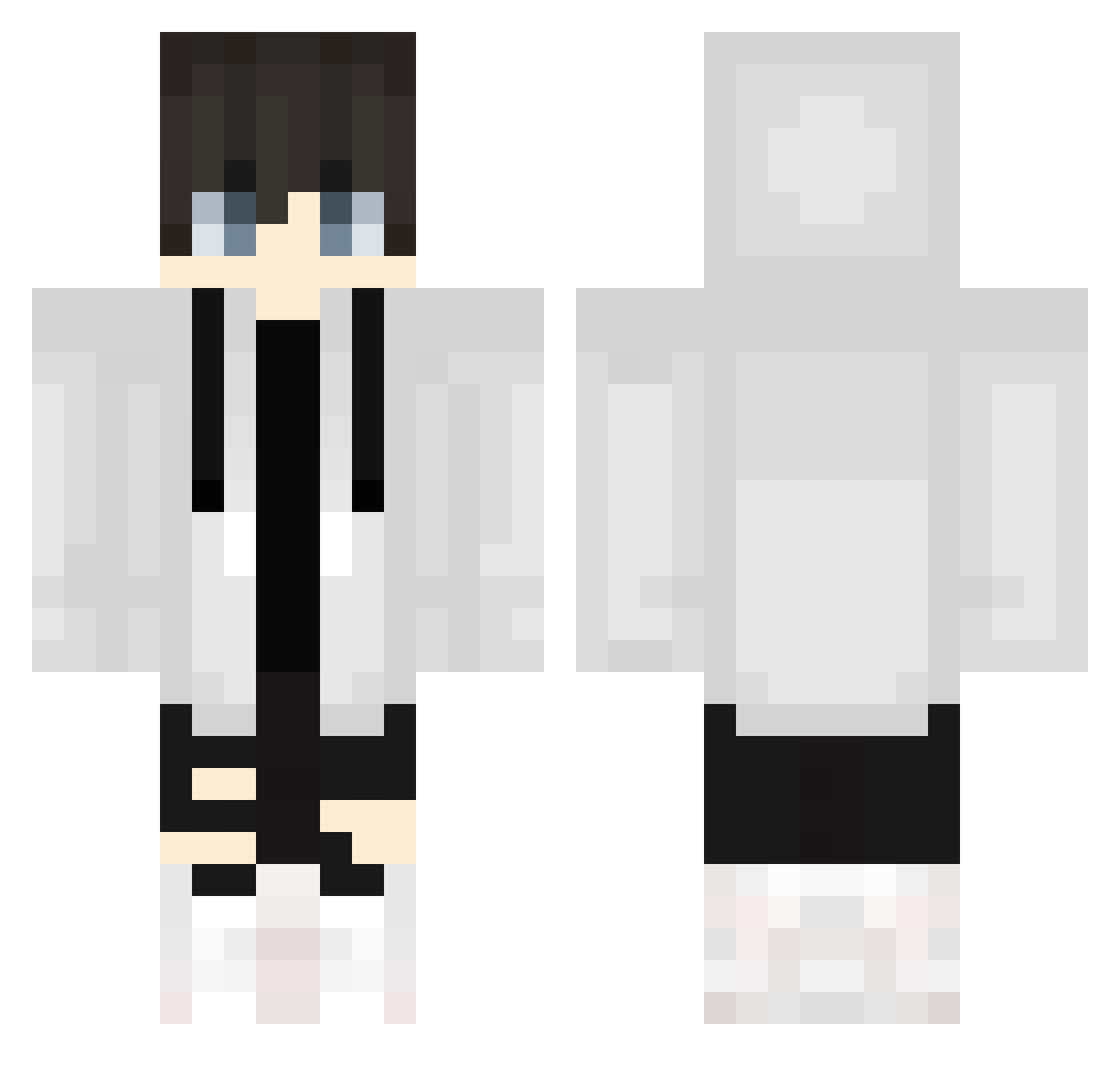
Current Minecraft skin of the player IamMrBunny, loaded from the official Mojang API. Rotate the 3D model with your mouse or finger, then download the skin as a PNG file and use it in Minecraft: Bedrock Edition or Java Edition for free. When IamMrBunny changes their skin, this page updates automatically and the old skin stays in the history below.
Other players with this skin (584)
IamMrBunny was the 394th player we have seen with this skin, first spotted on 28.09.2026. The same skin was seen on these players. Open a nickname to see their current skin and skin history.
 Sghost_Hank xSpqnge Dman98765 Mikou6 SnowyOnCrack Bankoso_0116 AnswerX omochi0808 Masonicgame1 gabrielwingler ImMattyG Krish99099 shunya2006 n4mlue TE3E Ryotaro_208 MSO_PAD001 JingH_MC Hazack99 Vladboi DreamTheOffical raposapl NevesLindao kuromame001 Dnnyy Ninjrfrg fruitpunch175 GermanHorst ChinaJ Light133 Lord_Ayan hn019 _Wilczek11_ thisisdconc xiaoxxxy matin384 k4pibara99 Kor_Jung soongwoo12 Konan0513 krysoum Quarteo BestDinkleBerry nibs3114 TopGreedZz Miklov07 yukiren1004 TolgaKara121 NINJA_LL rximh0912 Frano111 rtsk Liu_Zero And_lee _TeeTree_ Julianboolian nu14 Conn249 Euannnnnn Karlos20061
More Streetwear Minecraft skins
How to install the IamMrBunny skin
- Press the Download button above to save the skin as a PNG file.
- Minecraft: Bedrock Edition (PE): open the Dressing Room from the main menu (or tap your character → Edit Character), go to Classic Skins → Owned, press the + (new skin) button, choose the downloaded PNG and pick the Classic (Steve) model. Works on PC and mobile; consoles cannot import custom skins.
- Minecraft: Java Edition: open the Minecraft Launcher, go to the Skins tab, click New Skin, load the PNG, pick the Classic (Steve) model and press Save & Use. You can also upload it at minecraft.net → Profile → Change Skin.
The skin does not show up after import - what should I do?
Restart Minecraft and open the Dressing Room again - imported skins sometimes appear only after a restart. Also make sure you selected the imported skin and picked the Classic (Steve) model.
Which model should I choose, Classic or Slim?
This skin is designed for the Classic (Steve) model. If you pick the wrong model, the arms of the skin will look stretched or squeezed.
Is the skin of IamMrBunny free to download?
Yes. Press Download, save the PNG file and use it in Minecraft: Bedrock Edition or Java Edition - no payment or registration needed. The skin also works on multiplayer servers and Realms.
More skins
Looking for more? Go back to all Minecraft skins and check the top skins of the week, month and all time, or find any player's skin by nickname.